0512-BVE13-468x60-banner
In just over three weeks, BVE 2013 starts in London. I’ve been looking forward to it for months.

BVE is a production and post-production trade show with over 300 exhibitors and over 150 seminars. At one event you can visit Adobe, AJA, Anton/BauerArri, AutocueAvid

It is designed for editors, camera operators, producers, directors, broadcast engineers, writers… everyone involved in media production at all levels and stages.

Entry is free if you register in advance.

Read More

Where does PixelConduit come when comparing the various methods for making Final Cut Pro plug-ins?

fxplug-code

The post powerful Final Cut Pro effects are FxPlugs: implemented in Objective-C, using the same kinds of tools that make OS X and iOS apps. This is the hardest method.

Read More

Today Finnish company Lacquer updated their Conduit Live product and made it free for Macintosh users. Renamed PixelConduit, it is a video effect development system for motion graphics designers.

It was conceived as a live video performance tool. The application was designed take multiple video sources, apply many complex effects in real time and distribute the results to multiple screens. In recent years, it has been designed for more uses (from the manual at PixelConduit):

– Previewing visual effects on set.
– Theatrical shows and other video-based performances.
– Video installations.
– Compositing and other finishing work.
– Post-production workflow automation.
– Rendering custom graphics in post.
– Live graphics with custom control interfaces, e.g. for TV productions.

In order for real-time video effects to work, the UI metaphor is based on flowcharts that can be quickly manipulated while live video is being fed in:

cond_orange flow chart Read More

On Tuesday January 8th, 2013 I appeared on a webinar at Moviola.com hosted by Michael Horton of the Los Angeles Creative Pro User Group.

The web broadcast was free to watch live. The webinar is available for download on demand for $15.

Download the on-demand webinar to see me change the default settings for built-in Final Cut Pro X effects, bring the additional effects available in Motion 5 into Final Cut, and combine Motion’s advanced controls into single Final Cut Pro X effect controls.

The final effect that I make in the webinar corrects the kind of fish-eye distortion that some wide angle lenses can add to footage. I show how it corrects narrow, medium and wide angle GoPro footage.

Read More

As part of 685,000 blog views, visitors downloaded my Final Cut Pro plug-ins many thousands of times.

If you follow my blog via email using the control on the top left of the blog page, you’ll get advance notice of new posts and plug-ins and more.

Thanks to my many visitors in 2012. I plan to make many more Final Cut Pro X effects, transitions, titles and generators in 2013!

Final Cut Pro X Top 10

1. Blurs

Six blurs and one sharpen effect

2. Mask+

Define 4, 8 or 16 points of a mask with animation control over scale, rotate and perspective distortion

3. Colour effects

11 colour control effects

4. Magic Lantern HDR

HDR-logo-480w
Composition controls for resolving HDR clips generated by Magic Lantern on Canon SLRs

5. Bad TV

More controls than the standard version

6. 4 Up

Display four clips on the same screen, or switch between them

7. Aged Film

More controls and ‘Bad TV’-style rolling

8. Distorts

Four distort effects

9. Adjustment Layer

Any effects or transformations you apply to this title will be applied to all timeline clips below

10. Smooth Move

Defines a start and finish position, scale and rotation for clip content with controls for how the clip moves from start to finish

Final Cut Pro 6 & 7 Top 5

1. Closing Credits
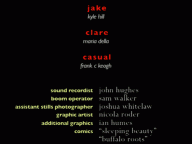
This plugin gives you typographic controls over all names or credits or section titles at the same time. You can also set the credits to scroll at specific speeds.

2. Access to all your fonts

Apple’s plugins don’t give you access to all your fonts. Use these replacement versions to use any installed font.

3. Lower Third

Alex4D Lower Third Final Cut plugin

This generator provides extra text and positioning options for labelling people and places.

4. Vignette filter

A vignetting plugin giving control over position and aspect ratio.

5. Improved text Crawl
crawl-screen-192

This generator removes the limit on the amount of text you can use in a crawl, and adds extra features.

This Final Cut Pro X effect is for combining HDR footage produced using the Magic Lantern tool for Canon DSLRs. Magic Lantern is open-source firmware that adds many useful features to cameras.

HDR-logo-480w

This effect is for HDR clips recorded with Magic Lantern. High Dynamic Range imagery relies on taking two pictures of a scene using different exposure settings: the first underexposed, the second overexposed. Combining these pictures results in more detail in the brightest and darkest areas. Magic Lantern does this for video by modifying exposure settings for alternate frames. Alex4D Magic Lantern HDR gives you control on how these frames are combined.

Visit the Magic Lantern site to find out more about the many features it adds to Canon cameras.

Here are the controls:

controls

Read More

Over at the fcp.co forum, a user named ‘parchabg’ was trying to get better results when exporting interlaced PAL from Final Cut Pro X. I suggested using Apple Compressor’s ‘DV Stream’ setting. It allows control over interlace field order.

If you use a Compressor preset very often, you can use that preset as a Share Destination from within Final Cut Pro X.

Compressor keeps presets in .setting files.

If these .setting files are in

Your user name/Library/Application Support/Compressor/Settings/

…you can use them within Final Cut Pro X.

I haven’t bought Compressor 4, I still use Compressor 3.5.3. It stores its .setting files in a place that Final Cut Pro X cannot see: Your user name/Library/Application Support/Compressor/

That means if there’s a .setting file I want to use in Final Cut Pro X, I need to move it into a sub-folder named ‘Settings’:

custom compressior settings location

To add a Compressor setting as a destination, go to the Share submenu of the File menu. Choose ‘Add Destination’. Double-click the Compressor Settings icon:

double-click for new compressor settings dest

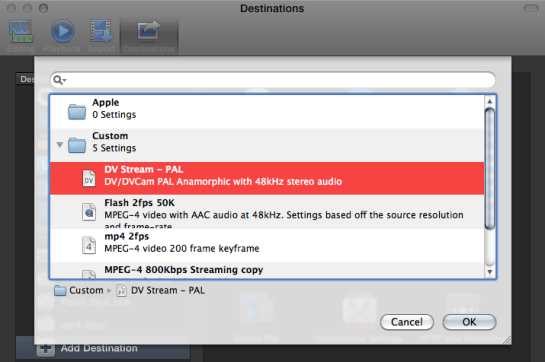
The dialogue box that appears shows the Compressor presets stored in .setting files:

choose setting you want

Choose the preset you want as a new Share destination and click OK. Once you close the Preferences dialogue, a new item appears in the Share menu: your new Share Destination:

new submenu entry

No Compressor 4 needed

If you need a custom destination but don’t have Compressor, you can copy custom .setting files from people with Compressor and this technique still works. This is because Final Cut Pro X includes all the code required to run these presets.

If you’d like to try this PAL DV Stream preset, you can download it from here.

When first trying out downloaded effects, transitions, titles and generators in Final Cut Pro X, sometimes the viewer turns blue.

If this happens to you, the most likely problem is that your version of Final Cut Pro X is too old. You need to use the Mac App Store to check for updates. You’ll see the update if you are signed into the App Store with the same Apple ID as you bought your copy of Final Cut Pro X.

In practice most people who provide transitions, effects, generators and titles update their versions of Motion 5 and Final Cut Pro X when they come out, so any tools they make available after that only work on the new version of Final Cut.

This means most effects and transitions made available after September 20th, 2011 won’t work in version 10.0.

Most effects and transitions made available after November 16th, 2011 won’t work in version 10.0.1 or earlier.

Most effects and transitions made available after January 31st, 2012 won’t work in version 10.0.2 or earlier.

Most effects and transitions made available after April 10th, 2012 won’t work in version 10.0.3 or earlier.

Most effects and transitions made available after June 11th, 2012 won’t work in version 10.0.4 or earlier.

Most effects and transitions made available after October 23rd, 2012 won’t work in version 10.0.5 or earlier.

Most effects and transitions made available after December 6th, 2012 won’t work in version 10.0.5 or earlier, but will work in the out of date version: 10.0.6.

Read More