Archive

Yearly Archives: 2012

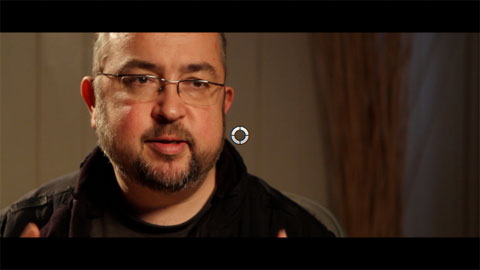
The 10.0.6 update to Final Cut Pro removed a control from the Letterbox effect. You cannot control the vertical offset of the underlying clip.

Here’s a Final Cut Pro X effect based on by Alex4D Widescreen Matte adjustment layer that brings back this control and more.

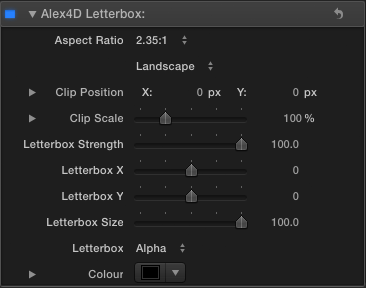
Here are the controls:

Read More

The 10.0.6 has made Final Cut Pro X noticeably faster at everyday tasks.

Given that, I was interested in seeing how it now compare with Premiere CS6.

This video times two everyday tasks in Adobe Premiere CS6 6.0.0 and Final Cut Pro X 10.0.6:

For over 50 free plugins and more for Final Cut Pro X, visit my FCPX home page.

The source clip is a 1 minute 1080p25 ProRes 422(HQ) movie.

The first task is to render a Gaussian Blur effect on the timeline. The second task is to export a timeline without rendering first.

I’m much more used to using Final Cut, so if I’ve not given Premiere a fair chance, please comment below.

Test setup

For regular Final Cut Pro X information, follow me on Twitter.

This was on an 3.4 GHz i7 iMac with 16GB of RAM and 2MB Radeon 6970M. The apps were running from an SSD, the files were on a 7200rpm drive. If you have a very different kind of Mac (or a PC), you’ll get different results. Also the brand of video card makes a difference. However, if you have the same kind of Mac as this, you’ll probably get similar results.

Perhaps others can do the same test on their computers to see the difference, it’s a matter of exporting 1500 frames (1 minute at 25fps, 50 seconds at 30 fps) of 1080p ProRes 422(HQ) movie and importing it into Final Cut Pro or Premiere. Maybe alternate video card architectures will make a big difference.

Premiere 6.0.2 update

After making the video I updated my copy of Adobe Premiere to 6.0.2 and redid the tests three times. The update seemed to make a difference.

Timeline render: The times were 80, 61 and 62 seconds (compared with 75 seconds in the video)

Export: The times were 109, 100 and 101 seconds (compared with 117 in the video)

Alongside many new features, the 10.0.6 Final Cut Pro X update also includes many new effects, transitions, generators and titles.

New effects

Stylize: Drop Shadow

Here are the controls:

In this example I’ve set the Blur Falloff to 0%, this makes the shadow blur increase the further the shadow extends from the source layer.

You can find it in the Stylize category.

Distortion: Heat

Read More

One of the best unheralded features of Final Cut Pro X is the ability to rename the parts of a clip used on a timeline.

For example, imagine you have an interview clip with a couple of sections you’d like to try in a project. In 10.0.6 you can define multiple ‘selection ranges’:

The first range was set by pressing the I and O keys when the playhead was at the start and of the first range. The second range was set using the Shift-Command-I and Shift-Command-O keyboard shortcuts.

These ranges were added to a timeline using the W shortcut to insert at the start of a timeline:

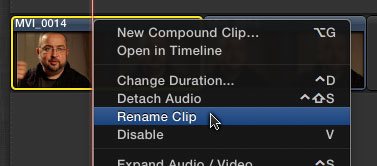
Each instance was then renamed. The first using Control- or Right-click to show the contextual menu for the clip:

Read More

The new version of Final Cut Pro X has some new commands. Some have new keyboard shortcut defaults. Others are available as commands which don’t have associated menu items or keyboard shortcuts. You can use these commands by adding your own keyboard shortcuts using the Final Cut Pro X > Commands > Customize command.

New commands with keyboard shortcuts

Show or hide the Event Viewer – Command-Control-3

Make Event Viewer active – Option-Command-3

Clear the selected ranges – Option-X

Move directly to next title text item – Option-tab

Move directly to previous title text item – Shift-Option-Tab

Set additional range selection start point – Command-Shift-I

Set additional range selection end point – Command-Shift-O

Insert freeze frame at playhead if it is in the timeline – Option-F

Read More

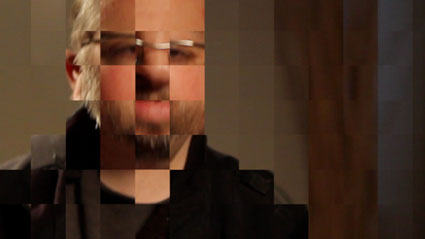
This Final Cut Pro X effect is an alternative way of adding a pixellation effect to a clip. It divides the clip into a grid and scales up each grid element.

Apologies to Matt Davis for scrambling his face.

Here’s what it looks like in action:

Here are the controls:

Read More

In September 2011, I made an improved version of Final Cut Pro X’s Ticker title. I linked the size of the background of the ticker to the font size of the text and made the title work in different aspect ratios such as 4:3 and 2:1.

This new ‘Plus’ version adds some animation and layout options. Now you can have the ticker move from left to right or remain still. You can also choose where the ticker starts moving from, and if the ticker itself is cropped. The duration of tickers can be longer too.

The default text position is within the title safe area. You can control the vertical position of the ticker, the transparency, border and shadow of the text and the background.

(To get the dot “·” used in the sample text, press shift-option 9)

Here are the main controls:

Read More

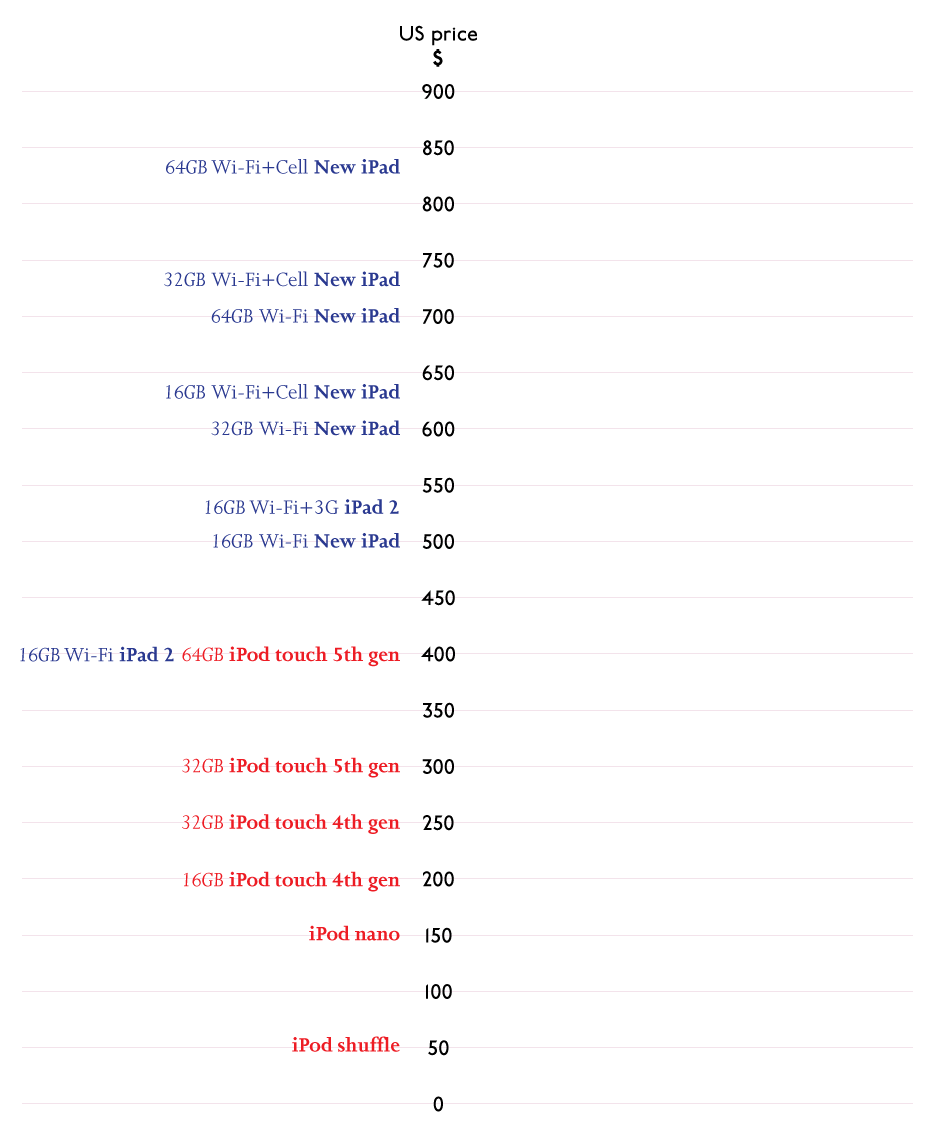
On the same day as the iPhone 5 announcement, Apple also launched new iPods. I found the pricing of the new iPod Touch interesting. If Apple is launching new smaller iPads next month, the pricing for the new iPods will have taken iPad pricing into account.

Here’s the current pricing line up for the iPod and iPad range as of September 12, 2012:

There are a two obvious price points left unoccupied.

The new smaller iPad is expected to be popular with younger people for use at home and at school, a similar market definition to the iPod touch.

So, where will the new iPads fit in? Will they have a 64GB variant? As the new iPhone 5 has enough space for a LTE radio, will there be a cellular version of the new iPad?

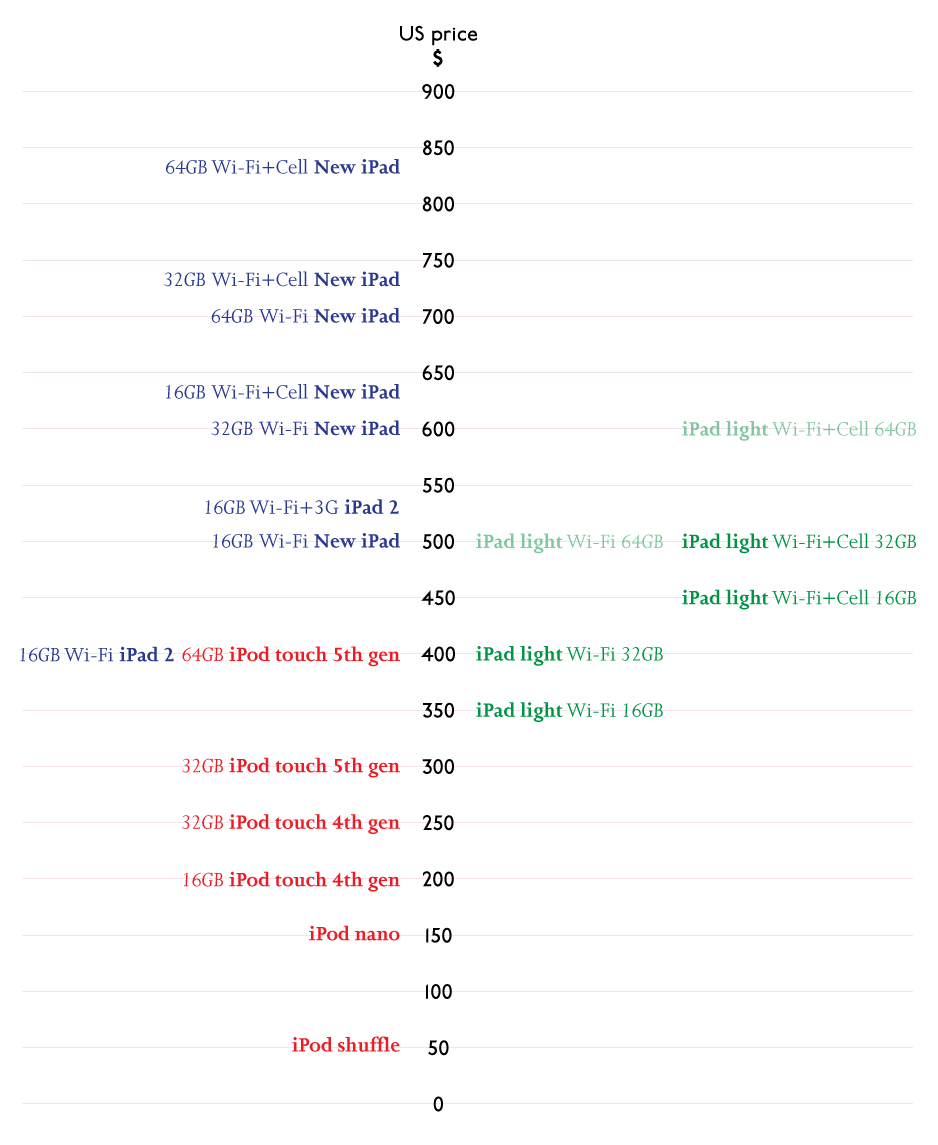
Although there isn’t a 16GB 5th generation iPod touch model, it is likely that Apple will want a gateway 16GB iPad ‘light’ model.

Although everyone is expecting the low-end iPad ‘light’ to cost as little as $250, that doesn’t seem to fit with the pricing of the iPod touches announced a couple of weeks ago.

Given that, here’s my guess as to where the new iPads might fit:

Although $500 seems high for a 32GB iPad light with LTE, it is unlikely that Apple will want to sell it for much less than a 16GB Wi-Fi New iPad.

Maybe the Wi-Fi iPad light will cost $300, but $250 seems unlikely. If it was $250, the 16GB iPad 2 will be priced at $50 more than a 32GB iPad light, and the 16GB New iPad will be $50 more than the 64GB iPad light.

It’s not as easy as it first seems to fit the new smaller iPads into Apple’s price list.

What do you think?

If you’ve updated your iPhone, iPad or iPod Touch to iOS 6, you’ll find the Maps app uses new data. It is likely that if you have local knowledge, you find errors and missing information. The new data is much less comprehensive than the Google Maps data the app used until now.

Eventually errors will be fixed and many more points of interest will be added. To speed the process, Apple have included ways for us to submit information and corrections.

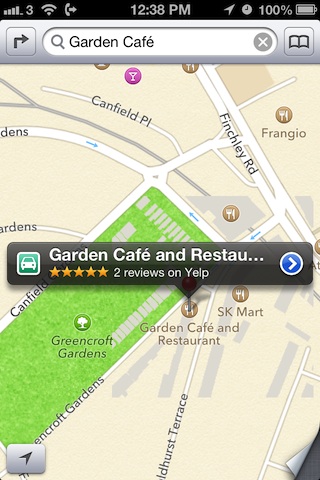
Points of interest shown at incorrect location

If you see that a business, park, station, hospital or other point of interest is shown at an incorrect location, you can send Apple the correct location.

Tap the blue right-facing arrow to see point of interest details.

Read More