In which I take an Apple patent and suggest that it could form the basis of a new collaborative on-location application for the cloud, iPhone and iPod Touch for TV and film makers.
Storyboards are fine in principle, but crews need to use enough setups to cover enough angles to capture the drama so that directors and editors can later tell the story in ways that that they didn’t plan.
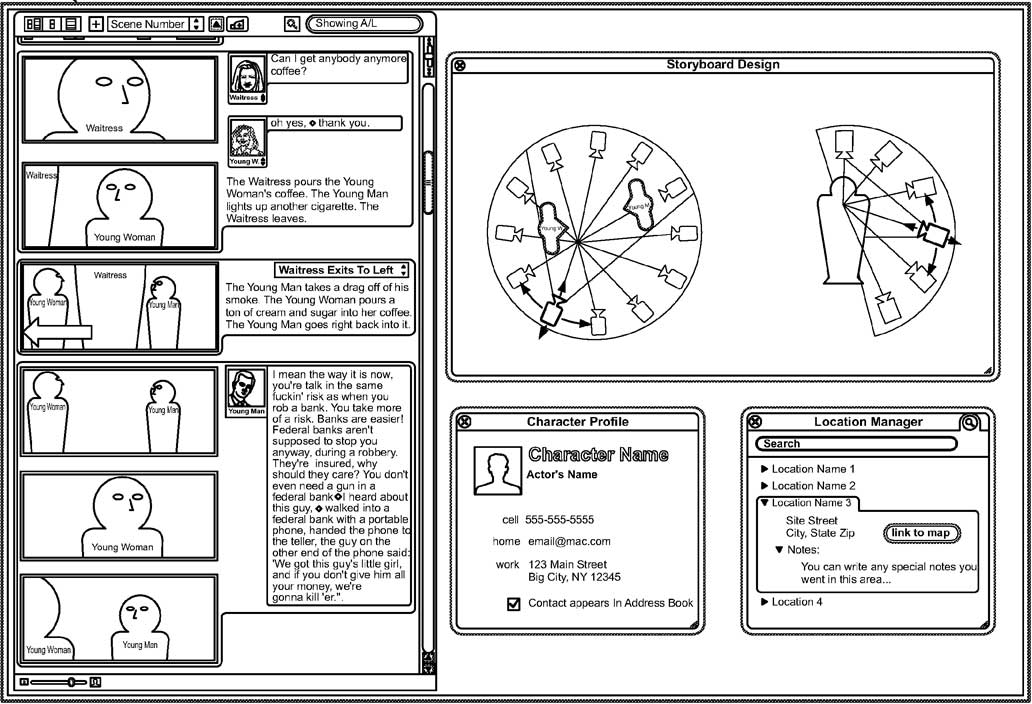
The recent patent granted to Apple is more about shoot planning than storyboarding. Instead of creating a comic-book simulation of a potential film, it helps movie makers plan how to cover the action in a scene.
In a potential ProApps product, Apple imagine using the script to plan where characters will stand, how they’ll move and where the camera will be to film it, and possibly where the camera will be when getting different close-up, medium and wide shots.
Another aspect of this patent (according to the text at the World Intellectual Property Organization) implies that the output of this system wouldn’t be paper printouts to go with script sides. As at least two of the authors are from Apple’s iPhone team, maybe this system is about creating and maintaining a model for how production will proceed.
A model that location managers, art directors, set dressers, continuity people, crew, caterers, actors and the post-production team will have continual access to using digital technology – on browsers and iPhones (which may be in Airline Mode some of the time).
This tool should have post-production uses too. It might replaced lined scripts. For an explanation of lined scripts (and how they are used with Avid’s ScriptSync feature), read Oliver Peters’ article on his blog.
Instead of lines showing number of setups and number of takes being written on the script, the editor will be able to look at the footage captured in the context of the scene in 3D-space. It’s interesting that Apple might now attempt to introduce new organisational techniques that supplant the methods used over the last 75 years.
As an aside, this is the first patent that reminds me of a book. If it comes to pass, this system will help you plan your film following the tenets of Daniel Arijon’s Grammar of the Film Language – a useful director’s text from 1976 (check out the positive reviews on Amazon).
1. Call O2 on 0870 600 3009 and put a bar on your number. That will stop anyone else making expensive calls on your account
2. If you haven’t protected your phone with a Passcode lock, you need to change the passwords for your email accounts. That will stop people sending mail using your account.
3. If any of the applications on your iPhone store password information for access to web services, change those passwords. I changed my blog admin password (because the iPhone WordPress application can modify anything on this blog using the password stored within). I also changed my Twitter password – so that anyone finding/stealing my phone can’t tweet using my account. I didn’t change my iTunes (App) Store password as you have to enter it each time you download paid music and applications.
4. After 40 hours O2 will be able to report on specific phone calls on your phone between when you last used the phone and when you arranged the bar to stop outgoing and incoming calls. This will give you an idea whether you’re likely to get your phone back. In my case I knew that the person who stole/found the phone won’t be handing it back after they spent as much time as they could making calls until the phone was barred.
5. If you don’t have insurance (and you want to replace your iPhone with another iPhone), you’ll need to buy a Pay-As-You-Go iPhone from your local Apple, Carphone Warehouse or O2 store. If you don’t, and you got your iPhone on a monthly contract, O2 will still charge you your full monthly fee until the end of your contract – even if you have no iPhone to use.
6. Your replacement iPhone will cost you to £352.50/£401.45 for 8/16GB. Those prices are £10 more than the list price. To buy an iPhone that is unsubsidised by O2, you have to add a minimum of £10 to the SIM that comes with the phone.
7. If you have a monthly contract, you’ll need a SIM card that can tells your replacement iPhone to use your old telephone number. You can get this for free from an O2 shop, or you they’ll post you one in 3-5 days.
8. As the iPhone gets backed up when you sync using iTunes, you won’t lose much information. Insert the SIM associated with your old number into you new phone. Connect it to the iTunes you synced your lost iPhone with. iTunes will offer to restore the backup from your old phone to the new one. If the new phone hasn’t been updated with the same firmware your old phone had, you won’t be able to use your backup immediately. You’ll need to let iTunes upgrade the firmware. Once the firmware has been updated, on the Summary tab, choose Restore to choose your old backup to restore your iPhone (The note next to this option isn’t accurate – it says ‘you can restore its original settings by clicking Restore’ – in this case you’ll be recovering an old backup and applying it to an iPhone with the new firmware).
In which I use the social media element of a UK advertising campaign to demonstrate how clients and agencies will need to learn how to trust unsupervised copyrighters with their brands.
If you’re interested in the future of advertising, maybe you should follow Aleksandr Orlov on Twitter or Facebook.
To anyone who’s ever been in interminable edits with a directors, copy writers, art directors, agency people and people from the client, you might not believe the following: with social media, you’ll have to find writers that you can trust.
Given the small number of words and images used in any given TV ad campaign, that doesn’t stop the script being endlessly taken apart an criticised by everyone involved. Given that eventually most campaigns will need to have a social media element, imagine how many more words and images will need to be created and distributed… and approved by someone.
This sort of micro-managing won’t work for social media.
A month ago, a campaign started to promote a car insurance price comparison site called ‘comparethemarket.com’ – it features a meerkat character who wants the audience to understand the difference between that site and the site he runs: ‘comparethemeerkat.com’:
An ad I don’t mind seeing when it comes up on TV, but didn’t feel the need to find out more.
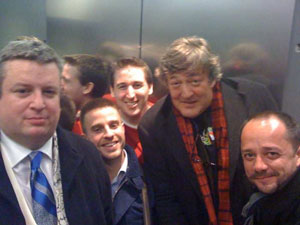
On Monday, writer, actor and TV presenter Stephen Fry got his 100,000th follower on Twitter. On Tuesday, he was up to 110,000. That made him the third most followed (after Barack Obama and CNN) on Twitter. On Tuesday, he also got stuck in a lift for a while with a few other people. While waiting for the engineers, he took a picture and uploaded it to twitpic.com:
Twitpic is a site used by Twitter users to share pictures in updates. The update that linked to that picture looked like this in Twitter: ‘Here we are x http://twitpic.com/1bgnt”
Over 65,000 people have seen this picture. A few hours later ‘aleksandr_orlov’ posted this on twitpic:
Over 3,000 people went to TwitPic to see this image. A day later I wanted to catch up with what Stephen Fry had been doing since – I thought that his getting stuck in a lift would be one of the random events that gets Twitter that bit closer to the mainstream.
Stephen Fry is considered a national treasure in the UK, he is becoming one of the first people British people follow when they sign up with Twitter. That means that some of Stephen’s updates don’t make as much sense as others – they are replies to messages from followers. You need to see the message he’s responding to.
In this case Stephen had posted this update: ‘@alboreto I thought there was someone else in there…..’ – on Tweetree I saw that @alboreto was retweeting the post from @aleksandr_orlov – I didn’t recognise the name or the new character pasted into the lift picture.
Aleksandr_Orlov is a puppet character from the Compare The Market insurance comparison website UK TV campaign. He has almost 2,000 Twitter followers and almost 200 updates in the last month. Interesting how most of the posts are responses to messages from other Twitter users. All his updates are consistent with the way he is portrayed in the advert. His bio explains his Russian accent and links to his Compare The Meerkat website.
If you want to see social media copy writing in action, visit his profile on Twitter. You’ll see how each answer is tailored to each question from other Twitter users:
Aleksandr Orlov has almost 80,000 friends on Facebook. Some Facebook notes are directly part of the campaign:
All my friends,
I have made new TV advertisement!
It seem some people still visit my site looking for car insurance deal. So this time I have make absolute clear difference. Only mongoose could not understand.
Please enjoy sneaky preview at http://www.comparethemeerkat.com/tv-ad.html
This note got some comments playing along:
Other Facebook notes maintain the character:
On Friday, I am travel to Miami, USA to see artist Celine Dion perform in ‘Taking Charge World Tour’! This will be 6th time I have seen Ms Dion live perform greatest movie song of all time ‘my heart will go on’. Magical. I will put up story of my trip when I return. I am excite!
Please do not be to much jealous
His channel on YouTube is quieter, but he still makes friends with YouTube users and has extra information about his character:
Movies and Shows: Baywatch, Antiques Road show, Meerkat Manor, Top Gear, Titanic
Music: Tchaikovsky, The Beach Boys, Shania Twain
Books: War and Peace, The Meerkat Mongoose Wars: A History
This sort of quick response to members of the public from the personification of a brand requires that the client trust the ad agency and the ad agency trust the copy writer(s). If someone makes a mistake they can delete a tweet, but they cannot edit it. Deleted tweets look suspicious too. The writer needs to maintain a consistent character 24 hours a day, using the principles of standup comedy and improvisation to respond to other users of Twitter, YouTube and MySpace etc.
The only caveat is that although a campaign may be entertaining for audiences and useful for the CVs of the people involved, the proof of the pudding is in the eating. This will only be a positive case study for the future of advertising if it improves the fortunes of Compare the Market.com – we’ll see.
In which I say why I can’t make NAB, but pass on a code ‘worth $150’ that their PR agency sent me.
Over the years I’ve watched the stories coming out of the NAB Show, and heard tales from those who visit. Sometimes I daydream about visiting – especially if I’m going to be in the US at the time. I’ll have to leave the reporting up to my friend Rick Young this time.
Given the nature of trade fairs these days, maybe NAB 2009 would be a good one to visit. If exhibiting and attending events like this starts to make less sense (ironically possibly because of some of the technology shown at NAB itself) in future, maybe you should catch one of these remnants of the 20th century in Las Vegas in April.
If I lived within four hours of Las Vegas, I would spend at least one day there.
Looks like I have enough pull with this blog for NAB’s PR company to send me a ‘a special registration code that you may pass along to your readers that will give them a FREE exhibits-only registration.’
So with that bit of full disclosure, if you want to save $150 (for access to the exhibition area and to the opening keynote), go to http://nabshow.com/passport and quote Free Exhibits Passport Code: TP01 (that’s T P zero one).
PS: If you want to follow NAB on social networks, you can – although http://twitter.com/nabshow is typical of business not yet understanding the nature of Twitter. They should be using social media as a precursor for replacing much of what the trade show is…
In which I show how to use the Final Cut ‘Dip to Color Dissolve’ transition effect to produce a camera flash between shots.
My friend Matt asked if I could create a flash frame transition plugin. Sometimes he likes to start a new shot with a flash of white that fades away very quickly as if a camera flash went off. He currently adds a six frame white colour matte on a higher channel and adds a dissolve transition:
It turns out that you can modify the settings of a built-in transition to make a flash frame transition.
1. Add a standard ‘Dip to Color Dissolve’ transition:
These are the standard settings:
2. Change the sliders and colour so the transition controls look like this:
Threshold sets the point of the transition where the colour fills the screen. The default of 50 makes it appear at the midpoint of the transition. If set to 0, the transition will start with the colour you choose.
Soft defines the amount of time the colour fills the screen. The default of 100 makes the colour appear for a single frame – setting it to 0 will make the colour appear for the full duration of the transition. With a short transition duration, a value of 80 will make the white flash stay for two frames before fading away.
3. Change the duration and transition alignment as follows:
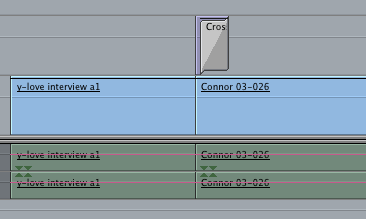
Your timeline should now look like this:
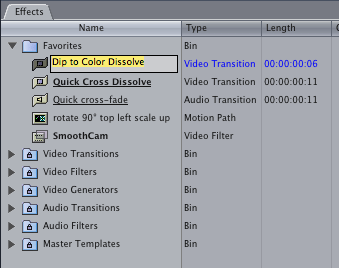
4. If you want to use this transition elsewhere in your project and in other projects, drag the modified transition from the timeline to the Favorites folder in the Effects tab of the project window. You can then rename it if you like:
5. When you apply this transition, drag on top of the front of the clip you want to add the flash to:
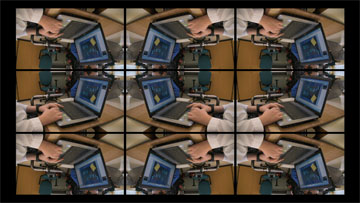
This is an improved version of Apple’s built in Cube Spin transition.
This video shows the improved options:
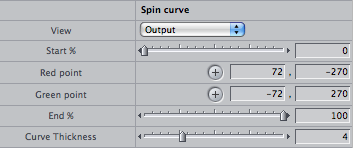
The first part of the controls provide extra options:
The second part gives you control of how the spin effect is applied. You can display a graph showing how the spin value ranges from 1 to 0 – with 1 at the start of the transition, 0 at the end. Bezier control points define the shape of the curve between 1 an 0:
This graph shows how Final Cut’s built in ‘Cube Spin’ transitions from 1 to 0 – a uniform slope:
The default graph for the ‘Cube Spin – Alex4D’ transition starts and finishes gradually:
The bezier control points can be modified so the transition starts slowly and finishes quickly:
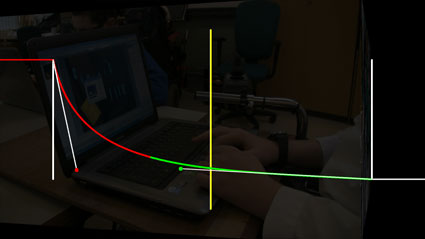
Or so that the cube spins quickly initially (the graph starts very steeply), then slows down as the transition finishes:
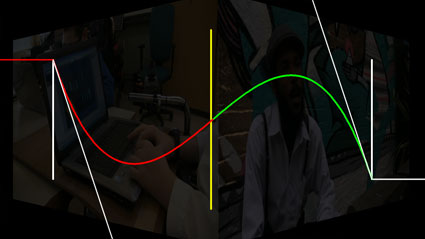
This is the graph of the transition shown in the video where the cube spins forwards, backwards and forwards again:
You can also set different border thicknesses and colours for the outgoing and incoming clips:
I’ll be posting my wave transition plugin later today, I’m also working on a user interface for editing the curves of values during transitions. This means that you’ll be able to edit the way a value changes during a transition.
This one shows how the transparency of the outgoing clip goes in a straight line from 100% to 0%. The transition will have the option to display a curve editing mode. I hope to add control points so that the line won’t be straight…
15 years ago I wrote an essay called “What if Media was Media?” It was based around an idea that might interest others, but I wasn’t sure what to do about it. As I wasn’t on the internet back then, all I could do was print it out and give it to a few people who might be able to help me…
The core point was that people may come to understand copyright more deeply because computer file formats will have layers of rights information built-in. In 1994, people hardly ever referred to contents of computer files as ‘media.’ I was imagining a system where all movies, TV, radio and music was created, distributed and delivered in digital forms.
I saw that the flexibility of digital media would make it much easier for old-fashioned media to be copied. To facilitate ubiquitous distribution, I thought it would be interesting if the file format itself included information on the rights-holders.
Once the rights information is included with the footage, then every time the footage is played elsewhere, the playback software will determine whether the person watching the footage would want to pay a one-off fee, or license to watch as many times as they want. Of course they could get an advertiser to pay on their behalf:
An imaginary ‘media payment preferences’ control.
They would also choose whether they want to watch on their own, or play it to larger audiences:
The system could also take into account times when footage is incorporated into other productions. If you witnessed the feel-good story of the week – when a talented and brave airline pilot saved passengers and crew by landing his stricken plane on the Hudson – and shot footage that news organisations all over the world wanted to show, they could upload it from your camera. If media rights were encoded into the file, each time the news item is shown on TV, from an archive, streamed on a corporate website or even embedded elsewhere, you would get a cut of the fees paid.
It’s a dilemma. On one hand ‘the little guy’ would automatically get paid. On the other, everyone who has a camera pointed at them will want to know what’s in it for them…


















 alex4D old blog