I’ll keep this post updated with the latest official information.

Supplementary information

June 21, 2011

Final Cut Pro X, Motion 5, Compressor 4: User manuals
Use the help menu.
Also, a list of the locations of online manuals:
Final Cut Pro X User Manual
Motion 5 User User Manual
Compressor 4 User Manual

Final Cut Pro X: Support resources
Apple’s main support page – including a links to support communities.

Final Cut Pro X, Motion 5, Compressor 4: Run Software Update after installation to install Pro Apps QuickTime codecs
The Pro Apps QuickTime codecs installer is also available.

Final Cut Pro X, Motion 5, Compressor 4: Installation best practices
Whether you install on a new Mac, a separate partition or on the same drive as FCS3.

Final Cut Pro X: Options for importing media from photo-based devices
From a media card using File > Import Files, or by dragging from iPhoto or Aperture to the Event library.

Final Cut Pro X: Options for importing photos from a media card used for both videos and photos

Final Cut Pro X: Importing Sony XDCAM media
‘You’ll need to download and install the Sony XDCAM Transfer software and XDCAM Drive software.’

Final Cut Pro X: Timecode of selected media in the Inspector may not display as expected
‘Timecode of selected media is displayed in the frame rate of the media and not the frame rate of a project.’

Final Cut Pro X, Motion 5, Compressor 4: Graphics card compatibility
A list of which Macs shipped with which graphics cards.

June 22, 2011

Final Cut Pro X: Movie files from iTunes, iPhoto, and Aperture do not appear in the media browser
A feature, not a bug. Drag movies from iTunes, iPhoto, and Aperture windows to the Event Library.

Final Cut Pro X: Use “Import from Camera” when importing media from an SD card that was copied to the local drive

June 23, 2011

How to purchase Final Cut Pro X, Motion 5, Compressor 4
Go to Mac App Store

June 24, 2011

Final Cut Pro X, Motion 5, Compressor 4: Using OpenCL-enabled graphics cards

June 27, 2011

Final Cut Pro X – Technical Specifications

Motion 5 – Technical Specifications

Compressor 4 – Technical Specifications

Final Cut Pro X Supported Cameras

June 29, 2011

Final Cut Pro X: Hiding Events in the Event Library
Move their folders from the Movies/Final Cut Events folder. This applies to Projects too.

Troubleshooting

June 21, 2011

Final Cut Pro X: High data rate media may cause unexpected behavior
‘Ensure the storage device has adequate throughput to accommodate the data rate of the media.’

Final Cut Pro X: Sorting content in the iLife Media Browser may cause unexpected behavior
‘Allow the process to complete; the symptom should not occur again.’

Motion 5, Motion 4: Motion projects cannot be previewed in finder or QuickTime Player
If Motion 5 was installed on a Mac with Motion 4.

Motion 5: Alpha type analysis of media with an alpha channel may not be determined correctly
‘In the Media pane of the Inspector, choose the appropriate option’

Final Cut Pro X, Motion 5, Compressor 4: “Please see if your boot volume has sufficient space” alert when sharing to an LG Blu-ray drive
Update the firmware for the LG Blu-ray drive.

Final Cut Pro X: “Please Locate” dialog box appears when selecting Spaces presets
Spaces is an audio filter. ‘Download the additional Final Cut Pro X content.’

Compressor 4.0: Batch files created with Compressor 3.5.3 open with Compressor 4.0
Open them from within Compressor 3.5.3 using File > Open

Compressor 4: Issues applying a setting to effects-intensive Final Cut Pro X projects sent to Compressor
‘Open Compressor and close the Preview window. Do this before sending an effects-intensive Final Cut Pro X project to Compressor for transcoding to prevent unexpected behavior.’

Motion 5: Imported Photoshop files in CMYK color may not behave as expected
Re-save your .psds as RGB before importing.

Compressor 3.5.3 & 4.0, Apple Qmaster: Network interface changes are not detected until Compressor is restarted

Final Cut Pro X: Unusable fonts may cause unexpected behavior with Inspector
Use the Font Book application to determine unusable fonts. Remove them and restart Final Cut Pro X.

Final Cut Pro X: Distortion when creating Motion templates with non-square pixel aspect ratios
When creating Motion templates, use the Snapshots to create versions for different aspect ratios.

Final Cut Pro X: Keyboard commands may conflict with Spaces keyboard commands
If you want to keep using Mac OS X Spaces, change the keyboard shortcuts using System Preferences > Exposé & Spaces > Spaces

Final Cut Pro X: Systems with two graphics cards may export QuickTime movies with green artifacts
Current workaround: ‘Only use Final Cut Pro X with single graphics card on your system.’

Final Cut Pro X: “Final Cut Pro generated an error or unexpectedly quit” alert when leaving Share Monitor open
If you have the Share Monitor open, close it before restarting Final Cut Pro X.

Final Cut Pro X, Motion 5, Compressor 4: About the “Failed: Quicktime could not access a file. Offset too big” alert
‘This alert message indicates that the drive you are exporting to is getting full.’

Final Cut Pro X: Connect your camera or device directly to the built-in FireWire port on your computer
Don’t use hubs.

Final Cut Pro X: Importing a range selection of iPod or MP4 video media plays clip as a still frame
Import the full media file.

June 22, 2011

Final Cut Pro X, Motion 5, Compressor 4: “Send To” menu command from Final Cut Studio (2009) opens incorrect version of target app

June 24, 2011

Final Cut Pro X: Mac OS X 10.6.7: Media Browser option unavailable in Share menu
Update to Mac OS X 10.6.8

June 27, 2011

Compressor 3.5.3 & 4.0: QuickClusters on the same system may not work as expected
Disable the Compressor 3.5.3 QuickCluster.

June 29, 2011

Final Cut Pro X, Motion 5, Compressor 4: May be unable to open Final Cut Pro 7
Open and quit Motion 4.


I know you could meet editors, post-production people, TV-show and movie makers from the UK and Europe. You’d see presentations on Final Cut Pro, Smoke for Mac OS X and Davinci Resolve 8.

There’s a chance Final Cut Pro X will have been launched by then, and this will be the first major event for us all to get together to talk about the implications.

But I’d rather you didn’t go. Michael Horton very kindly sent me a free ticket. I’m sorted. It’s not fair that you have to pay £20 for five hours plus of Final Cut and Mac post-production community building, education and inspiration.

The fact that if you don’t go, I’ve got a much better chance of winning a share of the £25,000+ raffle is nothing to do with it…

Part of the art of writing patents is to protect concepts that might be used in future products without delineating them too clearly.

Case in point: Apple was awarded a patent yesterday: Gestures for controlling, manipulating, and editing of media files using touch sensitive devices. Here’s the abstract:

Embodiments of the invention are directed to a system, method, and software for implementing gestures with touch sensitive devices (such as a touch sensitive display) for managing and editing media files on a computing device or system. Specifically, gestural inputs of a human hand over a touch/proximity sensitive device can be used to control, edit, and manipulate files, such as media files including without limitation graphical files, photo files and video files.

Seems mainly about Apple getting a patent for gestures used to edit video on multi-touch devices. But I think the interesting phrase there is proximity sensitive device. That means we’ll be able to edit without touching a screen (or wearing special gloves).

Hidden in the middle of the patent are the following two sentences:

Finally, using a multi-touch display that is capable of proximity detection … gestures of a finger can also be used to invoke hovering action that can be the equivalent of hovering a mouse icon over an image object.

Ironically, one of the arguments against making Flash available on multi-touch devices is the fact that the majority of Flash implemented UI elements use the position of the mouse pointer without the mouse button being clicked as useful feedback to the user – a concept not possible using multi-touch. If devices included advanced proximity detection technology, then ‘mouseover’-equivalent events could be sent to Flash UIs – so they’d work they way they have since Shockwave and .fgd files.

Although granted yesterday, the patent was applied for in June 2007. In August 2007, I wrote about gestural edits that required the UI being able to detect fingertip position while not touching the screen.

I also wrote about Apple being granted a patent for using a camera mounted to a portable device to detect hand movement in three dimensions.

A few days ago, I blogged about Apple making a surprise appearance at a London video event where they were going to present their ‘latest range of video products’.

If you go to MacVideo.tv, the home page has been updated to say although the MacVideo Expo is going ahead on Thursday 9th June, Apple will not be attending:

Change of plan – Apple has a busy month with WWDC June 7- 11 and as such doesn’t plan to be at MacVideo Expo, June 9, 2011. With the upcoming release of Final Cut Pro X, June is shaping up to be a phenomenally busy month so expect the unexpected. Anything can happen in the next few weeks. The show goes on.

I’m sure the Expo had a large number of interesting stands and packed schedule before Apple got involved, so the event should still be well worth attending.

Although Apple never said they were going to be talking about Final Cut Pro X (or new Mac Pros or Lion), I wonder if there’s more to this change of plan than them being busy that month. I’m sure they thought they could present something at the event as of the beginning of last week. Now they cannot attend.

What could it mean?

Given that Apple have announced that Final Cut Pro will be available in June, will there be a special event to launch it, or will Apple once again use a third party event to make the official announcement?

At the MacVideo Expo on 9th June, Apple will ‘be showcasing their latest range of video products.’ Note that this event is happening at the same time as Apple’s Worldwide Developer conference, where it is expected that the launch date for the next version of Mac OS will be announced. They might also announce new MacPros at the WWDC.

The MacVideo Expo is in the form of a series of industry presentations, demos, software & hardware tips and raffle in a large room. Outside the room there are a range of stands showcasing video technology.

Note that a larger but similar event is happening two weeks later in the same city – the LFCPUG Network’s London SuperMeet on 23rd June. Given that both events probably had full schedules organised, it is interesting that Apple didn’t request to be involved in the SuperMeet (as far as we know).

Once we see the MacVideo Expo schedule, seeing how long Apple will be presenting might be a useful clue as to whether this is a cut-down version of the April sneak peek, or a full product announcement… including information on support for tape workflows, frame-accurate editing and three-point editing… The nine hour time difference between London and California might even be relevant.

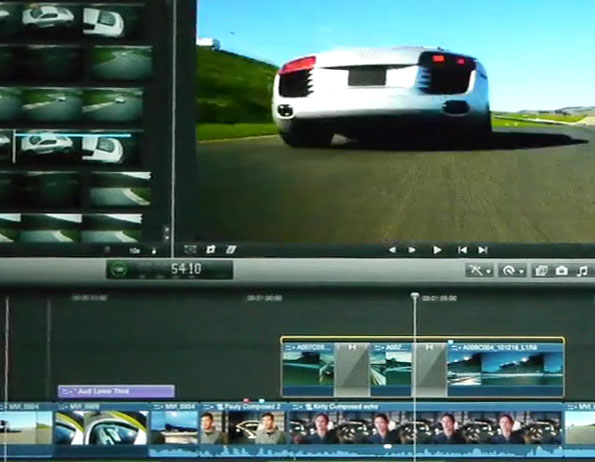
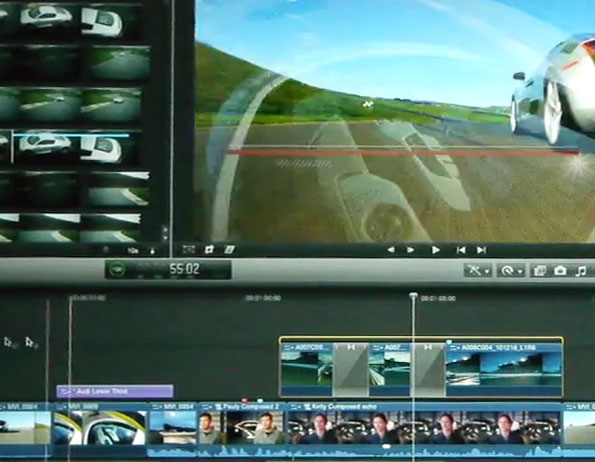
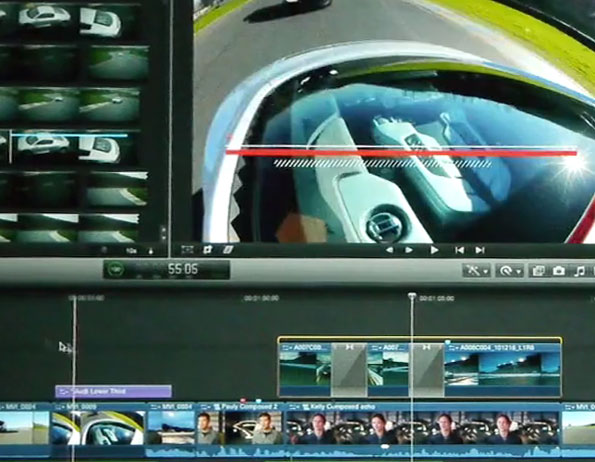
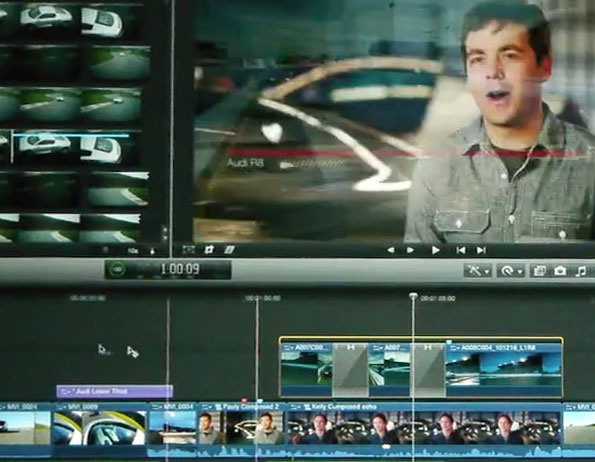
If you take a very close look at the second part of Emmanuel Pampuri’s recording of Apple’s sneak peak of Final Cut Pro X, you’ll see a few frames hinting at integration with Motion – or a much more advanced titling system:

Click each frame for elements in context:

A few frames before the title marked ‘Audi Lower Third’

A white line, a thicker red line and a cross-hatched line appear.


More of the cross-hatched line is drawn.


A thicker white line is drawn.

A few frames later, the rest of a white rectangle is drawn with text added on top – possibly lined up with with tab stops.

The title fades – the fade must be built into the title as there is no sign of a fade in the UI.

In a few weeks this post will be out of date, but for now, this demonstrates that the titling in Final Cut Pro X is likely to be at least as good as version 7.

Given that Apple say that Final Cut Pro has been rewritten from the ground up, it is very likely that it stores its information in a database that will be available to other applications and users. It is likely that multiple users will have access to the database at the same time.

That means new collaboration opportunities.

Sound

Given that the new interface is much clearer at helping users establishing and changing sync between clips or all kinds, it makes it easier for sound editors to work on the same timelines as picture editors. They’ll be able to do a great deal of work on audio sweetening (including fixing sync on clips) while the picture editors continue to work. For audio specifically this would work better if the position of one audio clip – a voiceover for instance – could define where other clips dipped their levels.

Editing

Collaboration works best when each user can easily understand which parts of a project they can have a look at and modify.
A suggested user interface showing that a compound clip is unavailable for editing.

Perhaps collaboration between editors will be afforded by ‘checking out’ compound clips on a master timeline. ‘Checking out’ is a database term that means an individual record will be locked while a specific person makes changes, but it still can be looked at, and other parts of the database can still be changed. In the case of Final Cut Pro X, the primary editor would be able to see a compound clip is being worked on by an assistant while temporarily unable to edit it.

As well as being a repository of a signed off B-Roll sequence, compound clips could also contain the verse in a music video, a scene in a movie or an episode in a web series. While I work on the verse/scene/episode, another editor could be repositioning the compound clip in the movie or even splitting it into two.

The Audition feature allows a given compound clip to display different choices chosen using a coverflow-type display. Perhaps instead of choosing between individual shots, in future editors might choose between different edits in a compound clip. Senior editors could use this feature quickly compare old and new edits by an assistant.

External suppliers

Maybe we’ll be able to give external suppliers access to chosen parts of our FCP X projects:

    Transcribers and translators (Given access to specifically-tagged ranges within clips, to which they’ll be able to directly add subtitling/close-captioning/alternate soundtracks)
    Picture graders
    Visual effects houses

We might even be able to choose which elements of our project are backed up on iCloud.

Other applications

Fun fact: If the Mac or iOS device is the dongle for Final Cut, then Apple loses nothing by allowing developers to create applications that have peer access to FCP X project databases – Core Data databases can only be served by OS X and iOS devices. That means if there is a market for applications that can edit FCP X data using a 20th century old-style (Avid/Premiere/FCP 7) UI, then Apple will allow third parties to develop them. The more applications that can manipulate FCP X project databases, the more high-margin iMacs Apple will sell.

Legacy tape & digital formats

There is a commonly believed rumour that Final Cut Pro X won’t have any DV and HDV tape capture features.

If Apple want metadata-based workflows to become more popular (preparing the way for more solutions to replace Unity setups at TV stations), it is likely that they’ll want metadata to work well with all media.

That means that if you import an FCP 6-7 project into X and spend the time adding metadata tags to people, places, shots, takes and regions, it is unlikely that Apple would throw that work away if someone decided to do a batch recapture in an older version of FCP and reimport the QuickTime files.

If an FCP X project is a database it is likely that if tape capture isn’t built into X, there’ll be another tool that will be able to add or change the database for those with tape-based content.

Batch recapturing doesn’t apply to tapes alone…

Given the multi-format editing nature of FCP X, the digitising tool might also be able to ‘re-link’ tapeless source data to projects that were converted from FCP 6 and 7. It makes sense that if you’ve used a H.264 or Red to ProRes 422 LT workflow in FCP 7, you could open the project in X to continue work after linking the timeline to source Red or H.264 data.

Please note that this post shouldn’t be counted as a rumour, just speculation: now that Final Cut Pro has been rewritten, there could be new opportunities to improve its collaboration features.

[Post rated 18(UK)/R(US) for ‘strong language’]

During a Q&A following a screening of Scott Pilgrim vs. The World (the videos of which were posted on Blip.TV by director Edgar Wright), Guillermo del Toro talked about how much respect directors and screenwriters need to have for the authors of the works they are adapting. He asks a question of the writer of the Scott Pilgrim books, Bryan Lee O’Malley (11:27):

Guillermo del Toro: “Let me ask you, because having gone through two movies with Mike Mignola [writer of the Hellboy comic books], I know the first time you show the movie, they shit their pants, the authors. I always say that adapting work is like marrying a widow, and you are going to be respectful of the late husband, but at some point, you’re gonna fuck. You have to stop talking about the late husband and say ‘shut the fuck up.’ For you being the dead husband thinking ‘holy fucking shit,’ what was your reaction when you first saw the movie?”
Bryan Lee O’Malley: “[…]That whole Vegan thing, what was I thinking when I wrote that? Seeing it all come to life. It was horrifying.”

Guillermo is telling screenwriters that respect for the original work should only go so far. To adapt properly you need to move on. because you are making a film, not rewriting a book or remaking a comic.

That’s just one bit from three videos from that night that are well worth watching.

Introduction (6:57)
Q&A part 1 (25:23)
Q&A part 2 (55:55)

In an event in September 2009 at USC, Stephen Susco talked to students about horror film development.

Poster for the US version of 'The Grudge' from 2004.

He says that he developed his version of The Grudge in parallel with Takashi Shimizu. Takashi had made a couple of shorter films for Japanese TV, so they decided to create their own feature versions seperately – one in Japan and one in the US. Stephen’s version was delayed, so when the time came for him to write the U.S. version, he had a few questions for Takashi (42 min):

‘”It’s great to meet you, so what was this?” and he would just be like “I don’t know. (beat) Does it matter?” In a way there’s so much genius in that, especially with horror. Look at the Shining. What does end of the movie mean? You don’t know. If you did it wouldn’t be scary. That kind of ambiguity is so essential to good horror movies
[…]
That’s what we’re lacking so often in that genre. I think it’s almost the only genre that is diametrically opposed to the way that studios develop movies. The development process is: “We need to understand everything.” You turn a script into a studio and you get 50 pages of notes and it’s all about clarity – having everything wrap up, so that when the movie is over people go “I got it, I got the whole thing.” Horror is about not doing that. Horror is about keeping people off-guard, unprepared and leaving with questions.”

He then talks about a development executive who points to The Sixth Sense as a perfect example of a script that has everything cleared up at the end.

‘So I said “OK, how could Haley Joel Osment see dead people?” […] If they had a scene where Haley Joel Osment as the camera is slowly pushing in on him gave this monologue about when he was five years old he was in this car crash and when he woke up in the hospital he could see dead people standing at the foot of his bed, the movie would have lost all of its power. But the movie was so good that you didn’t leave saying “Gee, I really wish I knew how the hell Haley Joel Osment could see dead people.”‘

He then goes on to tell a little more of his battles to keep The Grudge as ambiguous as possible. There’s a lot more available in the podcast of the event on iTunes (The episode dated ‘2 9 09’ here). The podcast is available as an mp3 at the bottom of the 2009-2010 podcast page at USC.

As I’m doing a huge favour to the organisers of Tuesday’s MacVideo Expo in London, they’re doing me a favour in return. If you email me with your name and company name, you can save the full £10 entry fee. There are three tickets left as of Monday morning.

MacVideo Expo 2010 logo

MacVideo Expo takes place at The Royal Society of Medicine, London W1 on Tuesday October 19. It is organised in the same way as a Final Cut Pro Supermeet: an exhibitor showcase, presentations and a giveaway of £10,000-worth of products to audience members. The £10 entry fee also includes a free buffet.

You don’t have to have a Mac to benefit from the event. The exhibition and show includes Panasonic’s AVCCAM range, Avid’s Media Composer 5, a 45-minute lighting demonstration from Dedo Weigert, Blackmagic Design’s DaVinci colour correction products and Autodesk’s Smoke. You’ll also be able to make connections with UK editors, camerapeople and post-production experts.

The favour I’m doing the organisers? I’m appearing on stage in a panel – The great DSLR vs Video Camera debate.

If you have an idea for a plugin for Final Cut, find me during a break. I’d love to hear about it. I’ll tell you about my next free plugin too.