Archive

Links

My friend Jean has been very good to me. She’s arranged for my blog to be linked from the Internet Movie Database. Twice. She sends me very interesting links. Here’s one that makes me seem cultured:

This is an example from one of three ongoing photography projects. This one was started in 1995.

When I start making movies, I like the idea of lighting them like this. Unfortunately, it’s been done before:

George Blackstone and I made The Things We Do for Love, a documentary on dating and relationships. It is made up of interviews with many people of all ages. A recent task I had was to make a DVD so that the contributors who couldn’t reach a screening would have a chance to see the film. I also planned to put alternative edits and bonus footage on the disc.

As I was putting it together, I realised that it might be better to make all the content I was generating available online. That is the modern way. So instead of building my menu system, I’m uploading the files to Vimeo.

Vimeo is a site where all the content is generated by the people who post it. As well as standard definition video, they host HD (be in 720p24, 720p25 or 720p30). They have an upload quota of 500MB a week. The great thing about this quota is that it encourages you to use it. Those camera tests and technology demos can now be hosted on a free site with minimal advertising.

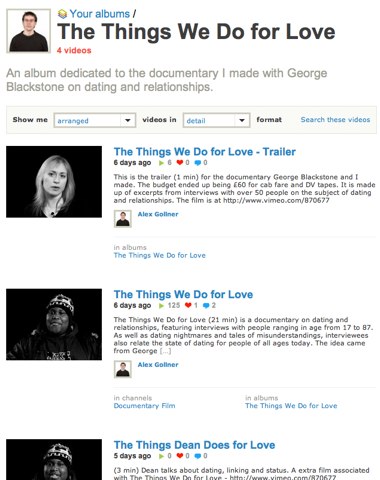
Videos and pictures that you upload can be grouped into albums, where content on a specific theme can be gathered together. I’ve grouped the videos associated with our documentary in an album called The Things We Do for Love:

http://www.vimeo.com/album/11274

In the coming days I’ll upload more bonus footage. The videos are smaller than SD for now because Vimeo sees 1024 by 576 PAL widescreen videos as being less than 1280 by 720 HD, so encodes them at a smaller size (for now). We shot at SD and I couldn’t fit a scaled up HD version into my weekly 500MB quota.

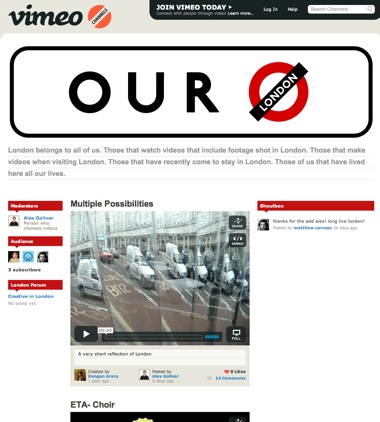
Another feature of Vimeo is ‘Channels’ – this is where users curate a channel of videos on a chosen subject. As well as their own videos, they can choose to include other people’s videos. This feature is more about community building – people can post messages that appear on the home page of the channel, and there is an option to include a forum for people to discuss the content of the channel – or anything else they fancy.

Mine is called ‘Our London‘ – it’s a collection of videos featuring London.

A screenshot showing a channel in Vimeo

I imagine many companies are trying to create the ‘Super YouTube’ – this one will do for me for now.

This may be old news to you, but as I’ve only just heard, here it is: To make YouTube content work on non Flash-based devices (AppleTV, iPhone), recent videos are available in higher-quality, non Flash versions.

To view higher quality MP4 (H.264) versions of videos, add ‘&fmt=18’ to the end of the address. You’ll see a big difference between

http://www.youtube.com/watch?v=ImyTzI7OSHM

and

http://www.youtube.com/watch?v=ImyTzI7OSHM&fmt=18

The audio is also better. The quality will only be better if the originally submitted file was better quality than standard size.

If you are running Safari, you can download the Flash and MP4 files from sites that don’t provide download links:

1. Before you go to a page with a Flash or MP4 video player on it, open the ‘Activity’ window using the Window menu.
2. Go to the video player page and carefully watch the list of items being loaded by looking at the list in the Activity window. You’ll see the Status of each item. Most will load quickly – they’ll show a file size of anything from a few bytes to a few K for the images.
3. Find the item associated with the video you want to download. The status for the video item will take longer to appear. The ‘Address’ of the item will be a long line of gobbledegook, but the status will show values such as ‘2.6 of 3.2 MB’ as the video is loaded into the player.
4. If you double-click this item, Safari will either download the video (check the Downloads window), or it will open a new window containing a load of garbled text. If a new window opens, wait for it to finish loading and then choose ‘Save As…’ from the file menu and save the file – without the suggested extra .txt suffix.

This works on the Mac version of Safari, but I haven’t tried it on a PC yet.

I’ve been doing more playing with the SmoothCam effect in Final Cut:

What SmoothCam does:


Click to see this at 720p

It moves and rotates your source video to smooth a shot. It doesn’t make a shot look like it has been shot on a locked off tripod, it takes large translation, rotation and scale moves and smooths the movements.

As you usually don’t want the edges of your video to be seen when it is smoothed, it gives you the option of scaling your video up so that you don’t see past the edge of the video. That means you should make sure you shoot progressive, and frame to allow for what SmoothCam will do. As some HD video is delivered in 720p format, you can scale up your 1080p video by 50% without any loss in resolution.

The following video shows what is produced if your shutter speed is too low. If you shoot at 25p and your shutter speed in 1/50th, the motion blurs look like distortions:


Click to see this at 720p

So use a higher shutter speed that you would normally.

You can also smooth a (very long) series of stills too:


Click to see this at 720p

Suzanne invited me to a show featuring many of the thesis films of last year’s students on the Royal Holloway Documentary MA course.

Two stood out. One was a beautiful documentary about the red light district in Amsterdam.

The other is by Yuan. She is going to be a star:

[YouTube=http://www.youtube.com/watch?v=HMG9VYpasRE&showsearch=0]

She pushes the limits of what documentary can be. However, her film has structure, a clear subject and a very distinctive voice. Important elements.

The handy thing about The Economist is that once you read an article in the magazine or website, you have a good idea to what extent relatively well-informed people are informed about subjects you know and love.

Take the case of the article in last week’s edition on Hollywood and the Internet. If you plan to raise money or interest from businesspeople who don’t spend their time following the business of movies, this is as much as they are likely to know about the internet ‘platform.’ You can keep this link and send it to people who need to know what you’ll be talking about for the next few months.

So here I am, gulping down the the ‘internet means no barrier to content distribution’ Kool-Aid when I read a contrary article over at a scurrilous tech ‘news’ site.

There I was, planning my own ongoing internet-hosted original drama series. I was going to workshop some ideas with some friends; write a tight 10 times three minutes pilot season; shoot it on my HD camera (in case NBC wants to pick it up); edit it on my Mac (not sure which software to use) and upload it for my future sponsor’s pleasure.

What if my subscribers had to pay for each download? What if ISPs went bust until the merged semi-monopoly ISPs started to charge for each megabyte streamed? What if that Web 1.0 verb (disintermediation) won’t apply in the Web 2.5 world?

Maybe I will have to forget the DIY ethos and move to LA and hope for a position in the CAA post room…

…or make sure my content is good enough to pay for. Let’s see, how much do Apple charge to download each $3 million episode of Lost?

This link is nothing to do with the Hallmark holiday that’s coming up. It’s a coincidence…

I know that when two people talk to each other in the movies, they stand much closer than real people stand, they don’t look where real people look, but it is still a good idea to notice the way real people act. We need to understand the non-verbal cues that communicate character and story. At slideshare.net, there is a presentation on flirting. Most of it is the same old Cosmo advice (you can certainly ignore almost everything after slide 28), but there is stuff in there for editors.

The presentation ‘slides’ are more like pages, so if your monitor is any smaller than 1200 pixels vertical resolution, you’ll have to read the text from the notes at the bottom of the page (which is the same as on the slides).

For example, it is a good idea for editors to follow eye-trace… We need to make sure that what actors are thinking and feeling is revealed by where they look. Even if it is for a few frames in a shot:
Excerpt from slide 8:

Once a conversation begins, it is normal for eye contact to be broken as the speaker looks away. In conversations, the person who is speaking looks away more than the person who is listening, and turn-taking is governed by a characteristic pattern of looking, eye contact and looking away. So, to signal that you have finished speaking and invite a response, you then look back at your target again.

Excerpt from slide 23:

The essence of a good conversation, and a successful flirtation, is recipro-city: give-and-take, sharing, exchange, with both parties contributing equally as talkers and as listeners. Achieving this reciprocity requires an understanding of the etiquette of turn-taking, knowing when to take your turn, as well as when and how to ‘yield the floor’ to your partner. So, how do you know when it is your turn to speak? Pauses are not necessarily an infallible guide – one study found that the length of the average pause during speech was 0.807 seconds, while the average pause between speakers was shorter, only 0.764 seconds. In other words, people clearly used signals other than pauses to indicate that they had finished speaking.

You’ll find all this in well-scripted, well-directed, well-rehearsed and well-acted rushes. However, as we editors are in the business of solving problems, it’s a good idea to have some social psychology resources to turn to – just in case.

We also might be able to make that connection that gets us the job in the first place too…

Twenty years ago US network TV was edited on film, yet the deadlines were as scary as they are today.

Check out this interview with the post supervisor on Moonlighting. They were shooting on Monday morning for a show that went out on Tuesday night:

But this editor said it was the strangest experience for him because he came into work, edited all night, went home, went to sleep, woke up and turned on the TV, and it was on the air. It was as though the network had just plugged a big cable into the back of the moviola.

There are many other interesting things in this article, including the use of music, stunt doubles, ordering music by the yard and using the emotion of a scene help the editor know who to to favour. Also there is a great deal on the editorial choices in the making of Boston Legal.