Archive

final cut pro x

Over at the fcp.co forum, a user named ‘parchabg’ was trying to get better results when exporting interlaced PAL from Final Cut Pro X. I suggested using Apple Compressor’s ‘DV Stream’ setting. It allows control over interlace field order.

If you use a Compressor preset very often, you can use that preset as a Share Destination from within Final Cut Pro X.

Compressor keeps presets in .setting files.

If these .setting files are in

Your user name/Library/Application Support/Compressor/Settings/

…you can use them within Final Cut Pro X.

I haven’t bought Compressor 4, I still use Compressor 3.5.3. It stores its .setting files in a place that Final Cut Pro X cannot see: Your user name/Library/Application Support/Compressor/

That means if there’s a .setting file I want to use in Final Cut Pro X, I need to move it into a sub-folder named ‘Settings’:

custom compressior settings location

To add a Compressor setting as a destination, go to the Share submenu of the File menu. Choose ‘Add Destination’. Double-click the Compressor Settings icon:

double-click for new compressor settings dest

The dialogue box that appears shows the Compressor presets stored in .setting files:
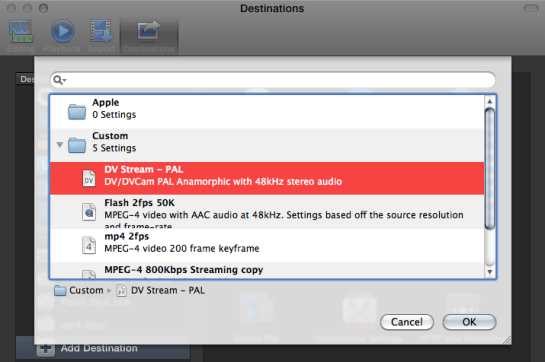
choose setting you want

Choose the preset you want as a new Share destination and click OK. Once you close the Preferences dialogue, a new item appears in the Share menu: your new Share Destination:

new submenu entry

No Compressor 4 needed

If you need a custom destination but don’t have Compressor, you can copy custom .setting files from people with Compressor and this technique still works. This is because Final Cut Pro X includes all the code required to run these presets.

If you’d like to try this PAL DV Stream preset, you can download it from here.
When first trying out downloaded effects, transitions, titles and generators in Final Cut Pro X, sometimes the viewer turns blue.

If this happens to you, the most likely problem is that your version of Final Cut Pro X is too old. You need to use the Mac App Store to check for updates. You’ll see the update if you are signed into the App Store with the same Apple ID as you bought your copy of Final Cut Pro X.

In practice most people who provide transitions, effects, generators and titles update their versions of Motion 5 and Final Cut Pro X when they come out, so any tools they make available after that only work on the new version of Final Cut.

This means most effects and transitions made available after September 20th, 2011 won’t work in version 10.0.

Most effects and transitions made available after November 16th, 2011 won’t work in version 10.0.1 or earlier.

Most effects and transitions made available after January 31st, 2012 won’t work in version 10.0.2 or earlier.

Most effects and transitions made available after April 10th, 2012 won’t work in version 10.0.3 or earlier.

Most effects and transitions made available after June 11th, 2012 won’t work in version 10.0.4 or earlier.

Most effects and transitions made available after October 23rd, 2012 won’t work in version 10.0.5 or earlier.

Most effects and transitions made available after December 6th, 2012 won’t work in version 10.0.5 or earlier, but will work in the out of date version: 10.0.6.

Read More

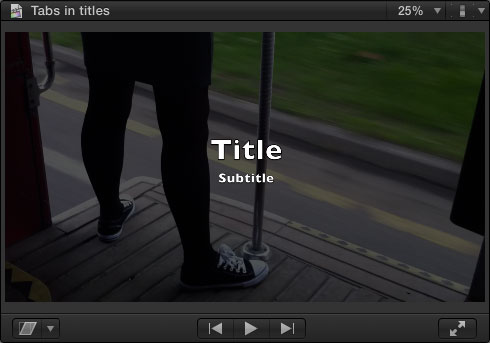
The 10.0.6 update added some text editing features for modifying title text. Here they are in action using the Zoom title (from the ‘Build In/Out’ section of the Titles browser) as an example.

If you select the title in the timeline, or if the playhead is over the title, there are two new ways to select multiple text items:

You can drag in the viewer or Command-click boxes to select more than one text box.

Read More

Although welcome, the recent 5.0.5 update to Motion was nowhere near as big as the 10.0.6 update to Final Cut Pro. As is usual, Apple’s release notes refer to bug fixes and performance improvements. This time there are also user interface speed increases and a few interesting new features.

Text Edit Markers

If you are designing titles, generators or effects which have a series of text layers that take turns in appearing, you can add a Text Edit marker to each text layer. Editors using the template in Final Cut Pro can navigate from marker to marker to make it easier to enter and edit text.

Here’s the Motion timeline for Final Cut’s built-in title from the Bumper/Opener section: ‘Snap – Text Build’:

Read More

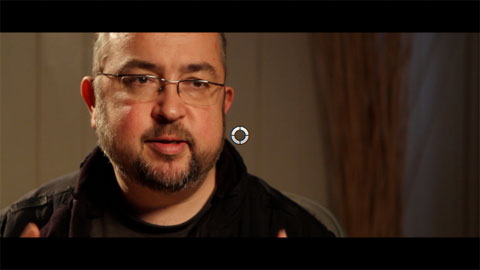
The 10.0.6 update to Final Cut Pro removed a control from the Letterbox effect. You cannot control the vertical offset of the underlying clip.

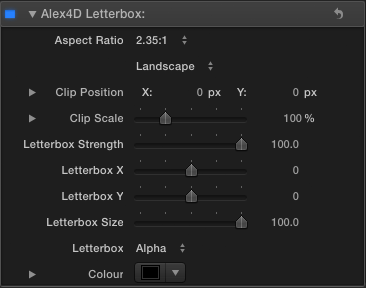
Here’s a Final Cut Pro X effect based on by Alex4D Widescreen Matte adjustment layer that brings back this control and more.

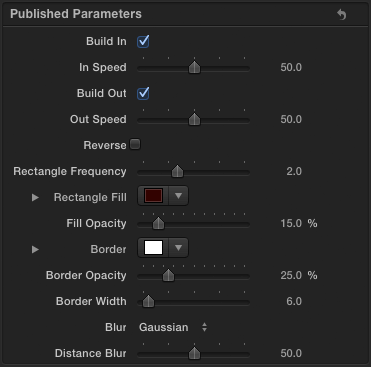
Here are the controls:

Read More

The 10.0.6 has made Final Cut Pro X noticeably faster at everyday tasks.

Given that, I was interested in seeing how it now compare with Premiere CS6.

This video times two everyday tasks in Adobe Premiere CS6 6.0.0 and Final Cut Pro X 10.0.6:

For over 50 free plugins and more for Final Cut Pro X, visit my FCPX home page.

The source clip is a 1 minute 1080p25 ProRes 422(HQ) movie.

The first task is to render a Gaussian Blur effect on the timeline. The second task is to export a timeline without rendering first.

I’m much more used to using Final Cut, so if I’ve not given Premiere a fair chance, please comment below.

Test setup

For regular Final Cut Pro X information, follow me on Twitter.

This was on an 3.4 GHz i7 iMac with 16GB of RAM and 2MB Radeon 6970M. The apps were running from an SSD, the files were on a 7200rpm drive. If you have a very different kind of Mac (or a PC), you’ll get different results. Also the brand of video card makes a difference. However, if you have the same kind of Mac as this, you’ll probably get similar results.

Perhaps others can do the same test on their computers to see the difference, it’s a matter of exporting 1500 frames (1 minute at 25fps, 50 seconds at 30 fps) of 1080p ProRes 422(HQ) movie and importing it into Final Cut Pro or Premiere. Maybe alternate video card architectures will make a big difference.

Premiere 6.0.2 update

After making the video I updated my copy of Adobe Premiere to 6.0.2 and redid the tests three times. The update seemed to make a difference.

Timeline render: The times were 80, 61 and 62 seconds (compared with 75 seconds in the video)

Export: The times were 109, 100 and 101 seconds (compared with 117 in the video)

Alongside many new features, the 10.0.6 Final Cut Pro X update also includes many new effects, transitions, generators and titles.

New effects

Stylize: Drop Shadow

Here are the controls:

In this example I’ve set the Blur Falloff to 0%, this makes the shadow blur increase the further the shadow extends from the source layer.

You can find it in the Stylize category.

Distortion: Heat

Read More

One of the best unheralded features of Final Cut Pro X is the ability to rename the parts of a clip used on a timeline.

For example, imagine you have an interview clip with a couple of sections you’d like to try in a project. In 10.0.6 you can define multiple ‘selection ranges’:

The first range was set by pressing the I and O keys when the playhead was at the start and of the first range. The second range was set using the Shift-Command-I and Shift-Command-O keyboard shortcuts.

These ranges were added to a timeline using the W shortcut to insert at the start of a timeline:

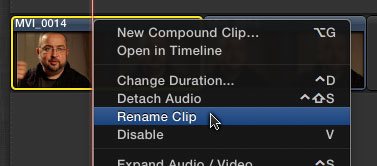
Each instance was then renamed. The first using Control- or Right-click to show the contextual menu for the clip:

Read More

The new version of Final Cut Pro X has some new commands. Some have new keyboard shortcut defaults. Others are available as commands which don’t have associated menu items or keyboard shortcuts. You can use these commands by adding your own keyboard shortcuts using the Final Cut Pro X > Commands > Customize command.

New commands with keyboard shortcuts

Show or hide the Event Viewer – Command-Control-3

Make Event Viewer active – Option-Command-3

Clear the selected ranges – Option-X

Move directly to next title text item – Option-tab

Move directly to previous title text item – Shift-Option-Tab

Set additional range selection start point – Command-Shift-I

Set additional range selection end point – Command-Shift-O

Insert freeze frame at playhead if it is in the timeline – Option-F

Read More