My contribution to this week’s Free Effect Friday is a new kind of plugin – a transition that can be applied to more than two clips at once.

Alex4D Inset Transition is a special kind of title that has no text. Titles with no text are adjustment layers – when connected to a storyline, they effect all the layers below.

In this case the plugin animates a pair of shutters closing to hid the storyline below and then reopening. Here it is connected to the primary storyline so that it covers three clips:

on-timeline-close-open-1

timeline-1

When using the Close then Open option, you must make sure the Alex4D Inset Transition layer is centred over the edit between the two clips you want to transition between.

Here is a video showing most of its features:

As this plugin is implemented as a title effect, if you make changes to the clips it is applied to, you might have to adjust the duration and timing of the title to make the transition work. This extra work is the price for extra timing flexibility and flexibility in the number of clips the transition can be applied to.

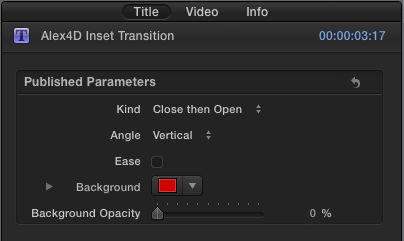
Here are the controls:

controls-2

Read More

In April 2011 Apple surprised the world of post production when they showed a sneak peek of Final Cut Pro X at the NAB Supermeet. It was obvious that the next version of Final Cut Pro after version 7 was going to be a completely rewritten application – thowing out all previous code and many of the concepts that had worked well for Apple over the previous 12 years.

iMovie Pro?

When Final Cut Pro X was launched in June 2011, there were many shocks in store which included an inability to open previous projects, no tracks, many missing features, strange colour correction tools, no ‘source monitor’ and hardly any connectivity with other post apps. After looking at screenshots – which seemed to show much less complexity in the UI, much less congurability and clips that looked like friendly rounded corner tiles – many people dubbed Final Cut Pro X as iMovie Pro.

Although Final Cut was launched with updates for Motion and Compressor, many pros were left in limbo when it came to how to interpret what this change in direction meant.

Was Apple still interested in people using their software to produce broadcast TV and feature films? Had they conceded that market to Avid and Adobe? Did it show that Apple was going to be happy with prosumers. The huge market of talented people with small businesses who sometime might need a very easy to use but capable video editing software, but not for those that support themselves primarily by editing videos, TV shows and feature films.

As 2011 went on, there were few clues from Apple. However much Apple used the word ‘professional’ when promoting Final Cut Pro X, there were many that were unconvinced. How could ‘professionals’ consider an application that doesn’t fit into established workflows? Apple never properly explained the problem they seemed to have with track-based editing.

Eventually Apple broke with convention and previewed some of the features that they were planning in the next major update. The implementation of Multicam turned out to be more powerful and simpler to use than any other editing app. The source viewer wasn’t as full featured as many would like, and the updated XML import and export was a disappointment to many third-party developers.

The rate at which Final Cut has been updated has reduced in 2013, but the fact that they previewed a new Mac Pro in May gave some people hope that Apple were still interested in making hardware for ‘professionals.’

GarageBand Pro?

The launch of Final Cut Pro X also worried the users of Apple’s professional music app: Logic Pro. Many thought that if Apple followed the ‘Final Cut’ strategy with Logic, they would end up with Garageband Pro X: an dumbed down app for prosumers – which would make life easier for people who only need to work on music very once in a while.

An alternative possibility was that Apple would let Logic Pro wither and die – the last major version of the app appeared in July 2009. Was Apple happy with people buying old MacPros, putting them in studio racks and using four year old software?

Logic Pro X and what it might mean for Final Cut Pro X

Last weeks’ Logic Pro update provides us with some  clues about the future of Final Cut Pro. Remember that although features appearing in Logic Pro X may show that Apple aren’t against them in principle, the same features may never appear in Final Cut Pro X.

1. The Final Cut Pro UI is for professionals

Given that the early reviews of Logic Pro X  say that the user interface may have been redesigned, but it still gives users access to all the power that was available in version 9.1.X and more – while being easier to use. Video editors and motion graphics designers will find Logic easier to use.

This clue tells us that as well as supporting prosumers, the ‘Pro X’ apps are designed to be easier to use by post professionals who don’t spend all their time editing video (Final Cut) or making music (Logic). Perhaps Apple doesn’t believe in making apps hard to use so that only established pros in a discipline will want to use them.

However Apple still needs to show how not having track-based video editing provides so many advantages that it makes sense for editors who have trained how to edit over the last 25 years to learn a new editing metaphor (I wrote a post on this last year: Final Cut Pro X: Apple’s bet against track-based editing)

old-UI-vs-new-UI

Read More

Here’s another in my ‘a4d’ plugin series. This series is about making Apple Motion 5 features available in Final Cut Pro X.

The Light Rays a4d effect adds a smearing effect to video clips, stills and generators so they look as if a light is being shone from behind them.

Here is an example of what it can do

result-1

Here are the settings:

controls

Read More

Apple have updated their music creation software. Today marks the launch of Logic Pro X.

Logic-Pro-X

Here’s the news for Final Cut Pro X users:

You can import Final Cut Pro X XML files into Logic Pro.

Use of XML to import Final Cut Pro sequences into Logic Pro allows you to exchange multiple audio tracks, with all positional region information, region names, and volume and pan automation data retained.

You can choose whether to keep the sample rates of the audio as they are in your Final Cut Pro project or have Logic Pro X convert them to a single sample rate.

You can export Logic Pro X projects as Final Cut Pro X XML files for import into Final Cut.

Software instrument tracks are always bounced to audio files. MIDI tracks are ignored. Bouncing will automatically switch to real-time mode, if necessary (such as when an I/O or External Instrument plug-in is used).

You can also choose whether you include the video that’s in Logic Pro X in the XML file. The Logic X project can also be exported so that it appears as a compound clip in an event as well as a Final Cut Pro X project.

You can see Final Cut Pro X projects as movies in Logic Pro X’s media browser.

Logic Pro documents will also appear in Final Cut Pro’s media browser so you can use them in Final Cut events and projects.

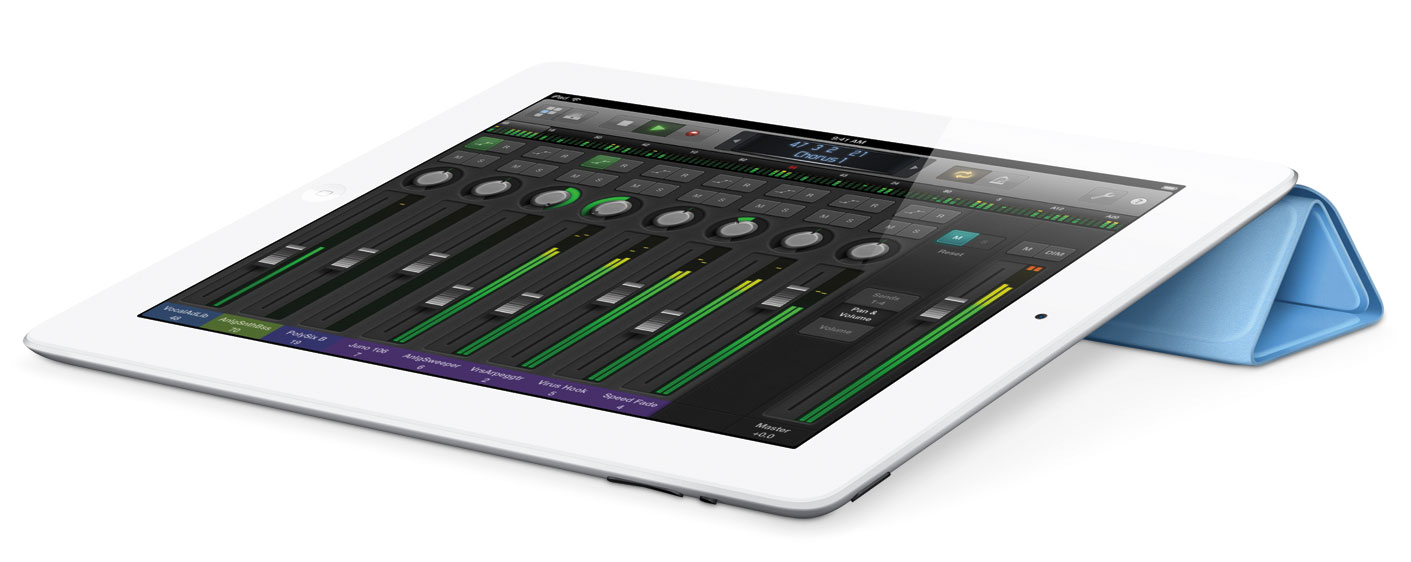
Also announced today was Logic Remote, an application for multitouch control of Logic using an iPad.

Logic-Remote

As well as the faders and mixing desk controls, Logic Remote can also assign any menu command to an on-iPad button.

Read More

In the past couple of years of using Final Cut Pro I’ve had few problems in rendering timelines in Final Cut Pro X, but have seen reports of other people facing this issue.

Yesterday I wanted to compare the speed of an old MacBook Pro with my slightly less old iMac. I set up a  timeline with one title generator and timed them both.

fcpx_progress_to100 Mid-2011 27″ iMac 2.5 GHz Core i7 – 23.5 seconds

Final-Cut-Pro---Background-Tasks-stall Mid-2009 17″ MacBook Pro 2.8 GHz Core Duo – 1 hour 19 minutes 15 seconds

Clearly something was up. Although the iMac has every possible advantage over the MacBook, this kind of difference looks like a bug. The most likely culprit is having a lower powered GPU with not enough memory.

It shows that if you do have access to a faster Mac, it is worth moving a problem project to a higher spec system. The speed difference may be orders of magnitude higher than you expect.

If you don’t have access to a faster computer…

Read More

It’s Friday, it’s time for another free Final Cut Pro X plugin. This one makes the ‘Random Tile’ Apple Motion 5 filter available to editors in Final Cut.

Use the Random Tile a4d effect to select a part of a clip using the on screen control. The plugin  replaces the source clip with many copies of that part of the clip and positioned randomly.

Using this source clip…

random-tile-source

…with the centre moved over Matt Davis’ face produces:

random-tile-default

Read More

Here’s another in my ‘a4d’ plugin series. This series is about making Apple Motion 5 features available in Final Cut Pro X.

The CMYK Halftone a4d effect makes video clips, stills and generators look like they were printed in a magazine or newspaper. In order to simulate a wide range of colours, printing usually uses a combination of four grids of colour – cyan, magenta, yellow and black. This is known as CMYK printing (K denotes black to avoid confusion with the blue of the red, green and blue combinations that are used in screen displays).

Here are four source clips:

source

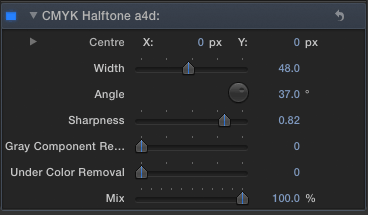
Using the following settings…

settings-1-controls

…you get this result:

settings-1

Here are some more results using different settings: Read More

For many years computer users outside the US have complained about the disparity in hardware and software pricing for international purchases.

In recent years price differences have been less egregious, but for some vendors, it is still much cheaper buy software if you live in the US.

US UK UK price difference Australia Australia
price difference
Creative Cloud US$/year
New $599.40 $736.93 22.94% $576.59 -3.81%
Upgrade $359.88 $429.77 19.42% $345.91 -3.88%
Student $239.88 $249.63 4.06% $172.90 -27.92%
Teams $839.88 $1,028.68 22.48% $807.27 -3.88%
Premiere Pro CC only $239.88 $276.35 15.20% $230.57 -3.88%
Final Cut Pro X $299.99 $314.37 4.79% $288.34 -3.88%
FCPX + 3 year subscription $699.98 $792.26 13.18% $701.63 0.24%

If you search the internet for statements from Adobe justifying these price differences, you get this sort of thing (from an Adobe.com forum):

Local market conditions significantly influence our pricing – these include the costs of doing business in different regions and customer research that assesses the value of the product in the local market…

…the cost of doing business in the rest of the world is higher than in North America. That higher cost is reflected in some of our pricing and would remain no matter how customers chose to purchase. For example, customers will still read about our products through local press to whom we reach out; they will meet local Adobe sales people who conduct seminars, participate in user groups, and visit large customers; and they will rely on support resources that Adobe makes available in these markets. All of these efforts impact the business costs of securing the sale, whether that sale is delivered online or in a box.


Adobe pricing advice

I’ve made over 50 free plug-ins for Final Cut Pro X. If I produce commercial plugins, I’ll need to decide how much to charge for them. Given that Adobe have much a higher market research budget than I do, perhaps I should use that research to calculate any international price differentials. They believe that the UK market will bear a 15-20% increase over the US, who am I to contradict them?

In August 2010 (almost a year before the introduction of Final Cut Pro X) Apple applied for a user interface patent that is relevant to colour correcting video clips. They were awarded patent 8,468,465 today.

Although Apple has chosen a different UI for colour correction in Final Cut Pro, the UI shown in this new patent may turn up in future Apple applications.

Abstract

Some embodiments provide a computer program that provides a graphical user interface (GUI) for controlling an application. The GUI includes a contiguous two-dimensional sliding region for defining several values. The GUI also includes several sliders for moving within the sliding region. Each slider selects one or more values from the several values based on a position of the slider within the sliding region. The selected values are parameters for controlling one or more operations of the application.

Excerpt

2D-sliders_fig_16

Read More