George Blackstone and I made The Things We Do for Love, a documentary on dating and relationships. It is made up of interviews with many people of all ages. A recent task I had was to make a DVD so that the contributors who couldn’t reach a screening would have a chance to see the film. I also planned to put alternative edits and bonus footage on the disc.

As I was putting it together, I realised that it might be better to make all the content I was generating available online. That is the modern way. So instead of building my menu system, I’m uploading the files to Vimeo.

Vimeo is a site where all the content is generated by the people who post it. As well as standard definition video, they host HD (be in 720p24, 720p25 or 720p30). They have an upload quota of 500MB a week. The great thing about this quota is that it encourages you to use it. Those camera tests and technology demos can now be hosted on a free site with minimal advertising.

Videos and pictures that you upload can be grouped into albums, where content on a specific theme can be gathered together. I’ve grouped the videos associated with our documentary in an album called The Things We Do for Love:
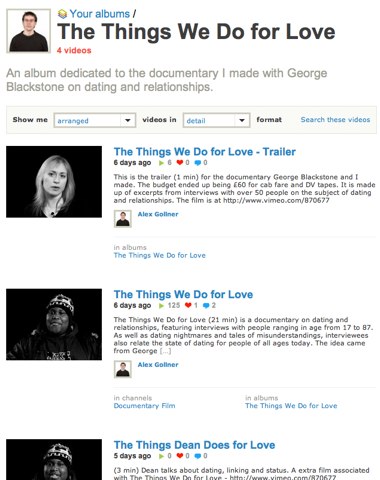
http://www.vimeo.com/album/11274

In the coming days I’ll upload more bonus footage. The videos are smaller than SD for now because Vimeo sees 1024 by 576 PAL widescreen videos as being less than 1280 by 720 HD, so encodes them at a smaller size (for now). We shot at SD and I couldn’t fit a scaled up HD version into my weekly 500MB quota.

Another feature of Vimeo is ‘Channels’ – this is where users curate a channel of videos on a chosen subject. As well as their own videos, they can choose to include other people’s videos. This feature is more about community building – people can post messages that appear on the home page of the channel, and there is an option to include a forum for people to discuss the content of the channel – or anything else they fancy.

Mine is called ‘Our London‘ – it’s a collection of videos featuring London.
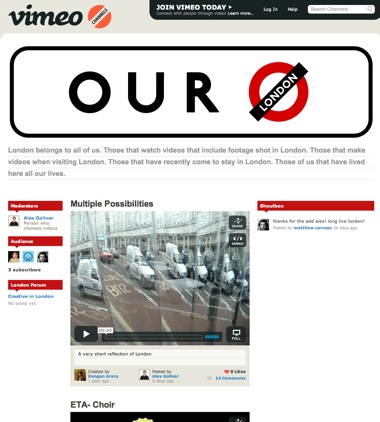
A screenshot showing a channel in Vimeo

I imagine many companies are trying to create the ‘Super YouTube’ – this one will do for me for now.
In an extensive interview at Variety, James Cameron has a lot to say about 3D production, but he also mentions the paper tiger that is 4K resolution for movies:

4K is a concept born in fear. When the studios were looking at converting to digital cinemas, they were afraid of change, and searched for reasons not to do it. One reason they hit upon was that if people were buying HD monitors for the home, with 1080×1920 resolution, and that was virtually the same as the 2K standard being proposed, then why would people go to the cinema?

He suggests that instead of having 4K (a 4096×3112 frame) 24 times a second, it’s better to go for 2K (2048×1536) 48 times a second. This would reduce the motion artifacts seen at 24 fps. ‘Motion artifacts’ most often happen when the camera pans too quickly – a juddering effect when 24 frames every second isn’t enough to show all the detail we would normally see if we turned our heads at the same rate.

[For those of you who are used to 2K being 1920×1080 and 4K being 4096×2160, I’m referring to the resolution of the full 35mm frame, which is cropped down for different aspect ratios when projected. Wikipedia has more on this.]

Artifacts also occur when objects such as cartwheels and hubcaps have detail that rotates at a rate that is close to 24 frames a second – as a picture is taken every 24th of a second and the pattern looks very similar avery 24th of a second, it looks as if the pattern hasn’t moved far and that the wheel is moving very slowly even though the cart or car is moving quickly.

If regular patterns are close the frame rate, you get strobing. The upper wheel is moving three times slower than the lower wheel.

The spokes in the lower wheel are moving so fast that they rotate almost as far the distance between two spokes, which makes it seem as if the spokes are moving backwards. You can see from the broken spoke that the wheel is still moving forwards.

Juddering pans and strobing wheels still occur at 4K. 4K gives us a more accurate representation of these effects. 2K twice as often will reduce these effects a great deal.2K at 48fps is better than 4K at 24fps. Temporal resolution is more important than visual resolution. This is why interlacing has survived into the digital era – those who want to show sport insisted in rates of 50 or 60 frames per second for their broadcasts. Due to bandwidth limitations, the would rather have half the vertical resolution (1920 by 540) twice as often.

Another advantage is the data rate for storing and communicating the footage would be less: 24 times 4096×3112 is 306 million pixels per second whereas 48 times 2048×1536 is 151 million pixels per second.

Cinema owners may have to let go of beating in-home systems using visual technology, they’ll have to concentrate on the architectural and social elements of a big night out at the movies.

If 2K at 48fps is adopted the post process will need to produce content that can be generated at both frame rates. 24fps has been a standard for so long that it will take years for projectors around the world to be replaced with digital projectors. As it costs $1,500 to produce a film print at 24fps, the sum will almost double for 48fps. With reel breaks happening twice as often, film projection at 48 fps isn’t worth the benefits of providing extra temporal resolution.

This isn’t that much of a big deal for editors. If we treat the extra frames per second in the same way we (used to) deal with interlaced footage, there shouldn’t be too much of a problem. Timecode can stay the same. We’ll stick to making edits only on 24ths of a second. If a 48fps movie is being mastered, it’ll get a bonus frame at the end of each shot. We’ll probably edit away at 24fps for now. Once the edits have been agreed on, we’ll be able to watch at 48fps to see if any moments added at the end of a shot are undesirable. We can then move the edit back a 24th of a second if need be.

It won’t take too much effort for Avid, Apple and Sony to add features to enable 24/48 fps workflows in their software. The sooner they do, the better the fidelity of the movies we make.

Yesterday I wrote a post about how making your movie 3D affects the post-production process. Although 3D has been around for decades, the technology might soon be available to many more people.

We expect that one day all media will have some sort of 3D element. This technology seems to follow on in the chain of movie realism. We started with hand-cranked cameras: action on screen was hardly ever shown at a natural speed; clockwork motors were added for consistency. Then sound and colour were introduced. 100 years ago people knew that movies weren’t reality – they suspended their disbelief. For those that thought there was a future in cinema, they expected sound and colour to be added some time in the future.

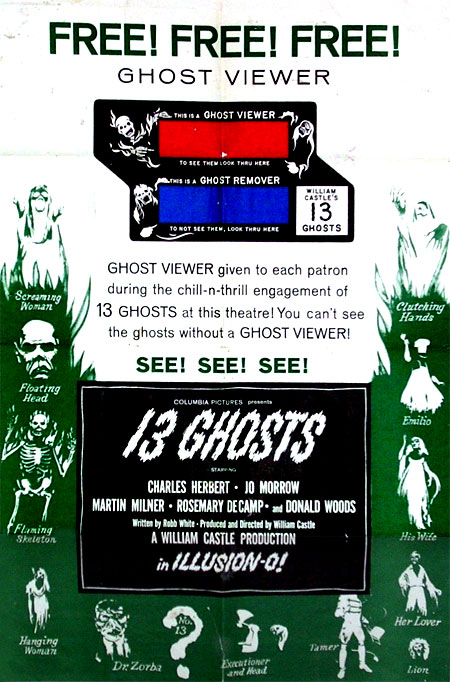
A poster promoting one of William Castle\'s movie gimmicks

In the 1950s the movie industry started feeling the competition from television. Enterprising producers started adding gimmicks that were hard to implement at home on TV. Widescreen formats became very popular in the 1950s, as did 3D.

It seems that the internet is the new competition to cinema. Film studios are starting to engage in an arms race of movie experience. If home viewers have access to screens showing movies at a resolution of 1920 by 1080 (2K) , cinemas will have screens with a resolutions between 4096×3112 (4K) and 10000×7000 (IMAX). If we have six speakers at home, cinemas will have speakers all along the walls.

The difference in the battle this time is that when people hear about great picture and sound and gimmicks such as 3D, they want to hear how it would work for them at home on their computer and TV. They aren’t so much into experiences that they can’t replicate where and when they want. We now expect technology to take the idea of the special occasion of going to the movies and make it everyday by giving us control. I imagine that if we could fit a collapsable rollercoaster into a backpack for easy erection anywhere we happen to be, we would forego the special occasion of going to a heavily branded theme park. We want special things in our lives, but can they be special if we have too much control over them?

That means we want 3D for our TVs, computers, phones, in-car instrumentation and product packaging. “It makes things more realistic” is the argument. It seems to make sense that one day, we won’t have 2D screens, just 3D projection everywhere: such as that employed by R2D2 in Star Wars.

Unfortunately, there comes a point when the benefit of the gimmick gets in the way of telling the story. If the way you tell the story becomes more important than the story told, then people might care a lot less about what you’re trying to say. If people are waiting for the next amazing special effect, huge sound, vibration in their seat or large 3D object seeming to poke them in the eye, they’ll be paying a lot less attention to the characters and the message. Some films are about the spectacle – the amazing effects, the original way of butchering a young woman, a breathtaking car chase. Better films may have spectacle, but they also have some thematic element that makes them last in the mind and heart. The Matrix may have introduced rarely-seen special effects, but people returned to the film because of the central concept and of the theme: ‘Is freedom possible?’ In Crouching Tiger, Hidden Dragon there are some exciting fights and stunts, but they are more exciting because sometimes you don’t know who you want to win the fight – you are on both sides at the same time.

Successful gimmicks are the ones that might get an audience to go and see a film – movie stars can be included in this category, but they don’t usually get in the way of the story. Some people may have gone to see Braveheart if Mel Gibson hadn’t starred in it, but he ‘opened’ the film. After that, it was the story and the theme that kept people coming back.

That means there are two possibilities for the future of stereoscopic 3D images on 2D screens: it is a fad that will fade away as battles between cinemas and the home move on to new fronts, or it will become so normal in film-making that people will hardly notice it any more.

Yesterday, the Hollywood Reporter announced that Avid are researching ways to making their products work with 3D footage. I would characterise the kind of footage they mean as being ‘2.5D’ – two cameras shoot simultaneously from slightly different positions to simulate human stereoscopic vision.

The article refers to the ‘Over and under’ 3D technique. In the days of film, that meant that each frame of celluloid had two slightly different images – anamorphically squeezed so one appeared above the other. These days it probably means that each moment in time is represented by two pictures in a single file, i.e. at 01:04:25:16 in the media file there are two images – one for the left eye, one for the right.

Avid’s current plan is for editors to edit away in 2D – only displaying what one of the two ‘eyes’ would see in the scene. Every once in a while, they could choose a special command that lets them review the cut in 3D.

Editing 3D will only become mainstream once the price of the camera systems come down. The Fusion system uses two Sony F950s (so that’s over $230,000 just for the cameras). There is a system that 21st Century 3D have developed, but it isn’t for sale. They’re going the Panavision way and only making their technology available via hire – with mandatory employment of their staff to go along with the kit. They’ve taken a couple of Panasonic HVX100 SD cameras, synced them together, added 4:4:4 direct to storage recording and combined them in one 24lb package:
3D camera only available for hire from 21st Century 3D

Funnily enough, they also require that they are in on the editing of your production too. From their FAQ:

…there is more to the editing process than just matching all your cuts. It is also important to note that our 3DVX3 camera system records RAW CCD data that must be converted by 21st Century 3D in order to be edited in standard NLE software. 21st Century 3D does work with our clients who want to edit their own videos by providing 2D window dubs that you can edit. Send us your Final Cut Pro project file, an EDL or the window dub edit and we will conform your 3D show.

Can someone from 21st Century 3D come to my office and show me how to edit 3D videos?

Unfortunately no. 21st Century 3D utilizes techniques that are in some cases proprietary and have been developed over the course of years.

I suppose you could do it with multicam mode when editing, place the sequence in a 48p sequence to view in 3D using a fxplug scripted plug-in.

I’m surprised that companies such as 21st Century 3D think that it is possible to keep post-production secrets. I doesn’t sound like too much of a challenge to me, but maybe I haven’t thought it through. I wonder if the aesthetics of editing 3D can also be kept secret too. People thought that editing with the Cinemascope 1:2.35 required a new visual language.

21st Century 3D believe that the best results come from having a large depth of field. They want to give the audience the choice of what to focus on. I think that cinematographers and editors have spent the last 100 years using depth of field and focus to direct the audience’s view. We should have a good idea of which part of the frame they are looking at. That determines the timing of the next shot – we need to know how long it takes for the audience to notice the edit and then search the new shot to find the most interesting thing to look at before we let new information be conveyed (a person’s expression changes, a bomb starts ticking). If we still can use framing, composition, sound, a shallow depth of field and focus to direct the audience’s eyes, we may need to take account of how much longer it takes for people to find what we want them to look at if they are looking at 3D footage.

What else determines how we’ll be editing 3D footage?

This may be old news to you, but as I’ve only just heard, here it is: To make YouTube content work on non Flash-based devices (AppleTV, iPhone), recent videos are available in higher-quality, non Flash versions.

To view higher quality MP4 (H.264) versions of videos, add ‘&fmt=18’ to the end of the address. You’ll see a big difference between

http://www.youtube.com/watch?v=ImyTzI7OSHM

and

http://www.youtube.com/watch?v=ImyTzI7OSHM&fmt=18

The audio is also better. The quality will only be better if the originally submitted file was better quality than standard size.

If you are running Safari, you can download the Flash and MP4 files from sites that don’t provide download links:

1. Before you go to a page with a Flash or MP4 video player on it, open the ‘Activity’ window using the Window menu.
2. Go to the video player page and carefully watch the list of items being loaded by looking at the list in the Activity window. You’ll see the Status of each item. Most will load quickly – they’ll show a file size of anything from a few bytes to a few K for the images.
3. Find the item associated with the video you want to download. The status for the video item will take longer to appear. The ‘Address’ of the item will be a long line of gobbledegook, but the status will show values such as ‘2.6 of 3.2 MB’ as the video is loaded into the player.
4. If you double-click this item, Safari will either download the video (check the Downloads window), or it will open a new window containing a load of garbled text. If a new window opens, wait for it to finish loading and then choose ‘Save As…’ from the file menu and save the file – without the suggested extra .txt suffix.

This works on the Mac version of Safari, but I haven’t tried it on a PC yet.

Over at Norman Hollyn-Wood, Norman wrote about how directors aren’t usually the right people to edit their films. Scenes aren’t usually the problem. It’s structure.

If you write, shoot and direct your film, you sometimes cannot keep the version of the film in your head that actually exists. You remember what you planned. You remember the versions you liked, the versions that the studio liked. You want to believe what you hoped for is there on screen.

The one time that I saw Robert Rodriguez’s “Once Upon a Time in Mexico,” I couldn’t understand what was going on. I remember repeated quick-fire exposition scenes. The plot seemed complex, and I’m usually the one that friends turn to to explain what was going on. Rodriguez may know how to edit a scene, but he was too close to the film to make the structure work. I think he thinks that there are scenes in the film that the rest of us never saw. He can understand the plot because he wrote the backstory and many unused scenes. I didn’t have access to any of that.

The editor is the one who’s job it is to keep track of all that. It is their skill to watch the film each time as if it is the first. The problem is education. If you think that teach people how to edit scenes is hard, just think about trying to teach people how to maintain the structure of whole films.

There are some director-editors who can watch their films as if it were the first time. I think Kevin Smith is a good editor for structure. That comes from his writing ability. He is a writer first, an editor second, and a director third. Not a bad order for the genres in which he works.

Scott Simmons has tackled the subject of the lack of post-production knowledge in up-and-coming editors in an article at studiodaily. It is couched in terms of ‘What’s wrong with the young FCP editor’ because ‘the young FCP editor’ is the current definition of the next generation of editors.

He enumerates the many technical failings of editors he has been coming across recently. There has been a lively debate in the comments section on that same page. I think the answer to his point is nothing to do with editing or technology. I think that the more people enter a field of endeavour, the more likely you will come up against the different natures of the way people approach problems.

I know it was some U.S. politician who came up with the following, but it makes sense nonetheless: it is the distinction between ‘known unknowns’ and ‘unknown unknowns.’ Some people find out the minimum required to get the job done. Others understand the wider context and have a framework in which to place new knowledge. The first people to attempt to learn how to edit/shoot/write/fix cars/do DIY are those who put the time in and understand to some extent the magnitude of the job that they are taking on. As tools are developed to make the job easier for more people to have a go, the second group get involved.

All the lack of knowledge that Scott was pointing out was in the technical aspects of editing. I argue that technology isn’t editing. Technology is for assistant editors. These days budget restrictions mean that editors don’t get the opportunity to be assisted as much as they used to, but I think that editors should know when they are assisting the edit and when they are editing.

My current definition of assistant editor is the person who creates the environment in which the editor can edit. Why should today’s editors learn new technologies in the coming years? If they are well assisted, the environment in which they edit may be implemented in a different manner, that isn’t the business of the editor. They need to find people they trust to work with. They can concentrate on evolving the art of the edit, not on the evolution of technology.

So, in this case I think Scott is talking about new editors who can produce programmes on tape, disc or online that may seem well edited to audiences, but those who have a deep understanding of the post-production process know that the technical knowledge was weak. They need to be assistant editors as well as be editors. Hopefully, once their artistry matters more than the technological understanding, they’ll be able to forget about keeping up with technology and trade their storytelling knowledge with the next generation of assistant editors.

Avid have finally done what many have suggested: simplify the range and reduce prices. Composer is now $2,495. Xpress is discontinued. $495 to upgrade to Media Composer. If I can work on Xpress at home and Composer on jobs, why would I want to upgrade?

This is Avid attempting to set the agenda for NAB. Will it be enough?

I’ve been doing more playing with the SmoothCam effect in Final Cut:

What SmoothCam does:


Click to see this at 720p

It moves and rotates your source video to smooth a shot. It doesn’t make a shot look like it has been shot on a locked off tripod, it takes large translation, rotation and scale moves and smooths the movements.

As you usually don’t want the edges of your video to be seen when it is smoothed, it gives you the option of scaling your video up so that you don’t see past the edge of the video. That means you should make sure you shoot progressive, and frame to allow for what SmoothCam will do. As some HD video is delivered in 720p format, you can scale up your 1080p video by 50% without any loss in resolution.

The following video shows what is produced if your shutter speed is too low. If you shoot at 25p and your shutter speed in 1/50th, the motion blurs look like distortions:


Click to see this at 720p

So use a higher shutter speed that you would normally.

You can also smooth a (very long) series of stills too:


Click to see this at 720p