In which I suggest that making it easy for everyone to show movies and TV shows to various-sized audiences would revolutionise media.

In these days of democratic production and distribution through digital technology, it’s about time we had a look at the exhibition side of things.

In the UK there has been some support for indie film distribution through the Film Council’s Digital Screen Network. They’ve fitted out over 230 screens around the country with digital projectors. This means microbudget films could even be released on DVD to many cinemas around the UK.

How about adding a few thousand more screens to the programme?

I suggest it would be a good idea for the UK government to combine two aspects of movie exhibition to make it simpler for anyone to create a cinema:

1. Some sort of open-source digital rights management scheme, so that content owners wouldn’t be worried about making their work available for exhibition. This would include automatic payment for rights holders by exhibitors.

2. A one-stop licensing scheme so that amateurs can arrange to pay rights-holders, public liability insurance, get permission from local authorities (and whoever else needs to get involved) for a single price.

Maybe by 2011, movies will premiere all over the country on all sorts of screens.

Any person with a room and projector could simply create a permanent or one-off cinema for whatever content they wanted. Licence prices could be banded so that the economics was straightforward based on audience size.

Films could be made available at different screen resolutions. SD for up to 40 people, 2K for larger audiences. Most TV shows would be cheaper to show, unless you want to show the HD version with surround sound. People would then be able to promote screenings, knowing how many people they need to get to watch. You could set up a season of obscure films or have a weekend party based around watching 23 episodes of your favourite TV show (leading up to a final 24th episode).

Indie and short film makers might get their films shown as part of creative double bills. Once this form of distribution becomes common, producers will be able to calculate how many licences at which price points they’ll need to sell to justify producing an idea in the first place.

The easier it is for movies to find audiences, the better it is for the film industry.

Here’s a link to a previous post on charging for content based on screen size, which implies the size of the audience.

In which I suggest a feature for Apple’s Final Cut – a way to create and edit multiclips (clips that can be switched as live between different camera angles).

Here’s another idea for a future version of Final Cut. To make multiclips a lot more flexible, imagine being able to use any (single codec) sequence as the source of the multiclip in any other sequence.

Shooting productions in order to prepare for multiclip editing is a little unforgiving. If sequences can be switched like multiclips, shows with timecode problems could be set up in sequences like this:

Footage from four cameras in a sequence

You can see here that cameras 1, 2 and 3 were started and stopped during the performance. Camera 4 had a sync problem, which was fixed by delaying the audio 9 frames.

Imagine if you could view this sequence as a multiclip. Instead of video layers, you would have video angles. Audio channels would move to be associated with their specific video angle:

A sequence in multiclip mode

All the angles would remain editable as tracks – you could change filter settings, clip positions and keyframes. The extra rows at the top of the display would give you the option to blade to cut between angles, choose which angle to switch to, roll to reposition cuts, add transitions to video and audio edits (but probably not ripple, slip and slide. You could make those kind of changes in the rows in the lower part of the window). You could treat the area as a preview of how the multiclip will appear if it was added to a ‘parent sequence.’

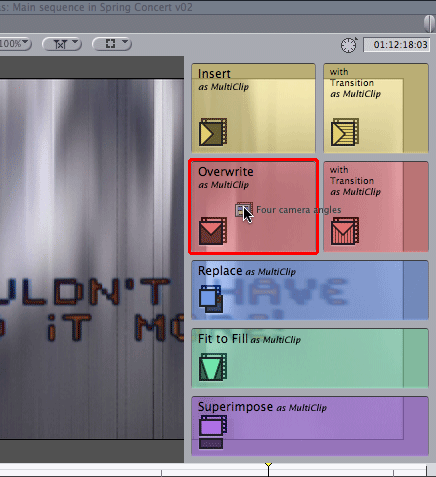
Once you are happy with the sequence, you could then add it as a multiclip to a parent sequence by holding down a modifier key as you drag to the canvas:

Dragging a sequence to the canvas as a multiclip

Once the multiclip is on the parent timeline, it would be editable in the same way as it is today.

In which I suggest that Apple could use their expertise in creating an App Store for the iPhone and iPod Touch to create a store for post-production professionals.

Now is the time to start guessing about the new features Apple might introduce in the ProApps that will make up Final Cut Studio 3. Most people are guessing that new versions of Final Cut Pro, Soundtrack Pro, Motion and DVD Studio Pro will be launched around the same time as the next version of Mac OS X. Snow Leopard is expected to be announced at Apple’s Worldwide Developer conference in May, with availability in June.

Some people say that Apple have had more and more problems dealing with Final Cut’s aging codebase. Fixing faults that have been around for years has proved too costly, however much they get in the way of long-time users. For example it is possible that Apple wanted to add draggable markers in the timeline, but implementing them caused too many bugs and unpredictable effects elsewhere in the application. It was probably easier to add features such as multicam.

This means that it might be that the best Apple could do with Final Cut would be to rewrite the whole application to fit better with the technology of 2009. It would probably take a few programmer-years to rewrite it all with no new big features. Experienced users would upgrade if all those little niggles were fixed, but Apple Marketing would have a problem with the ‘All new Final Cut Pro 7: Now works like it should have done for the last few years. Part of the new Final Cut Studio 3. Upgrade for only $499.’

Faithful Studio users are starting to request new features for their favourite apps, but it is likely that the feature list was frozen a little before Studio 2 was announced.

So, what would I add to Final Cut Studio 3? A built-in store for Final Cut Pro, LiveType, Motion, DVD Studio Pro, Compressor, Color, Soundtrack Pro, Aperture, Shake, Logic Pro, and MainStage.

Imagine having access to extra software and help from directly inside Apple ProApps. The Apple ProApps Store could also provide instant download access to plugins for Final Cut, Soundtrack, Motion, Compressor, Color, Aperture, Shake, Logic Pro and MainStage.

The economics of the App Store for the iPhone has changed the way people expect to be charged for their tools. Instead of buying large collections of royalty-free content, people could download just the parts they need. This would apply to clip video, livefonts, sound effects, music loops, and templates.

This would give people direct access to extra tools and help. This would also give tool makers access to a large community of users. As a Final Cut plugin creator, I would gladly give up 30% of my fees for Apple to handle distribution and billing for my software. They could even associate my plugins with specific serial numbers of Final Cut Pro and Motion. I could also provide free plugins, tutorials, footage and fonts to those who want them.

The Apple ProApps Store could also give access to freelancers who could provide personal tutorials, instant help and workflow consultancy. Sound designers, motion graphics professionals, typographers and programmers could make themselves available for commissioned work. Not many editors have created a professional environment for colour correction. Via the ProApps Store, freelance Apple Color graders could even colour correct a few representative frames from a series of shots in a difficult scene.

The Store could also provide a special search facilities that index external forums that might provide help when things go wrong or ideas when inspiration fails us.

Access to the store could be arranged through the Help system of each application. Version 1 could use a special version of the iTunes application. That would make the software engineering relatively simple given the huge effect this would have on the ProApps community.

If there was an Apple ProApps Store, what would you provide on it?

In which I suggest a very small user interface change to add a feature to Final Cut that editors have been requesting for many years.

I know… an idea that has been around for at least 10 years. However there are two parts to any feature request: the idea and how integrate it into the application. Many Apple and Avid competitors can add better features to their software. The trick is to come up with the user interface.

Final Cut has had markers on the timeline since the beginning (markers are the equivalent of Avid Locators). Clips can also have markers. I assume the request to make single and multiple markers movable using the mouse or keyboard has been around since before Final Cut Pro 1.0 came out.

The secret aspect of software development is that Apple and Avid know perfectly well the features than the majority of users would like. They need to weigh up which it is worth spending the money on implementing. We can only assume that when Final Cut was being designed in 1996 and 1997, a software implementation decision for the Timeline window was made that meant that it would be expensive to add a ‘move markers’ feature.

This means that adding an “option-click a marker and shift-clicking another marker before dragging” user interface is probably too hard to implement without causing too many other problems.

Most people guess that Final Cut 7 will probably be a completely re-written version (to get rid of all the bugfix and implementation workarounds of the last decade and for OS X Snow Leopard compatibility). However, how could you add moveable markers to Final Cut without having to change too much in the user interface?

If we go back to why we’d want to move markers, we usually need to move them to reflect edits. If a scene is shorter or longer, we want the markers further along the timeline to change too.

We can do this my having the option to make clip markers also act as sequence markers.

You do this by adding a check box in a dialog box…
clip-sequence-marker

and a different graphic to show in the ruler:
clip-sequence-marker-on-tim

The advantage of this method is that the sequence markers will then be updated to reflect any changes to the clips in the timeline.

In which I provide some feedback to the UK government on their Digital Britain report: a place to build and democratise access to the internet.

From ‘two birds with one stone’ part of my brain, I’ve come up with an idea for the government that will head off complaints that Post Offices are being closed all over the country and get rural areas connected to the rest of the world.

Lord Carter, the UK Government minister for Communications, Technology and Broadcasting recently presented the interim version of his “Digital Britain” report. He talked about it this morning. Here’s the blurb on what he has to say:

In his first major speech since the publication of the interim “Digital Britain” report, Lord Carter outlines how he believes industry and government can work together to put the UK at the forefront of the global digital economy. Lord Carter discusses the implications and recommendations of the report, and focus in particular on how to deliver the infrastructure for next generation networks and universal access to broadband.

You should have a listen, it’s great to hear how informal, yet informed a member of government minster can be.

The headline summaries of the report usually mentioned his suggestion that it would be a good idea of everyone in the UK to access to at least 2Mbps broadband connections in the next few years. Most people think that this is woefully unambitious.

My idea is to create an intermediate sort of nation-wide access until the infrastructure can reach every home: a Digital Village Hall for every community in the country. Imagine a small building with a large room and a few meeting rooms where local people will be able to share a 2Gbps connection to the rest of the world. This would be where the community would meet, be educated, where retired people could care for toddlers, where people would get access to government (post office-type) services.

It is a great deal easier keeping a single link to well set-up computers in a single location than dealing with sorting out access for hundreds of households.

The large room could be used to link communities together via conferencing technology during the day, or as a place for youth groups to meet in the evening. Smaller rooms could be used by people needing private access to the net, or for digitally connected meetings. Corporations who value employees with a good work-life balance would benefit from an intermittently connected workforce.

Imagine what a single very fast connection, three or four well-trained members of staff and the correct good value equipment in a few rooms would be able to do to keep children, freelancers, home workers, retired people connected and involved with the rest of the country and the world! I think that older people would be much more confident on dealing with the government through the web if they were led through it by a considerate human being.

Remember that Village Hall is a kind of branding, there’s no reason why these Halls couldn’t be set up throughout urban Britain too. It will also make sure that people still leave their homes and get out to meet other members of their ‘village’, wherever it is in the UK.

The Digital Village Hall is the place to introduce us all to the future of the internet and Digital Government.

After Larry Jordan’s London show a few punters stayed at the bar. We wondered whether some of the attendees there might want to stay in touch. We could support each other using similar Q&A sessions as we had today. Digitally, as well as meeting up in pubs and bars. If you’re interested follow me on Twitter and send a message using #ukeditors as the hashtag.

If you aren’t on Twitter and find all the noise about it a little irritating, read my posts on Twitter – ‘anti’, ‘check it out without signing up’ and ‘why Twitter’ for my take on it.

If you are new to Twitter and looking for editors and post people to follow, check out the people posting using the #editingandpost tag. If their posts interest you, follow them.

Following on from Larry Jordan‘s intense, cool and informative Final Cut PowerUp tutorial event in London, the question came up: which version of Final Cut works best with which versions of QuickTime and OS X?

Larry gave the most important advice: If your system is working fine do not upgrade until you need a specific new feature.

Here’s a link to a blog post with a table showing which version works best with which version… It might be a year old, but it should help the majority of people out there.

I’ve had no problems with FCP 6.0.4, QuickTime 7.5.5 on OS X 10.5.4

Comment with your combinations that work well!

In which I transcribe some notes I took at a trade fair about the BBC works with surround sound in their TV productions.

At the Broadcast Video Expo today I heard some useful tidbits from Chris Graver, a dubbing mixer with the BBC. He presented a seminar on 5.1 sound.

– Although you might see multiple speakers along the side walls of some cinemas, the sound usually is still 5.1. The same signal is being sent to most of the speakers.

– The six channels of sound are known as ‘5.1’ because the sixth channel (for low frequency effects) has a tenth of the bandwidth of the first five. L, C, R, Ls and Rs have a frequency range of 20-20,000Hz, LFE has a range of 0-200Hz. This channel isn’t usually included in the stereo downmix

– 5.1 ambience shouldn’t be noticeable enough so that people keep looking over their shoulders – you want them looking at the screen.

Dolby E

– A transportation encoding. Not for consumer use. As some delivery media only have four channels of audio, the first two are for the stereo downmix, 3 and 4 hold an encoded Dolby E soundtrack. This soundtrack delivers the 5.1 channels to the distribution systems of the broadcaster/publisher.

– Dolby E has a 1 frame encoding delay. This means you must advance your Dolby E soundtrack by 1 frame to match picture and the stereo downmix

– Dolby E has a 1 frame decoding delay too, but most decks can be set to account for this delay. A minority of broadcasters requiring Dolby E encoded 5.1 expect it be advanced an extra frame (for a total of two) to sync with picture and stereo

– The BBC and others will fail your programme in tech review if you do not add the metadata tag stating the correct Average Dialogue Level. In worst case scenarios, consumer kit might filter some of the dialogue bandwidth out if it doesn’t know the extents of its range.

– Make sure you use the correct track order before encoding as Dolby E: L, R, C, LFE, Ls, Rs – otherwise you might get your Back Right channel filtered as if it was the LFE channel!

In which I transcribe some notes on how the BBC uses Apple’s Final Cut Studio suite to make TV programmes.

I thought it would only take a day, but tomorrow I’m going back for more!

Trade shows bring out the worst in me. In recent years I’ve learned to do without them. However this time I have a couple of new reasons to go to an exhibition featuring Avid, Sony, Canon, Panasonic et al. demoing software and kit for post-production.

I spent the day at the Broadcast Video Expo here in London. I haven’t been in three years, so was expecting economic considerations to reduce the number of stands and attendees. I was wrong on both counts. The show isn’t huge, but it was big enough to be worth attending, and small enough to look very busy for the number of people there.

Here’s a picture I posted using my iPhone/Twitter/Twitpic/TwitterFon (!):
A busy Broadcast Video Expo 2009

Today was a day of seminars, starting with the BBC on how they use Final Cut Studio for HD workflow. They concentrated on Final Cut Pro’s links with Color. Here are my live tweets from today, with extra notes.

100:1 shooting ratio: Offline at dv res. 100 hrs=1.2Tb
– For documentaries, the shooting ratio ranges from 100:1 to 200:1. That is too much for anything other than DV resolution. 100hrs of DV rushes is only 1.2TB

HDcam not great. Avid worth it if time pressure is high.
– Problems with HDCam tapes. Using Adrenaline/Nitris etc. workflow is fine, but not worth the extra cost unless you have a very tight transmission deadline.

Mouse based colour tools not great. Like control surfaces.
– The Avid colour correction tools they used had to use mouse/keyboard and bright screens. Darker displays and control surfaces are much better

Apple Color is good option. Stable version of Final Touch
– BBC used Final Touch before Apple bought it. Worth the high price, but not reliable. They thought Apple were right not to change anything but improve the reliability. Now any problems are due to operator error, so allow for a couple of extra rendering hours in case something goes wrong overnight.

Use Apple ProRes as equivalent of Avid dnxhd. 6:1 ratio.

Docs need too much storage for uncompressed – can’t delete footage – producers always coming back with changes
– As HD takes so much storage, rushes need to be removed to backup. That is bad news for docs. Producers and directors are always coming back with a couple of little changes every few days. That doesn’t work well with high-end systems.

Apple Color doesn’t roundtrip well. Export full res qt from fcp, grade in color and bring back into fcp.
– Export ProRes QuickTime from Final Cut timeline. Import that QuickTime onto a new video layer in your project. Use the blade tool to slice your movie at each edit point in your timeline. Delete your original clips. Send to Color. Correct in Color. One problem is that you can’t correct Picture-in-picture sequences this way. You need to 3-Way Color Correct these in Final Cut relative to the background picture before you export to QuickTime. Once the grade is ‘over’ export at ProRes QT and return to Final Cut for captioning.

Grade in Color in 20 minute sections
– This is the most stable way to use Color, a figure determined by trial and error and talking to Apple.

Apple Color one flaw for pros: can’t get sound cues. Color is mute

BBC uses Natress Bleach Bypass filter in Apple Color
– There is a built-in Bleach Bypass filter, but Natress’s one is better. They also use Natress’s film effects plugins.

Apple Color can match any high-end system at a fraction of the price – if you have the time.
– The problem is that clients/production people need to understand that Color will seem to be dropping frames. However tricked out the Mac is, it seems to play 90% of the frames per second. You need time because rendering usually takes 6 times real time.

Apple Compressor for standards conversion very slow, but good enough

More soon…