Some editors who have animation experience miss the ability to smoothly control the position, scale and rotation of clips in Final Cut Pro X.

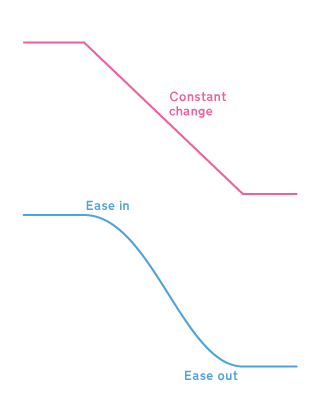
In the natural world objects don’t move at a constant speed, they slowly get moving, speed up and then slow down before stopping. That slow speed up and slow down is called ‘easing in’ to the animation and ‘easing out.’

My Smooth Move effect animates a clip between two states with the option to choose the shape of the curve that is used to animate the parameters.

Read More

This flexible transition can be used to momentarily produce a variety of effects by fading the outgoing clip while showing a background, and fading the incoming clip.

You can control the timing for the point at which the outgoing clip has faded out, the timing for the incoming clip, whether the background is a solid colour, a third clip of your choice or simply the storyline below.

The default settings produce the same effect as Final Cut Pro’s Dip to Color Dissolve:

Read More

While creating my next Motion 5 template for use in Final Cut Pro X, I came across a small problem. I’d rigged various behaviours to a single slider. Sliders default to having two snapshot positions: at 0 and 100.

I wanted to add a snapshot to the slider at exactly 50. You add snapshots to sliders by double-clicking below the slider. You then can position the snapshots by dragging them left and right until they are at the slider position you want.

Unfortunately you can’t drag as precisely as you might like. It helps if you drag the edge of the inspector pane to make it much wider – you get more control that way. Here’s what I ended up with:
Screenshot of a rigged slider showing a snapshot not positioned at exactly 50

Read More

Final Cut Pro X users can make their own PDF version of the online help, but the generated PDF doesn’t have any internal hyperlinks.

Here’s how to make your own copy of the help system that works when you don’t have an internet connection for your Mac, PC or phone.

The advantages of the html version over the PDF version are internal links between sections:

…pop-up boxes to explain terms:

and an operational search system:

Read More

To showcase the template features of Motion 5 and Final Cut Pro X, Apple shipped them with a range of fonts to suit every mood.

There are 28 font families, as some families have more than one variant there are 53 fonts in total. They are built into each app so that they’re are always available if projects include any Motion templates.

Read More

User Interface

In the Final Cut Pro/Contents/Frameworks/LunaKit.framework there is evidence that the window layouts were or will be more flexible than they are in version 10.0:

(Name your current layout:)
_Pro Text Field Cell (Untitled)
_Pro Push Button (Cancel)
_mPro Text Field Cell (Different window layouts can be saved to suit different working environments or styles.)
_Array Controller^Manager Window
_KPro Static Text (Use the current layout as a basis to create a new layout.)

Read More

This is the third in a series of posts about what’s hidden inside Final Cut Pro 10.0.

Inside FCP X there hints of features that have yet to be fully implemented, or have been dropped and never to be made available. There’s no way of knowing which is which, but it’s interesting to get inside and have a look around.

Ever since the case of the first ever Macintosh in 1984 not having any text to describe connectors, Apple have tried to enable internationalisation of hardware and software a priority. That means that most Macintosh applications contain text in multiple foreign languages. This makes software simpler to distribute, but also easier for us to examine.

In bygone days we would have used ResEdit to take a look at application text, dialog boxes and menus. As MacOS X is based on Unix, applications are now stored as specialised directories which can be explored without needing a specialised tool.

Text from Final Cut Pro / Contents /Resources / en.lproj / PELocalizable.strings

More preference panels than we know how to display:

/* PreferenceTabs */
“PEEditingPreferenceName” = “Editing”;
“PEPlaybackPreferenceName” = “Playback”;
“PEImportPreferenceName” = “Import”;
“PEDebugPreferenceName” = “Debug”;
“PEVoiceoverPreferenceName” = “Voiceover”;
“PECacheFilePreferenceName” = “Render”;
“PEStoragePreferenceName” = “Storage”;

So there is a debug mode for Final Cut Pro X.

Read More

On Monday July 11, I tweeted the following:

#fcpx prices in $ UK: $288.94 US: $299.99 Euro zone: $342.35 Denmark: $344.02 Australia: $376.61 Japan: $434.22

Last night Apple changed the price of Final Cut Pro in three of those Mac App Stores. Here’s a slopegraph of the changes:

Slopegraph showing prices in Japan & Australia coming down and the UK going up so that prices are more similar in different parts of the world

The initial price spread was extreme. Japan was oddly expensive, and I’ve never known for any Apple product to be cheaper in the UK than the US.

Did Apple UK tell head office that given the lack of feature parity, sales would be tough? Did Japan say that price doesn’t matter?

What do you think?

Inside version 10.0 of Final Cut Pro X are graphics files not used on screen… yet:

These are large versions of the icons used in Motion’s library:

Perhaps these icons will support a ProApps Store that is built into a future version of Final Cut Pro X and Motion.

Read More