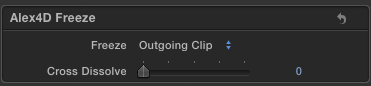
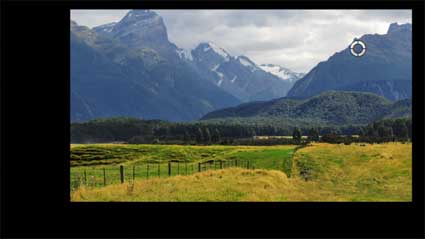
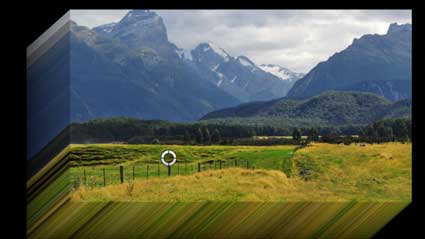
This transition freezes the outgoing clip before showing an incoming clip or shows a freeze frame of an incoming clip or freezes the outgoing clip and then shows a freeze frame of an incoming clip. You can also choose to cross dissolve between the clips.

Here are the controls:

Freeze: Choose between Outgoing Clip, Incoming Clip or Both Clips

Cross Dissolve: 0 – no dissolve i.e. show freeze only, 50 – dissolve for half the duration, 100 – dissolve during the whole transition

Here’s a demo:

Read More

Although Final Cut Pro X has had many updates over the last year, editors still need workarounds to get the same features as they were accustomed to in alternative editing applications, including Final Cut Pro 7.

Sadly the 10.0.5 update changed the way the Timecode generator worked in Motion and Final Cut Pro X. This generator was used to create effects that could show timecode on a clip.

This can be useful when collaborating with other people. Knowing the timecode of specific times in footage can be useful to producers, researchers, transcribers and translators.

Since version 10.0.5, any effects applied to a clip don’t get any timecode information a clip has. This means any effects created in Motion, such as the timecode generator, don’t get that information, so cannot display it.

Until an update fixes this problem, here’s a workaround.

Read More

Following on from a patent for media collaboration for professionals, Apple have recently applied for a couple of video editing patents. Note that I’m not interested in whether such software features should be patentable, I’m interested in what these ideas could mean for future software.

Smart transitions

The first patent is about applications automatically selecting a transition between clips based on content, metadata or ‘sideband data’.

…based on the analysis and/or comparison of adjoining video clips, or adjoining portions of video clips, a transition type may be selected. The transition type may be selected based on rules defined for particular content characteristics, such as motion characteristics, temporal characteristics, or color characteristics, or a combination of content characteristics

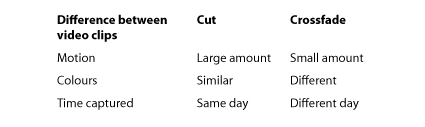
The patent includes some examples showing the choice between a hard cut and a crossfade:

For example, if it is determined that the content of adjoining video clips is temporally proximate (i.e., was captured on the same day), a hard-cut transition may be selected for transitioning between the adjoining video clips. If it is determined that the content of the video clips is temporally distant (i.e., was captured on different days), a crossfade transition may be selected for transitioning between the adjoining video clips. If it is determined that the content of the adjoining video clips contains a high amount of motion, a hard-cut may be selected for transitioning between the adjoining video clips. If it is determined that the content of the adjoining video clips contains a low amount of motion, a crossfade transition may be selected. Moreover, if it determined that the color characteristics of two adjoining video clips are similar, a hard-cut transition may be selected; if the color characteristics are different, a crossfade transition may be selected.

The patent mentions that the rules of which transitions to apply to which video clip combinations can be set using application preferences.

Read More

However much you test software before it is launched, there’s nothing like releasing version 1.0 to reveal many problems you never thought of.

Many applications have a secret ‘debug’ mode which helps software engineers get useful information about how the software is running. This helps track down bugs. In the 90s discovering these modes in popular software was a sport for many power users. These days entering these modes isn’t just a matter of holding down the shift, command and option keys and opening a specific menu. It is more likely that debug modes only work if the Mac you are running the main application is also running a developer helper app. At the least it is a matter of setting a secret preference using a Terminal command.

Even though I don’t know how to get into Final Cut Pro’s debug mode, the text associated with it is built into every copy of the application.

There is a great deal of debug text, most of it making sense only to a few hundred people. However, debug modes can also be a place for Apple to test features that haven’t been fully implemented yet…

It seems that there are many debug settings in a secret debug preference panel. Text from Final Cut Pro.app / Resources / Contents / en.lproj / PEAppDebugPreferencesModule.nib

Debugging text sample:

Highlight Missing Artwork
Enable Performance Monitoring
inspectorDarkAlternatingRowColor
Catalog Settings:
   Discard catalog on launch
   Discard catalog if older

Helium Settings:
   Log Helium Effects to Console
   Log Helium Effects to Dot File (in /var/tmp)
   Log Helium Render Statistics

CPU Cores:

Optical Flow Analyzer:
   OpenCL GPU
   OpenCL CPU
   Non-CL

Color Settings:
   Display the Region Picker

Periodic backup interval (in minutes)

Developer Settings:
   Enable Screen Size Override (next launch)
   Clear User Defaults Stored In Catalog

Display Player Debugging
   Nearest Neighbor Filtering When Scaling to Display

Draw First Field Only

   Draw Both Fields Alternately (use Cmd-> to step by fields)
   Draw Both Fields Interlaced as Single Frame
   Draw Both Fields Interlaced Alternately

Read More

Many editors don’t understand why Apple have abandoned the track-based editing metaphor.

Tracks have been in Mac applications since Macromind VideoWorks in 1985:

videoworks

 Image source: Jamie Fenton

VideoWorks (which evolved into Macromedia Director in the 90s) was an animation application that imported graphic images (into a ‘cast’ window), these images are then placed on a stage in layers. The ‘Score’ showed these numbered layers listed vertically, with animation frames shown horizontally. In the example above, there is nothing shown in layer 3 until frame 8. The current frame is 13, with the graphic in layer 2 selected.

When Avid and Adobe Premiere came along, they had timelines that represented video clips overlaying each other in layers, and this metaphor survives to this day. Here’s an example of how tracks are used in editing today:

The modern rule is that the lowest numbered track is in the background, and video clips in higher numbered layers obscure the layers below. In the example if all the clips were full screen, the final edit would start with the wide shot, followed by Actor A, then B, A, the wide, B, A and back to the wide.

Read More

FCP.co has reported in detail on Apple’s new Methods, systems, and apparatus for collaborative media editing patent:

Methods, systems, and apparatus for collaborative media editing. In one aspect, a method includes presenting, to an originator, an originator interface including multiple media panes; establishing a connection with a collaborator; receiving from the originator a selection indicating an item of media content associated with at least one of the multiple media panes; transmitting to the collaborator the selected item of media content; and enabling inter-user communication relating to the selected item of media content in the originator interface with the collaborator. Further, a connection can be established with a second collaborator, the item of media content can be transmitted to the second collaborator, and communication can occur in the originator interface with the second collaborator.

The ‘method’ (patent parlance) they use as a example in the abstract is shows an editor sending media clips to collaborator A and having a window-based chat session about prospective changes. Collaborator A then goes on to share the task with a new collaborator, B, who gets the footage and who can appear in the chat window of the original editor.

Here’s the picture FCP.co used to illustrate the news:

They pointed out a possible code name for a collaborative media application is included in Apple’s mockup: ‘Light Table.’ In this case the role of the user on the project is ‘Assistant Director,’ the tasks listed are Storyboarding, Acquisition, Organising, Placing Media, Effects, Collaboration and Delivery.

Read More

Included with Motion 5 is an effect that extrudes a clip so that it has a 3-D treatment. Alex4D Extrude makes this effect available in Final Cut Pro X.

Here are the controls:

As Extrude can only draw in the transparent parts of a clip, if the footage fills the clip, you must first apply an effect that adds areas of transparency. In the example above, I added my Alex4D Curve Scale effect that scaled down the clip to 80% of its original size around a control point, adding an area of transparency around the footage:

Alex4D Extrude takes the output of the scaled clip and simulates the effect of many copies of the clip are stacked on top of each other, with the back copy being offset by a distance and angle. You can enter numbers for Extrude Angle and Extrude Distance directly, or drag the on-screen control to set the values:

Read More

If you create effects in Motion 5 for people to use in Final Cut Pro X, there is a gotcha when it comes to the text that appears in the Undo menu command.

Many effects use on-screen-controls. Sometimes these controls are implemented using Motion effects that are applied to layers that are set to have an opacity of zero before being published to Final Cut Pro.

For example, in my Mask+ set of effects, I wanted an on-screen control that set values for position, angle, width and height of my mask. In Motion, the Kaleidotile effect has an on-screen control that sets all these values. My technique is then to apply the Kaleidotile effect to a dummy layer and use Link Parameter behaviours to change the position, angle, width and height of my mask:

You can see from the thumbnail that the ‘Transform controls group’ has an opacity of 0%. It has the Kaleidotile effect applied to it. The ‘Effect Mask’ group has Link Parameter behaviours that link the Kaleidotile parameter values to that of the Scale, Rotation and Position of the group as a whole.

A small problem arises when you publish effects like these in Final Cut Pro X. If you change these values in an instance of your template applied to a clip and go to the Edit menu to undo what you’ve done, Final Cut reports name of the action most recently performed. In this case if you change the on-screen transform controls of the mask, the Undo menu item looks like this:

This also applies if you change on-screen controls in Apple’s Mask effect and go on to undo:

In this case the on-screen control for the Poke effect in Motion 5 has been linked to the co-ordinates that define the top-right position of the four-point mask.

Luckily there is a way of fixing this.

Read More

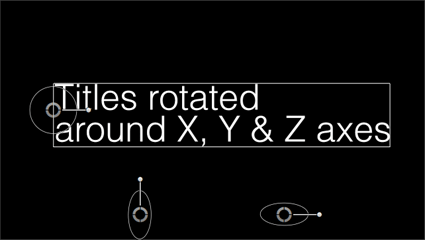
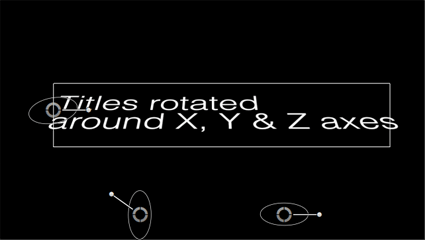
The current version of Final Cut Pro can only rotate clips and other content in one dimension. If you imagine the Z axis as a line that points out of the screen towards the viewer, that is the axis around which objects can be rotated. Alex4D XYZ rotate adds controls for the other two axes.

You can also choose the centre point around which the clip rotates:

In this example, the origin has been moved to line up with the first title character by dragging the centre on-screen control.


Rotated around the Z axis.

Read More

As I’m updating my HDR effect I wanted to create my own luma key effect.

Luma Include makes areas of your clips transparent based the luminance values of the footage. Although you can produce similar effects using the Luma Key effect, the parameters of Luma Include can be keyframed.

The effect defaults to showing all luminance levels: the Upper Limit is 1 and the Lower Limit is 0. Each limit also has a smoothness value.

Here are some two examples of different looks using the effect:

In this case the value of the Upper Limit parameter has been reduced, so the brighter areas of the image have been made transparent (also known as having been ‘keyed out’). Here are the controls:

Read More