So there I was working on someone else’s rig when I noticed all the pretty colours on the timeline. They reminded me of old Final Cut render errors, when it didn’t update the timeline window properly.

I guessed it was to do with using the same footage multiple times in a timeline and wondered why my friend had that option on. I thought you’d only want to use it on film projects. It turned out that he found it useful when making conference videos. If you need to shoot, edit and encode a video in a single day, it is very handy.

You can use it to see if you’ve used the same shot twice by mistake. You can also see if you’ve included all the shots requested for a montage. All good if there’s no time to label every clip clearly.

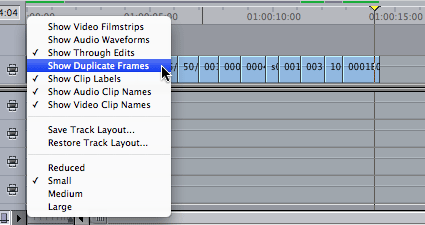
To see which bits of footage are used more than once in your timeline, choose ‘Show Duplicate Frames’ from the Timeline Layout Popup:

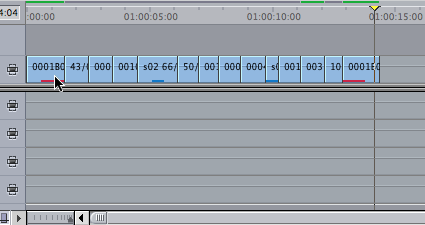
This shows that two bits of footage are used twice in the sequence:

Up to seven colours are used to show dupe frames, if seven clips were used twice you’ll see the eight repeated clip will be marked in red.

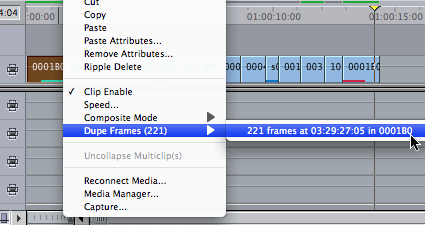
You can also right- or control- click a clip to jump to the point in the timeline the duplicate frames are used:

Choose the Dupe Frames submenu and choose an instance of where the frames are used and you’ll jump to that point in the timeline.

This means you can jump to each instance of a clip you’ve used in a sequence. Quicker than using the Find command in the timeline. Adding some frames of all the clips you want to find to a sequence will quickly show you if any clips you are looking for aren’t in the sequence. In this example, the first and fourth clips don’t have any frames duplicated in the clips pasted on the end of the sequence:

The clips pasted at the end could be the clips chosen for a montage of the earlier clips. In this case two clips would be missing from the montage.

Visit my Final Cut home for more plugins and tips
finalcuthomethumbnail

In a podcast from Creative Screenwriting on The Illusionist, the producers talk about becoming successful as screenwriters before they made The Illusionist. Brian Koppelman and David Levien got their big break with the script of Rounders, the Ed Norton poker movie. It was directed by John Dahl. He told them something interesting: “You can never take back something you’ve said to an actor” – if writers are to be allowed on set, they have to be very careful in talking to actors. Any insights you give them will haunt them until the film is finished. A tentative suggestion of a formative experience for a character may become the only possible way the actor will look at that person’s childhood.

Writers can go on set if they don’t spend their time defending what they wrote. They need to be there to collaborate to make the film better. They get the access they want by not wanting to be the centre of the film making. There’s more during the last five minutes of the podcast on iTunes.

There are some interesting recent podcasts there featuring the writers of The Dark Knight, Juno, Wanted, Choke and Synecdoche, NY.

If you want to use the ‘*’ character to create centred, movie-style closing credits, you cannot use any character with an ASCII value above 127 on the left-hand side of your credit list. If you do, the position of the * is determined incorrectly meaning that the centering doesn’t work, a character vanishes and the * remains.

This due to a bug in the ‘FindString’ fxScript function, the interpreted language that implements the generator.

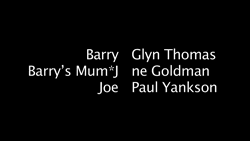
The only likely 8-bit ASCII character you’ll want to use is the possessive closing apostrophe – as in Barry’s Mum*Jane Goldman which produces this result:

If you use
£££££££££££££To the left*To the right
as your text in ‘Scrolling Text’ you get:

If you’ve been having these problems with Scrolling Text, my alternate free plugin might help.

Download Alex4D_scrolling_text_v1.01

Download Alex4D_scrolling_text_v1.01.

Put the ‘Scrolling Text v1.01.fcfcc’ file into

Your Startup HD/Library/Application Support/Final Cut Pro System Support/Plugins

or

Your Startup HD/Users/your name/Library/Preferences/Final Cut Pro User Data/Plugins/

Restart Final Cut, and you’ll see a new generator in the ‘Text’ section of ‘Video Generators’

If you are scripting, if you are using FindString to find a single character, you can use the following routine instead:

on myFindChar(string stringToSearch, string charToFind)
float pos, stringLocation
string chartotest

stringlocation = kUndefined

pos = length(stringToSearch)
repeat while (pos > 0)
pos = pos – 1
CharsOf(stringToSearch, pos, pos+1, chartotest)

if (chartotest == charToFind)
stringLocation = pos
end if
end repeat

return(stringLocation)
End

Which you use with the following snippet:
index = myFindChar(curline, "*")

…which looks in a string named curline for an asterisk and assigns it’s position to the float named index.

Note that my programming is a little rusty, so this script might not be able to deal with every input possibility.

Visit my Final Cut home for more plugins and tips
finalcuthomethumbnail

The Final Cut user interface is still active when in Digital Cinema Desktop Preview mode. That means you can still control Final Cut with directors and producers watching without the distractions of the software getting in the way.

As well as using keyboard shortcuts to control playback, you can also control-click locations on the screen where you know the current timecode is being displayed in order to jump directly to specific markers.

To see the video I used as a sample, visit the mini site it was made for.

Some editors think it best to get a feel for the correct point for the In and Out of each clip while the clip is playing. As it is quicker to release a key than press a key, in Final Cut, the In point is set when you release the ‘I’ key and the Out when you release the ‘O’ key.

Whether the video is playing forwards or backwards (J key or Shift-space), you can set these points without tapping the keys.

Alternatively, you can do the same by holding your mouse down on the Mark In or Mark Out buttons until you are happy.

Again, this is from the manual, but when I last looked at this section, it said tapping I or O was the way to mark in and out.

There are always many filmmaking competitions around. Here are two that caught my eye in the last two days: Apple’s Insomnia Film Festival 24-hour film challenge for students in the USA and The Guardian’s YouTube competition for adults in the UK.

The Apple competition seems to be about two things: associating themselves with cool film and the young, and getting people to register with Apple. High-school and college students are encouraged to register film making teams with Apple. On 9am on November 15th, Apple will post a list of ten required elements for a 3 minute movie. Registered teams will have 24 hours to make and upload their film using at least three of the ten elements (such as a specific location, prop, costume or character name).

The more important part of the competition is the second stage, where teams need to encourage people to watch and rate their film online. You can only vote if you have an Apple ID – the kind of ID you need if you are an Apple developer, or want to talk on Apple support forums, or have an account at the iTunes Store. This condition is to stop fake voting, but will also benefit Apple in getting email and registration details from a whole lot more people.

Logo for the Guardian YouTube competition

The UK competition seems to be more specifically about the way videos on sharing sites might inspire people to create new videos in response to what they have seen.

They have posted an odd short story, and would like entrants to come up with some sort of response to it:

Mum had become deflated again. He couldn’t find the pump so he blew her up himself, red and giddy until she was full. “I need you,” she said. “The air leaves me quicker every day.”

“I know,” he said, but that night he dreamed of a sharp needle in his hand and pressing hard into mum until she burst. Her screaming woke him up. She’d found another puncture. He plastered the wound and slept until lunch.

He was invited to a party that night at Donna’s. Donna was a scatter cushion and nothing special. But her parents were a suite. He wanted to be with them. He looked at the trainers and the sports bags and the lap tops, all moving to the electro clash, and he wanted to be there; but he felt too sofa tonight.

I’ve come up with a response, now all I need to do is make it and post it to the YouTube channel set up for the competition…

Today I presented at what used to be called the AppleExpo here in London. I spent a few minutes telling people about my plugins (links in my Final Cut Pro page) as part of MacVideo Live.

Jonathan Harrison gave a presentation on interview lighting that reminded me of a principle useful in editing and post production as well as lighting, camera and shot setup:

Three things attract the viewers attention in a given shot:
1. The thing that is moving
2. The brightest thing
3. The sharpest thing

Of course the DoP suggests that getting this right in front of the camera is best, but videographers, compositors and editors don’t always have the luxury of perfectly captured footage. At least we have the software technology to control what is seen to be moving, how bright parts of the frame are and what objects are in focus and which are out of focus (Once we know where the audience is looking, there is no need to worry about continuity where the audience isn’t looking).

Use these tools to direct the view of the audience without them knowing. We need to use the tools of visual storytelling to help the people we are telling our tales to forget they are being told a story.

After weeks of fund-raising producers do well to get all the money together to make their short films. There are so many little expenses that mount up. No day arrives without an invoice from some unexpected place. Suddenly the shoot starts, and everyone works for 24 hours a day until all the footage is in the can. In the following weeks producers work with directors and editors to get a rough cut…

Then a new set of problems arise. The film cannot be submitted to festivals unless it is finished. What about those effects that can’t be done on the editor’s home rig? Does anyone have a £8,000 grading-quality broadcast monitor and the grading suite with the 50% grey walls and expensive kit to do the grading in. How about doing a proper audio mix? What about doing a film out to 35mm?

If you’ve run out of funds, maybe the UK Film Council Short Film Completion Fund may be able to help. They take submissions from film makers who have got to the rough cut stage. Many producers have problems raising the next thousands of pounds to get the film to a releasable stage. The Completion fund has been set up to get them over that hurdle.

Twice a year the call goes out to producers who need that extra help. Each round up to seven shorts are supported. The current deadline is January 5th 2009. To find out more, go to The UK Film Council (the web page shows the wrong date for the deadline for applications).

The fund is administered MayaVision International, a TV documentary production company. It must be a tough call on which films to support. They need to assess the potential of the film based on the rough cut and the people who want to finish it. Is the film any good, and will the money available improve its prospects? I would say that based on the London Premiere of the six most recently completed films I went to last night, the current crop of films succeeded in both counts.

Ralph – 13 mins (dir. Alex Winckler, prd. Olivier Kaempfer) is the tale of a boy taking a chance on love in France. It started slowly and finished a little too quickly, but showed a sunny aspect missing in many recent shorts I’ve seen. Although the story was small, I ended up caring a lot for the characters.

Hatemail – 12 mins (dir. Frazer Churchill, prd. Mark Murrell) shows how childhood trauma can people do the strangest things. This story was brave enough not to paint its protagonist in too strong a positive or negative light. The tale is told in an exciting way, but we are left to make our own conclusions.

Unborn – 13 mins (dir. Justin Trefgarne, prd. Francine Heywood, Laura Giles, Ernest Riera, Sarah Parfitt) is a horror mystery: a couple can’t conceive, so who is that crying in the attic? This film is still mysterious to me, I’m not sure what the resolution was. However the tension was built up very effectively. It is said that one of the most frightening shots in film happens when the camera creeps up on a closed door. This film proves that adage.

Domestics – 7 mins (dir. Rob Curry, prd. Colin McKeown) is a time jumping impressionistic illustration of how far a domestic argument can go. There’s a lot of style supporting an interesting idea, and the intrigue doesn’t overpower the excitement.

The Hero’s Journey – 6 mins (dir. Jack Herbert, prd. Barrington Paul Robinson) We go on a journey of discovery as a little boy records his Star Wars fantasy. A deceptively ‘low-tech’ film that fits a lot into six minutes in real time.

Dead Dog – 6 mins (dir. Edward Jeffreys, prd. Loren Slater, Kerry Kolbe) An impressionistic tale of a young man seeking justice. The most avant garde of the six, yet it has clear compelling story.

The film that stays in my thoughts the strongest is Hatemail because it tells a story that doesn’t make a clear moral judgement on the anti-hero. The audience is left to make up their own mind.

The reason why the UK Film Council supports short films isn’t only to produce entertaining films that stand on their own. They want to support films that demonstrate a specific way of telling a story, an original story, professional production ability and post-production quality. This makes these films calling cards for directors, writers, producers and post-production facilities. Which will support more British Film industry activity in the future. I would say that the films I saw last night succeed at least three out of four of those criteria.

Watch for these names, you saw them here first!

I think it’s a good use of my tax funds and lottery ticket proceeds.

My father tells me that an old catchphrase for journalists is: “Two facts plus a deadline equals a trend”

Here are the two facts:
1. A free site that I use will be starting to charge for some of what they do.
2. I found out about the Volocast plugin for iTunes

Starting with the second one first, what is Volocast? If you go the the product page, you’ll see a fun little plugin that appears on a video podcast each time you pause. It adds three buttons to the iTunes video playing window, ‘Share’ ‘Bookmark’ and ‘More:’

Share is for sending information about an iTunes video to your friends
Bookmark is for sending comments and links about a video to websites such as Digg or Facebook
More takes you to other videos linking to the one you are watching (possibly related to the specific part of the video you are watching)

What do you think of it so far? Mildly interesting. Not a very compelling product. I’m not sure how long people stay watching videos within iTunes. Call me when it works on my iPod or iPhone.

It turns out that Volomedia is in the business of helping media content owners make podcasting pay a return on their investment.

That’s what fact 2 has to do with fact 1.

1. StephenFry.com will be starting to provide subscriber-only content in the coming months.

Every few weeks I check to see if there’s something new at http://www.stephenfry.com – I’m not an avid forum user or contributor over there. I sometimes read stuff there or listen to his podcast via iTunes. As Mr. Fry is primarily a writer and TV presenter, he’s been providing his site as a favour to his audience and others. He isn’t yet in the business of primarily being an internet content provider. Nevertheless, bandwidth costs money, and success breeds more costs and Mr. Fry needs to pay for his site. Instead of going in the direction of advertising (or selling information about registered members), he’s going to start charging.

Back to two… Here is what Volomedia have to say about their plugin to media owners:

VoloMedia enables some of the largest media companies to monetize and manage their downloadable video and audio assets from the PC to the portable device while providing detailed reporting on consumption of media — requests for downloads, completed downloads and played downloads. Our turnkey integration with the leading Content Delivery Networks (CDNs) enables us to quickly and easily activate our advertising management and reporting services.

It turns out that providing those little buttons in the iTunes video window also means that the software can do useful things for publishers and advertisers. One of the missing links when it comes to selling advertising on podcasts has always been that publishers have little information they can give to advertisers about who, how many and when people are listening and watching the content.

Magazine and newspaper publishing is about defining and delivering a market segment. Advertisers want to create messages that are specific to a target audience. Podcast producers need ways of defining the market segment they cater to and need to be able to prove that the segment they are targeting are consuming their podcasts.

At the moment there is only one measure of podcast success – the measure that is used at the iTunes Store: the number of new subscribers in a given day.

Apple can count how many times each podcast is subscribed to. After that, each instance of iTunes goes directly to the location of the podcast to download the audio or video. The owners of the podcasts know how many times they are downloaded, but they have no way of proving it. No-one knows if these podcasts are being listened to. No-one knows if they are being kept by people as favourite content.

Podcast producers need an independent system to show how many times their content is being used. They need to know who their audience is, where they are and when they listen. Advertisers need a simple way to get their messages to specific groups of people without having to negotiate with hundreds of amateur podcast makers.

Volomedia are trying to become both the advertising broker and ratings organisation for podcasts. They provide a plugin for iTunes that people are incentivised to use. The plugin sends information back to base about when the content used. It might even look at information gleaned from attached iPods and report back the number of plays of podcast episodes.

The plugin also allows for producers to automatically insert advertisements into podcasts at specific places – adverts aimed at specific consumers.

It seems as if this plugin has Apple’s approval, but I wouldn’t bet on Volomedia getting all the control they want over the podcasting market. I think Apple have been planning this for a lot longer, and they have all the control to make it happen.

In the most recent version of iTunes, they have introduced Genius playlists. If you volunteer to have Apple look at all your playlists and music tracks, they use the combined tastes of millions of people all over the world to select 24 other tracks that probably will go with the tune that is playing right now:

This is a feature that is useful enough for millions of people to happily hand over personal information to Apple about how they use their media. I don’t think Volomedia’s plugin is as useful as Genius playlists.

Combine this data sharing with Apple’s patenting of inserting customised advertising into any media at any point and I think we might soon get to the stage when certain podcasts, video podcasts, TV shows and movies will only be visible via iTunes, QuickTime Player, iPods and iPhones. Producers and advertisers will see this as a reasonable limitation if they want to stay in business.

Other people may try to create media tracking and ad insertion technology (Google), but Apple won’t let any of that work on their iPod/iPhone platform.

Once this is established, we’ll have the choice of how we want to pay for our media. Directly by digital transfer of money, or through others wanting to pay to sell to us:
Media payment preferences

To mark the 100th anniversary of London Transport’s roundel, Art on the Underground have commissioned 100 contemporary artists to come up with a piece incorporating London’s logo.

They are on display in London, and available on an eBay auction. Bid here for more.

What would you do with the logo?

If you want to have a go putting your own text in the roundel, see page 95. Careful though, Transport for London don’t allow any modification of their trademarked logo without permission.