In an earlier post I wrote about themes in screenwriting. How do you get across your theme in your screenplay? Although screenplays are often debates on a given question (for example “Faith leads to conflict”), how do you get this debate into your film?

You can’t have scenes with ‘on the nose’ dialogue that has characters having a debate on the theme question. Films are about appealing to the heart, not the head.

Our involvement in drama is always immediate and emotional: any theme, to be effective, must be embodied in the immediate action of the story. As a screenwriter you must make us care by arousing our feelings for your characters through the conflict: then, because we care, we will think about what the story means.

– From The Understructure of Writing for Film and Television.

I suppose evangelism is by definition avid. Avid have started a series of online tutorials the explain their interface to Final Cut Pro users. They’ve only just begun with the introduction and lesson 1, which is how to start an Avid project and how the file organisation on disk differs from Final Cut.

They also don’t waste too much time selling how much better Avid is than Final Cut, although it does creep in a little.

Avid’s tutorial for Final Cut Pro users.

Multi-touch controls are the new ‘in thing.’ Soon we’ll be interacting with our tools by touching screens in multiple places at the same time using our fingers. This means that operating systems and applications will be able to respond to gestural interfaces. On the iPhone moving two fingers in a pinching together motion makes the picture or map smaller on the screen. The opposite movement makes the map larger. On some computer-based multi-touch systems, the position of your fingers at the start and finish allows you to rotate as you scale up.

Here’s a demo from January 2006 showing what a multitouch gestural interface looks like.

How does this impact on the next user interface for editing? If it’s going to related to multi-touch controls what will that be like? Will we suffer from new forms of RSI? Will we take our hands off the keyboard to directly manipulate our pictures and sound?

The advantage of mice and graphic pen tablets is that we don’t have to use palettes as large as our screens to manipulate pointers. With mice we can move the mice away from the desk and move the mouse in the opposite direction through the air before bringing it down on the desk to keep the pointer moving. However many large screens you have, you never run out of space with a mouse.

With pen tablets, we give up this advantage in return for having control of pen pressure. We need more precise hand control because the effective resolution that a small movement of a pen on a tablet is much smaller when and A5 tablet needs to represent 2 or 3 thousand horizontal positions across a pair of monitors. Wacom tablets can detect pen movements down to an accuracy of 2000 dpi, but how many people have that kind of muscle control?

Imgine having a pair of displays that add up to 3840 pixels wide by 1200 pixels high. A common editor’s setup. Imagine if these screens were touch screens that could detect every touch your fingers made. What would working with a system like that be like?

Unless we change the way we work with software, our arms are going to be very tired by the end of the day…

One of the good ways to innovate is to jump to the next stage in technology and come up with new ideas there. I would say that Avid, Apple and Adobe’s current interfaces may be tapped out.

I’ve coming up with some possible gestures and interface tools for editors. Is anyone interested? It’s worth thinking about. We might as well help out Avid or Apple or whoever’s going to come up with the interface that might beat both of them…

Keyboards 1880-1984 Mouse 1984-2009 Multitouch 2009-?

…sometimes a worrying phrase. In a USC podcast, Jane Espenson talks about the difference between compelling ideas and compelling characters. She’s using the example of sci-fi, but this also applies to stories where writers and producers are campaigning, or have some sort of message they want to give:

The reason why a lot of people think that they don’t like sci-fi is because they are remembering the heavy-handed Star Trek episodes like the one with the character with a black and white face. There’s no characters in this show, there’s just an idea: “racism is bad.” That doesn’t suggest two characters having a really interesting revelation about each other. It could, but it doesn’t necessarily. I think that the new Battlestar Galactica is a show that’s about people and that Firefly was too. I think that’s much more interesting…

She went on to say that shows like The Twilight Zone were about nifty little ideas – less so about character interactions.

Listen to the rest of the podcast to hear how finding the right character to explore an interesting situation makes the story much more rewarding.

She also talks about writing scenes where you are constantly change allegiance between two people in a scene. You find yourself feeling sympathy or even agreeing with the antagonist. She got her job exec producing Battlestar Galactica by telling the creator that she liked the show because there was no moral ‘cheat sheet’ for the audience: From show to show or from scene to scene it is hard to say who are the good guys and who are the bad guys. That’s compelling for audiences.

Visit her blog for a lot more on screenwriting.

Avid for FCP Users: Autosave compared with the Avid Attic

The equivalent of Final Cut Pro’s Autosave feature is the ‘Avid Attic.’ In Final Cut, the whole project is saved every few minutes. You choose where these backups are stored using ‘System Settings’ in the ‘Final Cut Pro’ menu:
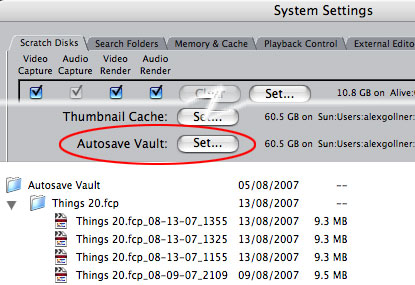
You can choose where to send your autosaved Final Cut Pro projects

With Avid the backups go to a specific place ‘/Users/Shared/name of Avid software/
Avid Attic
.’ The Avid Attic is where your project’s bins are backed up. The bins are only backed up to the Attic if there have been any changes. Within the Attic, the organisation is ‘Avid Attic:Project Name:Bins:Bin Name:Bin Title.n’ (where n is a different number for each backup):

Individual bins in Avid are saved to the Avid Attic

In this case, the ‘Marconi Bros AG’ project was moved from a Media Composer to an Xpress machine. Since the move only the ‘Sequences A’ and ‘Takes’ bins have meed modified – therefore only they have been backed up to the Avid Attic.

This means that you can go back to earlier versions of some of your project without losing recent changes to the rest of your project. To recover older versions of bins, you have two options, depending on if you want to completely revert to the way the bin was, or if you need to access a clip or sequence in the backup while keeping the bin as it is.

To replace the bin with a backup, rename the filename extension from ‘.n’ to ‘.avb’ and replace the current file in the project folder.

To have access to both the current and older version of the bin, you need to rename the backup bin with a different name as well as change the extension to ‘.avb’ – then copy the bin file to your project file.

Due to a bug in some versions of Avid (including Media Composer), it isn’t possible to have both the current and backup version of a bin open at the same time in Avid. Even if you have renamed the backup bin, Avid can’t display the contents of both bins at the same time. To get around this you can have the window of the backup bin open and drag the clips and sequences you want to the icon of the unopened current version of the bin. Once you close the window of the bin copied from the Attic, you can open the current version of the bin and continue to work.

As Avid only autosaves the bins that have changed in your project, you should also have a policy of backing up the other files and folders kept in the project folder to a backup drive (not the media drive).

Avid for FCP users: How to make a clip offline

Sometimes Final Cut Pro editors like to make clips offline, usually so that they can be recaptured at a higher resolution. In Avid terms this is is known as ‘unlinking’ the clip. There is no ‘Unlink’ in the Bin menu, but there is a way to change ‘Relink…’ to ‘Unlink’

If you want to make a selected clip offline, hold down shift and command(i.e Apple), go to the ‘Bin’ menu and choose ‘Unlink.’

Clip contextual menus in Final Cut Pro and Avid

Alternatively, if you have a two button mouse, hold down command and right-click the clip and choose ‘Unlink’ from the contextual menu.

Editing is like everything else. It’s a reflection of how people think about their times and how we react to the medium. You can look at a film made in the 1960s and know if it was made in 1963 or 1969. Editing is a lively art and it changes with the seasons. So we’re always going to have something new and something unusual coming up.

Carol Littleton.

Hear more from her in the Vault at the Manhattan Edit Workshop. You can use their flash-based site to get to the Vault, or listen via iTunes.

You should bookmark Norman Hollyn’s blog. Why?

He wrote The Film Editing Room handbook. All you need to know about how to set up and maintain all the technical aspects of editing feature films. He starts with pre-production and follows the process through to the answer print. As well as technical issues, he also covers how to deal with those you need to interact with: The camera department, the director, equipment suppliers, telecine companies, effects houses and the sound editors. You learn what information you need to supply them, and what they expect of you.

He is responsible for the teaching of editing at USC (now known as the USC School of Cinematic Arts). He developed the courses that the prospective editors, producers and directors take to learn editing from first principles. You can hear him talk about editing in film schools on these two Avid Podcasts: web part 1, web part 2 (iTunes part 1, iTunes part 2).

His blog is a great place to keep up with debates on the place of the editor in film making.

As editing is about storytelling, we can learn from what we leave out from the stories we tell. The moments that aren’t directly required to relate our tales are left out. Dreams are stories that our unconscious mind tells us so that we learn the lessons from the experiences of the day. When I wake up still remembering my dreams, I write them down. What I write down ends up being an ultra-distilled story. A story that is sometimes difficult to understand. It’s the distillation that is interesting for editors.

In our day-to-day lives we don’t experience jump cuts from home to work, or from starting a job to sharing in the results. On the other hand, that is the way we remember our lives. This is why picture editors can splice two scenes together and make the join invisible. ‘Training montages’ work for audiences because we summarise hours and hours of practice and effort in the same way – the way they are summarised in a montage.

Ingmar Bergman:

“No form of art goes beyond ordinary consciousness as film does, straight to our emotions, deep into the twilight room of the soul”

I would say that all popularised 3D film technologies would be more accurately described as two and a half D. It’ll be a while before we’ll be editing “film in the round.” However, until then, my friend Jean has sent me an interesting document from IMAX on what to bear in mind when editing IMAX 3D (the IMAX format is known as ’15/70′):

Some editors screen all the footage in 35mm, sitting very close to the screen and concentrating hard — a demanding method, as the two formats look radically different. If something looks questionable, they order a 70mm print of that footage. Some print and screen their rough cut in 15/70. But, as Andy Gellis has observed, “If the film is working well on the Avid, then it will work like gangbusters on the big screen, as long as you calculate or calibrate the shot durations correctly. The brain can’t absorb the overload of information on the IMAX screen as readily as it can on the video monitor.”

Video will not give you an adequate impression of how the footage will look on the giant screen. For instance, if the eye has to move too far across the scene, a cut won’t work as well. Or in 3D, if the depth cues in successive shots aren’t similar then the brain will have difficulty fusing the left eye and right eye images. You may not recognize a spectacular 15/70 shot when seen in video. For these reasons, some video editors will rely more heavily on their 35mm printdowns, and selective contact printing of 70mm footage.

Occasionally, the reverse may be true. Stephen Low finds that “when you need to bamboozle the audience for a second to make a cut work and there’s something distracting on the edge, sometimes 15/70 is more forgiving than small formats, because (in 2D) you’re not as aware of the edges. A bad cut in 35mm or on video may be all right for the giant screen because peripheral vision is nowhere near as important, and the audience is more focused on the centre. And in IMAX Dome theatres, you’re not at all aware of the edge of the screen.”

Notes editor Barb Kerr: “You have to be even kinder to the audience in 3D, because their eyes are really focused deeply inside the picture. If you change the focal plane to something essentially above the head of the person in front of them in the theatre, you have to set them up to make that shift or it can be completely baffling or hurt them.”

From The 15/70 Filmmaker’s Manual from the IMAX site