Over at the LAFCPUG forum, Casey Petersen asked if it was possible to change the default colour of the ‘color’ matte generator. Not directly, but you can create a new generator plugin with a different default colour:

1. Open FXBuilder from the tools menu.
2. Paste the following text into the Text Entry window:

scriptid "Color";
generator "Color - white", 120;
group "Matte";
input fillcolor, "Color", color, 255, 255, 255, 255;
InformationFlag("dontEraseDest");
InformationFlag("bypassCache");
code;
channelfill(dest, fillcolor.a, fillcolor.r, fillcolor.g, fillcolor.b);

3. Choose ‘Create Plugin…” from the FXBuilder menu
4. Enter “Color – White” as the name
5. Save it in
Your Startup HD/Library/Application Support/Final Cut Pro System Support/Plugins
6. Restart Final Cut and you’ll have a new generator which produces a white matte by default.

Note that this won’t be broadcast safe. It might be better to use a different value in the script such as

input fillcolor, "Color", color, 255, 230, 230, 230

instead.

Here is my next plugin: A generator that takes a clip and animates it from one place to another. It defaults to moving the clip from off the bottom of the canvas to off the top.

I came up with this when creating closing credits for a film partially funded by the Arts Council of England (using another of my plugins: Closing Credits). One of the conditions of funding was that their logo appears during the end credits scroll. Oddly enough, it is not straightforward to animate objects in Final Cut to move at specific speeds.

move_01

Download Alex4D Move
Download: Alex4D Move.

Copy the ‘Alex4D Move 1.01.fcfcc’ file into one of two places on your computer:

Your Startup HD/Library/Application Support/Final Cut Pro System Support/Plugins
or
Your Startup HD/Users/your name/Library/Preferences/Final Cut Pro User Data/Plugins/

(Your Startup HD/Users/your name/Library/Application Support/Final Cut Express Support/Plugins for Final Cut Express users)

Restart Final Cut, and you’ll see the generator in the ‘Animate’ section of ‘Video Generators’

Here’s a long (20 minute) video showing how it works:

Here are some magic numbers for entering into the dimensions values for video clips:

NTSC: 640 wide by 480 high
NTSC widescreen: 853 wide by 480 high (?)
PAL: 768 wide by 576 high
PAL widescreen: 1024 by 576
720p: 1280 by 720
1080p: 1920 by 1080

Visit my Final Cut home for more plugins and tips

finalcuthomethumbnail

If you want a clip to move smoothly and then stop, use the ‘Keyframe % Complete’ animation method. You can then set a value of 0 at the start of the generator, and 50 when you want the image to stop moving (if you want the clip to end up halfway across the screen). Control-click the second keyframe in the graph to smooth it so that the image smoothly slows down to a stop:

Getting the clip to move at the same speed as something else will take some trial and error. You could add some keyframes between 0 and 50 that produces a straight line segment of the animation graph which makes the clip move at a constant speed. The angle of the straight line defines the speed.

You could duplicate a copy of the generator and use the fixed speed method to animate, and use the position of the copy to help set the keyframes.


Each year London’s Royal College of Art uses a secret sale to raise money and make a point about fame and the business of art.

From today for a week, Londoners are invited to visit their gallery for the opportunity to view 2,700 pieces of art drawn on postcards. At the end of the week the postcards are made available in a sale where each postcard can be bought for £40.

For the right piece of art, not a huge sum.

rcasecret2008sm

What exactly is ‘the right piece of art?’ Unlike most sales, each artwork is not labelled with who created it. You only discover the artist once you have bought your postcard. The majority of the authors are RCA students, but some are internationally famous established artists and designers such as Yoko Ono, Tracey Emin, Manolo Blahnik, Nick Park and Anish Kapoor.

Some would say paying only £40 for a unique piece by such artists makes this an exciting lottery. On the other hand, that only matters if you plan to make money from selling the piece you’ve bought. This is one of the few art sales where aesthetics are the only consideration: buy if you think it is worth £40 to you. Just because it was made by someone famous doesn’t make it any better as art.

Imagine buying a number of cards and never turning them over to see who created them. That would be a statement about making the experience of the art solely about aesthetics

At a networking evening for the London part of Stellar Network, I got into a conversation with Jason and Tim. We were talking about what more a film producer needs to know as compared to a theatre producer. Jason wanted to get an idea of the differences. When I butted in, Tim was explaining some of the complexities of contracts and negotiation. I attempted to help by referring to Mark Litwak’s book for indie producers – Risky Business: Financing and Distributing Independent Films. It is a very detailed book including most of the contracts you would need to be a film producer. Time said that although it was a good book, the law in in the UK is sufficiently different for it to be a problem for British film makers. I then guessed what line of work Tim is in.

However there are some useful resources for UK producers. He told be about Own-it, a site for people in creative industries that provides free advice on intellectual property. It is provided by The London Development Agency and a couple of arts universities. As well as helping you deal with ‘the Man’ (finding out who you need to pacify in order that you can make your film), it also helps with making sure your work isn’t ripped off by others.

If you aren’t from the UK, you still might find some of the general principles outlined on the site useful, so check it out at

http://www.own-it.org

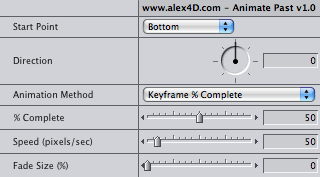
To go with my closing credits plugin, I’m working on a filter that animates objects across the screen. It defaults to animating them from off the bottom of the screen to the top of the screen. This will be useful if you need to include logos or moving video in your end credit scrolls.

animatepastui

To make it more useful, it’ll also animate from the other edges of the screen or an arbitrary point in an arbitrary direction until the clip is off the edge of the screen.

According to The Economist, a development at the US Federal Communications Commission is taking us a little closer to ubiquitous media:

After four years of deliberations—and staunch opposition from television broadcasters, makers and users of wireless microphones, and mobile-phone companies—the federal regulators voted unanimously on November 4th to allow a new generation of wireless gizmos to access the internet using the empty airwaves (“white spaces”) between television’s channels 2 to 51.

The FCC could have auctioned off those frequencies—it raised $19.6 billion in March 2007 by auctioning blocks of frequencies above 700 megahertz that will be vacated when television switches from analog to digital broadcasting—but to its credit it opted to make them freely available.

The special features of these wavelengths of radio spectrum is that they can get to the hard-to-reach places that wi-fi signals have had difficulty getting to before. They can carry more data over longer distances without being affected by metal in walls and the vagaries of the weather.

This is a step towards the availability of any media on any surface. I imagine that within 10 years the idea of a specific device for showing 2D (and stereoscopic 2D) imagery will seem quaint. We will probably expect most permanent surfaces to be linked to a worldwide network and be able to display whatever we feel like calling up at any time.

That means nearby picture frames, blinds, wallpaper, painted areas, tables, plates, floor coverings, ceilings and buildings. This would progress to flexible digital paper, carpets, clothing, curtains and fabrics …eventually ending up as digital tattoos!

Sometimes working on low-budget projects means leaving the initial edit to others. Researchers sometimes already have plans for the footage. Producers might not have the funds for all your editing time.

That means preparing the way for a paper edit. You send the footage to someone else who sends you back an initial edit as a document listing a series of timecodes indicating what footage goes where:
[01:47:22]-Mr. Thomas: "That's when we decided to extend the name of the club using the initials of the new members..." -[01:48:12] "...as to who the second 'A' was."
[02:12:01]-Mr. Yankson: "I thought it a demotion..." -[02:12:56] "...the Muddy Lawn."

They usually refer to hours minutes and seconds, because the specifics of frames don’t apply to paper edits.

How do they know what timecode to put in their documents?

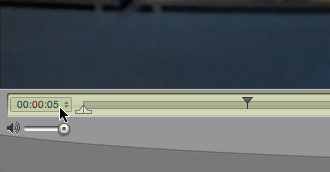
The simplest option is to use QuickTime player. The time shown in the bottom-left of the window usually shows the number of minutes and seconds counted since the start of the movie:
timecode_qt

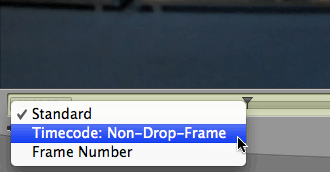
If you move the mouse over this counter, it changes into a pop-up menu where you can choose to display the source timecode of the movie (the timecode used within Final Cut, Avid or Premiere):
timecode_qt2

timecode_qt3

If the person who is doing the paper edit refers to this time, you can use it within your editing software: “Use the third time the guard opens the cell door [from 36:28 until 36:42]”

If you are not sure of whether your collaborator will have access to QuickTime player, or if they require footage in another format, it is better to add timecode to the video itself:

This is known as a “timecode burn”.

The most straightforward way in Final Cut Pro is to use Andy Mees’ Timecode Generator plugin. Before you add it to your timeline, enter a value for duration at least as long as your timeline:
timecode_d

Download it from his page (by clicking the screenshot at the top of the page).

Another option is to use a separate application to add a timecode burn to your movies: QT Sync. It was originally created to fix QuickTime movies whose audio and video are out of sync. It has an option to add timecode to existing movies. This can be useful if a movie takes a long time to render, and you want a version without a timecode burn:

Apple have had their success with iTunes partially because the pricing model is so simple: 79p per track, £7.99 per album. They delayed launching video because they wanted something as simple for movies and TV shows.

People don’t want to have to remember more than one price for a TV show or a movie. When they are about to choose which to buy, they want to be sure how much they’ll be paying.

To those owning the films and programmes, they want to charge more if they think they’ll get people to pay. Recent releases are worth more than catalogue titles. Recent releases need to be paid for too.

However I think there will be a market for pricing based on the size of the potential audience of the video. A video kept for reference and watched every once in a while by an individual could be priced lower than one shown to over 200 people at a private club.

If that is so, why not charge based on screen size instead of resolution. Imagine paying less for a video than can only be shown on an iPod Touch or iPhone than one that that those devices output to TV.

The tradeoff between the content owners and consumers could be based on the implied audience size associated with a screen size. It would be uncomfortable for many more than one person at a time to watch an iPod movie. Not more than 30 would want to watch a consumer-based HD display at the same time…

I vote for cheap movies for people with no friends, they deserve something to make up for the loneliness!

As well as surprises from Nikon and Canon when it comes to using Digital SLRs to capture moving footage, we can also get a preview of how important image resolution will be in future.

Now that multi-megapixel digital cameras now cost less than £100, the stills market is evolving. Soon, the number of pixels in the detector will matter less, it’ll be the quality of the technology getting the light to the chip which will matter more.

I suppose once we get to 8K for moving footage, there’ll be no point in increasing resolution. Engineers will be more interested in stereoscopic images and higher frame rates, or possibly variable frame rates within the same movie.

Will 8192 by 6224 be enough for you?