A little revisionist history tells us that the general public eventually turned from VHS to DVD when they realised how much better the picture quality was. Consumer electronics firms hope that impulse will convince people to trade in their old DVDs for movies in HD stored on Blu-Ray disk.

Firstly, people chose DVD because it was convenient: you don’t have to rewind the movie to see what you want to see. The CD-like disks are more resistant to the depredations of children and other family members. They also take up less space. Secondly, most people didn’t have a problem with VHS picture quality – pre-recorded tapes looked as good as TV.

HD quality on Blu-Ray is neither here nor there for 80% of the population. The quality difference is not worth re-buying DVDs that look great on SD TVs and scale up well enough onto HD screens.

The other two advantages of Blu-Ray over DVD are enhanced interactivity and increased capacity.

In the case of interactivity, I think the majority of movie fans just want to get access to the extra information: the pictures and supporting documentaries. Not many will step through scripts screen by screen. Few played the hide-and-seek games found on early discs. Few modern DVDs use the interactivity features of the format, specified more than 10 years ago. How many recent discs have the graphical buttons that overlay the screen during key scenes giving the option to find out more? It’s been a long time since I’ve heard of a DVD that offers alternative camera angles for a movie.

All we have left then is increased capacity. You can store a great deal more content on Blu-Ray discs. Hours of documentaries, commentaries and soundtracks, or whole TV series. Yet now we see that features are being released in dual Blu-Ray packages. It turns out that marketeers think that consumers would rather buy a pack with two discs half filled with content than a single disk filled with features.

Looks like DVD will be the last consumer hardware format. What do you think?

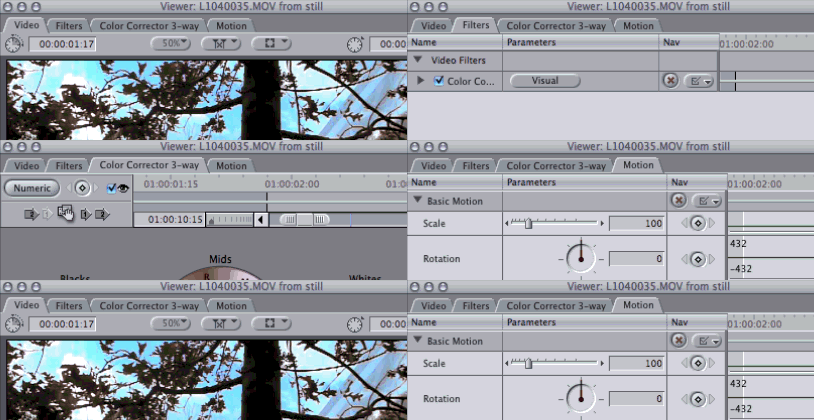
You may know that you can switch between sequences in the Timeline and Canvas windows using the shortcuts for selecting the previous tab Command-Shift-[ and the next tab Command-Shift-]

tabs_1_sequence

You may not know that you can also do this in the Viewer as well.

To open a clip from the timeline, you can press return.

To switch between the Video, Audio, Filters and Motion tabs from the keyboard, use the same shortcuts.

You can bring up the Motion tab while looking at the Video tab by pressing Command-Shift-[ in the example below, you can switch from the Filters tab to the Color Corrector 3-way tab by pressing Command-Shift-]

tabs_2_viewer

I’m not posting much of substance today apart to point out that I’ve added a comment and footnote to the post about YouTube’s HD service and to remind people:

If you don’t have a backup plan, make a backup of all your files now. Then create a backup plan and stick to it.

The HD on my parents’ computer failed today (during a backup). Hence this message.

As Matt Davis said in a recent presentation: ‘A file only exists if it is in more than one place’.

Technology has helped movies evolve in many ways over the years, but sometimes it’s a good idea to eschew an advance to see what happens.

In a podcast from USC featuring the team behind ‘Son of Rambow’ the director describes a method for helping their two child leads. From 6:40 in:

“We got rid of any monitors or any way to watch playback… So that they [the kids] never saw themselves, and they never became self-conscious. It was great for us as well because we hate that whole thing of rewinding and going ‘ohh, maybe he was a bit slow in the background.’ As we just got rid of it everyone just had to watch. For a couple of days there was a bit of a mutiny, the crew didn’t like that: ‘How am I supposed to do my job… how can I light…’ We answered: ‘Just watch.’ … It made everyone focus… empowered and on the case”

Take a look at the technology around you and see if some of those aids are holding you back from giving your best.

Subscribe to the other podcasts in the USC series from their site or from iTunes.

A few months ago I posted a shortcut that let you see better quality encodes from YouTube (add &fmt=18 to the end of the URL). That was part of YouTube re-encoding all their videos to a better codec: H.264.

They’ve now been re-encoding videos that were uploaded to YouTube at higher resolution than standard definition. On videos that are available in higher quality, you’ll see a link below the video: ‘Watch in high quality”

Normal quality:

High quality:

To see the differences zoom the videos to fill the screen. You’ll see that YouTube may be using the better resolution than SD uploaded but its users, but it isn’t displaying HD on it’s site or in embedded videos yet.

This sort of content seems tough for the Flash encoder. It isn’t been optimised to deal with primarily dark video. Although Vimeo is better, there are problems:

Of course in the case of Vimeo, you can click their logo to see the video in higher resolution on the Vimeo site, but even the SD embedded version looks better here. If I was based in the US, I could also have the option of paying $60 a year to have the HD versions of my videos embedded on my blog.

PS: If you want all the videos you see on the YouTube site to default to the higher quality version and you have an account, click ‘Account’, ‘Playback Setup’ and ‘I have a fast connection. Always play higher-quality video when it’s available.’

Followup 23 November, 2008 by Alex

As you can see from my comment below, YouTube is encoding 720p videos – an HD resolution. It just takes a few more hours for that version to be available.

Last week the BBC reported on a new addition to Google Earth: the ability to explore ancient Rome.

The 3D models and virtual tours of the Rome of 2,000 years ago were created by Past Perfect Productions. I hope they move on to creating more environments for people to explore. Once there is is a market for this, standard ways of modeling and showing the past, things will get very interesting.

It might be that we will be able to explore any place on Earth at any point in history.

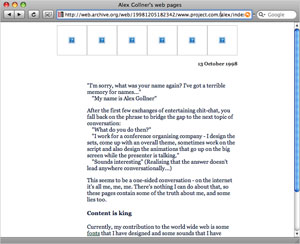
My home page from 10 years ago stored at archive.org

My home page from 10 years ago stored at archive.org

Today Google software continually explores the web and catalogues text and image content for search purposes. The search page lets millions of people all over the world the explore the current representation of the world on the web.

One day similar software will use XML-tagged information to build a model of the Earth at any point in the past. Combining all pictures, words, models, sounds used to represent the past will mean that we’ll be able to search based on the world as it was 2,000 years, 100 years or ten weeks ago.

Imagine looking at the world the day you were born. You could look at your favourite websites filled with the news as it was back then. Once architect and municipal plans are combined in the model with photos taken in the weeks before your birth day, you’ll be able to walk down the street you were born. Or the street where you live today as it was back then.

Witness the model of the world as it was thirty years ago become clearer as governments and organisations release documents kept secret up until now. Once you combine accounts, memos and all the documents kept in world archives, the model will become more accurate.

If you could go to any place and time, where would you go first?

Engadget pointed to a video on Vimeo that shows ‘the first major step in computer interface since 1984’:

They’re referring to the introduction of the Mac user interface (almost 25 years ago). That UI was a revision of the Lisa user interface for home users. The elements that made this work were the mouse, icons and overlapping windows. They were around for many years before 1984.

The stuff in this video is the equivalent of the generic concept of a pointing device. A 3-D mouse.

There is no next generation representational abstraction, i.e. a replacement for icons. The 2.5 D interface (the 0.5D being the layers of windows on screen) is now a 3D interface.

There’s no point having a multi-touch 3D mouse unless you have better ideas for what you’ll be manipulating with it. They even had to fake automatic keying of a truck and a man from a couple of shots that were then combined in a third. Anyone who has done that kind of keying and composition knows that you need to do a lot more than point at what you want to get things done. Just because you are compositing some 2D footage in a shallow-depth 3D-space doesn’t make the job of compositing that much more intuitive.

They didn’t even use eye-parallax – if you need to collaborate with others, you still need cursors. How twentieth-century of them…

mouth
My new input device

Following up Google’s voice-operated iPhone search application, maybe it’s time we started to think about non-visual interfaces for our technology. We’ve seen them depicted in Star Trek and sci-fi stories for decades. They show heroes of the future engaged in conversations with technology.

I think that children born ten years from now will find our obsession with visual interfaces quaint. UIs are still centered around ‘the document’ – the system used by corporations in the 18th and 19th centuries to organise colonial empires, and by educational institutions to formalise schooling.

It may be that technology will eventually help us come up with a new technique to pass on and store knowledge. Do you conceive of what you know in terms of words and pictures written on documents? That’s not the form I use to maintain my model of the way my world works. Documents (such as this blog) are a transmission method. We may be able to come up with something more effective in the coming decades.

The late 19th and early 20th century and introduced electricity-powered motors to middle-class people’s lives. Clothes are washed and dried using spinning motors. Refrigeration works using heat pumps. The reason why alternating current was chosen as the method for delivering electricity to people’s homes was that motorised devices need AC to work. As the decades went by, electric motors became hidden, less noticeable in everyday use. Technological methods recede into the background as the services they deliver evolve into utilities. Few families have their own electricity generator, water pump and sewage treatment works any more.

In the same way, computers eventually will fade few view, and our connection to the rest of the world will through a voice whispered in our ears and our instructions will be whispered so no-one else can hear. Nearby surfaces will be used as displays for images and video, but probably won’t be the primary method for technology interaction.

There are a few trends that may lead us in this direction.

The idea behind ‘cloud computing’ is partly about getting people and organisations to let go of having a specific place for a document or unit of computing power. We pay for a service that handles making sure that the documents we have are safely backed up and instantly available where we are in the world. The cloud also provides computing power; when an online service starts getting bogged down with consumer requests, it can call on Google’s cloud of computing power to help out for a few hours. We don’t need to know which power station produced the electricity that is keeping out lights on at night, as long as the power is there when we want it, eventually we’ll trust that the cloud holds all the information we’d like to have access to anywhere. It might be easier for us to tell our technology to do what is needed to get us through the day: “Tell this new bank what it needs to know for me to open the new account.”

The natural language interfaces that have been evolving for the last ten years will eventually become that ‘personal digital assistants’ that will spend their time looking after us. For example I Want Sandy currently uses email to communicate, I assume they’re working on a voice-operated version for mobile technology.

Think about how important needing to find or create ‘the right document’ is for us all today. Eventually something will come along to replace this need. Such is the the nature of technology: in the long run it makes every generation feel out of date.

It is time to turn to the educationalists and see if they can come up with something better…

Oscar award season has started. The ‘for your consideration’ adverts have started to appear. That means the ‘glut of award hopefuls to be released in the next six weeks’ and ‘end of the cinematic year’ articles can be written.

Go on over to Hollywood Reporter to read an interview with six writers who may be nominated for an Oscar. When asked about discipline, Andrew Stanton, writer of “WALL-E” said:

My mantra is: Be wrong as fast as you can. Because I have to have the liberty to know it doesn’t have to work so that I’ll just keep moving.

I hope they get around to talking to some below the line people.

Went along to the Blank Slate ’08 short film showcase at Bafta tonight. It was the premiere of a film I edited: Crimson by Piers Hill.

The programme was made up of nine films funded by the UK Film Council through B3Media. Two were documentaries, the rest were dramas.

I was struck by the ambition of these films. Less than ten years ago, short films were set in one or two locations (uaually interiors) with possibly 10 or 15 setups.

When I got the rushes for Crimson I found that the crew had managed to record multiple takes from over 70 setups in only four days (and nights) of shooting!

I thought that this would make our film stand out, but many of the other films shown this evening were as ambitious. Multiple locations, day and night, in parks, from cars, police stations, schools… It may be that digital technology may be helping today’s film makers reach further.

It seems that these films are calling cards to show that the producers, directors and crews could be trusted with bigger budgets and bigger stories…