I recently noticed that the ‘Ripple Dissolve’ transition works best on quick transitions. If you set the duration to much more than a minute, you can see that the incoming clip fades in – it isn’t distorted by the pond ripples.

My new plugin ripples the outgoing clip as well:
pondripplestripsimple

I’ve also added some extra controls so that the position, speed and intensity of the incoming ripple can be different from that of the outgoing clip:
rippleui

Here is a clip showing how the transition works and comparing it with ‘Ripple Dissolve’:

Download Alex 4D Pond Ripple
To use this plugin, download the ZIP document, copy the ‘Alex4D Pond Ripple v1.fcfcc’ file to

Your Startup HD/Library/Application Support/Final Cut Pro System Support/Plugins

(Your Startup HD/Users/your name/Library/Application Support/Final Cut Express Support/Plugins for Final Cut Express users)

‘Alex4D Pond Ripple’ will appear in the ‘Dissolve’ video transition category.

Visit my Final Cut home for more plugins and tips
finalcuthomethumbnail

On my way back from Liverpool by train a while ago, I held my camera up against the window for a while.

If you have a portable media player, and need to go on a journey in the dark, you can play this video instead of looking out of the window.

Click the Vimeo button to go through to their site to watch in HD, and to download the source file.

I don’t know if work for freelance web designers is starting to dry up, but here’s a new sideline: take an existing Flash-based website and use the same text, pictures and video to make a version for mobile phone users.

Many people believe that Apple will not allow Adobe’s Flash on the iPhone. The PR reason is that they think that the programming language behind Flash could cause security and technical problems. An incompetent or malicious programmer could make iPhones go wrong. Since phones have been able to run more and more 3rd-party applications, they have become more unreliable.

The ‘Steve Jobs’ reason might be that Adobe have never spent enough time making Flash work well on non-Windows-based computers. People complain that it is a waste of processor and battery power when a Flash movie plays on a mobile phone. On Macs, simple Flash operations take over 70% of CPU resources.

If the iPhone becomes more popular, it might be a good idea for those sites that are centred around Flash to have an alternative non-Flash version available for those browsing on the run.

A few weeks ago I was at a social organised by Stellar Network. After chatting with various people for a while I thought it wouldn’t be too pretentious to get my iPhone out. We had been talking about post-production toys such as the new Red camera system, so I hoped that browsing the web in public would be OK. It was response to a conversation about web design. One person there was Melissa Byers. As she is a cinematographer with foresight, she grabbed a great domain: camerawoman.com:

Melissa Byers' site

I tried visiting her website. My iPhone wasn’t good enough to browse her Flash-based site.

I got an email from Melissa this afternoon. I remembered our conversation and visited her site for the first time today.

That’s why it might be a good idea to have alternative version of your Flash site for people like me with more money than sense – iPhone buyers!

You could even learn how to turn Flash sites into iPhone web applications. Before July 2008, that was the only way to add functionality to the iPhone. Find out about iPhone WebApps at http://www.apple.com/webapps/

I used to be in the conference industry (called the events business by those working in it). That’s my a month ago my friend Matt sent me a link to an interesting presentation: 25 signs your event SUCKS. I thought I might as well check out what’s going on in conferences at the moment. It mentioned some web technology I had heard of, some I hadn’t.

I discovered that the techniques that might be used to support conferences soon could be categorised as ‘Social Media’ ideas. I already have a tag in my blog called social networking. The new name for that is social media. It turns out that the ‘media’ in social media is the word in the sense of the kind of media that people like to share: videos on YouTube, pictures on Flickr, blog posts on WordPress and others.

The social media ‘Platform’ most talked about at the moment is Twitter.

twitterquestion

I’d been hearing about it since Summer of last year, but didn’t think it was for me. Seeing it mentioned as part of creating a community to support of a conference piqued my interest.

It started off as a micro-blogging service. Instead of writing a few hundred words about your life every few days, Twitter asks a single question: “What are you doing?” Each time you update twitter.com with what you are doing, the friends of yours who are watching the twitter.com web page get an update. You need to keep your answer concise, you only have 140 characters to play with. This limit is because Twitter is designed to help you keep your circle of friends informed when they are away from their computers. When you sign up with Twitter, you give them your mobile number, and you have the option for your friends twitter messages (known as ‘tweets’) to be sent to your phone as SMS texts, and for your tweets to be sent to their phones.

What do people use Twitter for?

Those keeping friends informed update their status when they are doing something different from what they were doing before: “I’m having coffee with Sophie” “I’m Meeting Debs in town” “I’m away until Saturday”

Others use Twitter to broadcast thoughts in the past they might have written in a notebook. Thoughts that might inspire others in their circle. Twitter can also be a quick way of asking your contacts a question: “Do you know any good coffee places near London Bridge?”

Some use Twitter to entertain people. They might pretend to be someone famous and come up with humourous ideas of how they might answer the ‘What are you doing?’ question. If you follow ‘Michael Bay’ (@MichaelBay) you’ll get messages such as these: “The sunset on the set last night was beautiful. Not a real sunset, just a fake one I break out every once in a while.” “Just bought 3 highly endangered Asiatic lions. Why? Just because.”

Many people use Twitter create networks of those with the same interest that they haven’t met yet – traditional online social networking. Blogs sometimes form the nucleus of these interest groups. Blog posts could be described as a record of the ideas the group has.

The ‘media’ of the blogging Social Media Platform is the idea.

For Twitter, the media is a thought expressed as a sentence or two. Twitter is for sharing thoughts. Thoughts that can keep others informed, involved, amused, educated or inspired. If you want to share fully-formed ideas, write blog posts and articles.

How I got started with Twitter

To start off, sign up at Twitter.com. Once you pick a user name, ask your friends if they are on Twitter. If not, use the tool on the site to invite them. The method for choosing who’s updates you receive is called ‘following.’ If you follow a person, you get to see their updates (tweets) mixed in with yours on the Twitter home page. If they follow you, they see your updates when they go to Twitter.com.

You don’t need to know someone to follow them. If you know their user name, you can add that to the Twitter address and see what they’ve been writing recently. For example, if you find someone interesting on the web, and they mention their twitter user name, you can take a look. Stephen Fry’s user name is stephenfry. His profile page on Twitter is at http://twitter.com/stephenfry – there you can see what kind of tweets he writes, check out a link to his home page. You can add his old updates and future updates to your twitter feed (the tweets listed on twitter.com) by clicking the ‘Follow’ button on their profile page.

When someone ‘follows’ you, you get an email informing you of their user name. It is Twitter etiquette to take a look at who they are and ‘follow’ them in return – unless you think the kind of tweets they write would not interest you, or that the web page they link to on their profile page has no content you are interested in.

So, get involved with Twitter if you’d like to share your thoughts. Work out if the sharing will inform, update, entertain or inspire others. Before you attempt to do all these things, pick one or two to start off, and see if people respond.

I’ve been on Twitter for four weeks, so I’m just starting out. If you want to get involved, you might learn more than me very quickly.

Explore at twitter.com

Session 4: Brand Engagement
– a discussion moderated by @audio

Brand Engagement is

…empowering the consumer – take the brand into their own hands – becoming brand ambassadors

Offline BE will morph into online BE

@audio – Brand owners are scared of BE

@alex4d – Offline brand activation could be converted into online happenings

Traditionally brand owners deliberately don’t want to know what people think of them

PRs have to remind clients that their role is to present the messages to the media – not to guarantee specific coverage

The most basic return on investment is to make the cost of PR less than the gain

Online BE – there are many more measures from web analytics

Almost too much web analytics info. Consultants can step in to interpret.

If you tag your images, images.google.com will bring you people.

If people find your site using ‘wrong’ keywords, not campaign keywords, you might want to change your campaign

@alex4d – Brands are offline in nature. Crowdsource online representations of the brand. What does ????? mean to you as online experience?

@alex4d – If you make the brand decision important, then people are more likely to evangelise on your behalf

Session 5: SEO 101 – everything you wanted to know about getting found in search that I can cram in this session
Judith Lewis

SEO = Search Engine Optimisation

Consider all the following factors, don’t pick some:

1. Keyword Research

– a. The terms real people use, not internal terminology

– b. Use the more frequently searched version of a phrase: these days ‘social networking’ is more often searched for than ‘social media’

– c. Provide specific keywords for specific pages (party camera, weddings camera, portraits camera) on a site (camera)

– d. Use wordtracker and yahoo and other keyword tools as well as google

– e. just because people are searching for a term that seems relevant to you, be careful, People searching for an LG chocolate phone will be irritated to find your page if you optimise a page to mention that search term… if you are in the business of selling chocolate

– f. Optimise based on longer phrases, more specific searches

– g. If you have 20 similar things, use keyword research to find what other words people use when looking for these things (i.e. what people use to choose a specific one of these similar things)

– h. Different keyword research tools have different constituencies – useful in countries with different search profiles

– i. Well-written copy means that you will use semantic variations of terms – better for searches (On a movie page you would also use film, flicks, cinema etc. to avoid repetition in well-written copy)

2. Page tags

– a. Your page title is the advert that appears as the label for your listing on a web page – limit yourself to 65 characters Put your company name at the end of page title so that you don’t get a load of tabs with the same beginning when browsing

– b. Your tag appears below your title in search results – limit to less than 150 characters

– c. Use meta robots tag “noindex” on spare copies of duplicated info.

– d. Make sure your CMS can display and control these tags

(we are running out of time, so…)

3. On page text: focus – don’t put all your site keywords on all pages. No magic % for keyword density

4. Sculpt your site – put keywords in .htm filenames – more info: search for ‘site sculpting’

5. Fill in ALL your image tags

@petewailes suggests an article on site sculpting: part 1 part 2

Find out more at http://www.decabbit.com and SEOchicks

Session 6: Online Reputation Management – who is talking about you, what are they saying and what can you do to fix it
– Judith Lewis – http://www.decabbit.com

We are all brands – prospective employees

When people search for you, what do they find? Be ready for some time in the future when people do research on you

(For larger brands) Why monitor? Competitors can undermine your image. You may find problems you weren’t aware of

(People with a grievance) Look at entry 4 when your search for “land rover discovery” – “The truth about…”

Check user-generated news sites – e.g. http://consumerist.com/

Check potential names for your brand – they may have a bad associations that will be revealed through search

You can’t rely on defamation law to remove bad press

Monitor your own brand using Bloglines, Google Alerts, Yahoo Alerts

Don’t forget misspellings of your brand

bloglines.com is more comprehensive than Google Alerts

bloglines monitors the social web. Yahoo can alert you to sites banned by Google (for spamming for example)

Even individuals need PR: Send press releases when things matter. Make sure the page you link them to has different copy

(For releases for professional journalists) Use a single, paid PR service. Journalists will pay attention to a single message from an authority

To see which sources journalists trust, hang around at www.gorkana.com for a while

Corporate blogging:

– a. Authentic voice from within company (not PR)

– b. Share a little personal info, people will engage.

– c. Respond to comments

– d. Consider (their) negative comments carefully

– e. Promote employee blogs even if they aren’t official

– f. CEOs should chip in only when they have something to say – give space to others to add their voice

If you create a Facebook app, be open about what your counter/game does. No spamming, keep it opt in.

“Don’t forget to follow us on Facebook, Twitter, Bebo, Livejournal, Flickr” – do different things on different Social Media Platforms

for more on online reputation management – @decabbit

Here is a post with the my first set of notes posted via http://twitter.com/alex4d – I’ve made a very few changes (enclosed in brackets):

Session 1: Networks and not-works. A taxonomy of social media platforms and how they help and hinder communication.
Benjamin Ellis of http://redcatco.com/blog/

The way Social Media Platforms (SMPs) are constructed is important

SMPs are at the stage the telephone was in 1880s

Corporates say that SMPs are less efficient than email conversations

Remember that Facebook is the face of SMPs

Media = content in general: photos/videos (not TV/Press/Radio)

Different people use the same tools in different ways. Twitter for my friends, my job, my career, my hobby

Twitter. Started as status. @ use by community changed it. DM changed it again

SMPs engage two senses: vision, audio

Add time to media makes it linear

Whereas text can be skipped and scanned it is counted as non-linear

Linear media requires bigger investment in time for community

If an SMP only allows links, people have the option whether to access additional media

Initially, the quality of the community you adopt is more important than the quality of the SMP you create to support it. (That may be so, but watch out that a better SMP may come along and take the community away from you)

Twitter followers are fans. You don’t want the star to know about you, so you follow them, not friend them. (A distinction from Facebook)

Following: Publish and subscribe. Subscribers can choose how much they get. Much better than contacts pushing their content via email.

In SMPs, a brand broadcasting to people is OK – a back channel can be available rarely in special cases for people to chat back

Small brands may not be able to scale their property of remaining in a conversation with customers. SMPs might be able to help

SMPs make money when they give brands access to individual private conversations (But some don’t dare to do this or they will lose their community very quickly)

SMP taxonomy comes from the kinds of links between people. Friending vs. Following.

SMPs don’t yet support the polite decay of relationships

Technology representation of social network may be inaccurate because we don’t want to face up to stopping relationships (in offline relationships we guess when they are over, it’s OK. There may lots of inaccurate parts of people’s social maps that show relationships that are dead – SMP long tail)

Inverse power law – famous people become more famous because they are famous (i.e. we follow people who have lots of followers, which gives them more followers etc.)

SMPs give us insights into our contacts’ social networks – unlike in the real world

(A more evolved marketing policy:) sell to those with the right contacts, not the most contacts (People with few links who bridge between large groups of people)

Facebook want to help app developers connect the discrete social networks we are connected to – not via us

Dunbar says that the size of the neocortex in your brain determines the size of the group you can handle being part of

He says people can generally handle being in communities of 100-250 people.

(With modern technology) People have tiers of relationships. We use friends of friends for outer tier – for up to 1000 members of our community

SMPs need to maintain constructive feedback and not break links between tiers

Session 2: Will PR inherit the social media earth?
– A discussion amongst attendees moderated by @JanetParkinson

@blogtillyoudrop and @sylwiapresley do Word-of-Mouth marketing: engagement with potential ambassadors to maintain long-term relationship with brands

PR usually try star bloggers to create content on SMPs.

Gemma: it is difficult to get our PR clients to give us approval to go beyond star bloggers

@JanetParkinson Brandseye: an online reputation management tool

PR clients don’t know enough about SMP

Clients will buy SMP expertise from those who already do it for themselves.

Not all brands should be in Social Media – some aren’t conversational

Bigger PR agencies need to be careful. A Twitter policy was needed. Personal comments seen as official. (By agency clients)

Clients find it difficult to deal with the idea of people external to their organisations trusting that Tweets are personal

@blogtillyoudrop a freelancer felt less free when she realised that some blog entries would be in conflict with clients

Start with firefighting, risk management. There is bad PR out there in SMP, so you need to be there to deal with it. Go to a new client and show them what people are saying on SM, here’s what we can do to manage it.

PR are trying to hire SM experts. How can you measure that expertise?

An SM danger: Don’t listen to a very vocal minority. Dell lost money by listening to Linux activists

Don’t forget that huge numbers of people aren’t part of SM

Session 3: A DIY approach to online monitoring
– A discussion amongst attendees moderated by @rachelclarke

What tools are we using at the moment?

Distilled have a reputation monitoring tool – http://reputation.distilled.co.uk

http://www.brandseye.com/ gives you a single score for reputation – searches each hour – includes sentiment and context.

Attendee http://www.localmouth.com/ uses Google alerts and Yahoo inbound links

http://www.backtype.com twitter search

http://tweetbeep.com/ – Google alerts for Twitter

How do you set up a instant response chain of command?

Kneejerk responses can cause problems. If you respond wanting to know more, you engage without committing, which is safer.

Clients want their Reputation Managed on SM first while being educated, they want to take the task on themselves after a while

Clients know they should us RM, but don’t know why.

If a PR agency uses a paid service to do Reputation Management, they can pass on the agency (their supplier) case studies to their clients

Free tools can’t deal with 400,000 mentions a day.

Brand discussions happen in ‘private networks’ – not catalogued by search engines.

RM tools make correct guesses about comment sentiment 70-80% of the time

Surveys are about attitude. (Give them what they need not what they want.)

RM terminology: SM = Sentiment Monitoring

SM tools can send specific ‘important messages’ to PRs – from ‘high-reputation’ posters

If you work for a large brand, monitor the effects of what other agencies (working for that brand) are doing – you can get kudos for RM if bad things happen (e.g. If a press ad is causing uproar on SM)

(Individuals) can do your own RM – do you try and influence people’s opinion – actively or reactively

On twitter recently, if you mention a brand their competitors follow you.

When doing your own RM, wait a little for followers to manage your reputation. (You many have people in your network who will go to bat for you)

Sometimes it is good to respond during RM by stating errors in fact – and that’s all

(In Telegraph newspaper) Innocent accused of Greenwashing. SM sprung to their defence

(As RM tools don’t search) forums, be careful – get to know the social scene too.

PR clients may not care about negative comments on Digg and YouTube – they like the traffic (if all they count is traffic)

You need to check the quality of traffic from Digg and YouTube – unless you are ad-supported

In pitches companies promise ‘10,000 positive comments in the blogosphere’

Agencies set up thousands of blogs with fake cross-references to generate ‘positive comments’

‘If our crap business has lots of SM traffic, all will be well’ – the KoolAid for the next five years

@alex4d – (People seem to be saying, for RM) Forum handling: Lurk, groom, bribe

i.e. forums of fans of a brand

Online people forget that many brands are predominately offline. Imagine if they got in touch with you when you aren’t in brand mode.

Out of hours RM – respond quickly to say that you are sorry, but you cannot respond until later

Apple seed support forums so the community will support itself, then leave them to do all the work

Be honest during RM – (A carefully worded response): http://www.macysbelieve.com/

Wouldn’t it be great if you never saw or heard an advert that you weren’t interested in? Imagine those who pay to tell you stories, be they multinationals, governments or the local shop, only talking to you if their message is relevant to you. Combining a register of interests with a deeper understanding of your state at any moment are steps in this direction.

That is why combining a future Google with a future Twitter (or Indenti.ca) will be a powerful combination.

However, once ‘perfect advertising’ is achieved, we might have to get used to a world with less media – unless we are prepared to fund it ourselves.

Here’s how banks work: People lend banks X, banks lend out 3X – knowing that it is unlikely that the people lending them money will want all their money back at once.

Here’s how advertising works: People who sell things want to inform others that those things are available. They pay the media to produce content that an audience wants to consume. While consuming the content, the audience might also take in the salespeople’s messages. Note the word ‘might’ – you have to spend a lot on the off-chance that people will pay attention.

Currently advertisers need to spend 10X to communicate with their audiences, although they would only need to spend X if their messages only were delivered to those they specifically want to communicate with. To paraphrase an old saying: ‘At least 9X of my 10X ad spend is wasted, I just don’t know which 9X.’ TV programmes are too general. Specialist publications can’t deliver the audiences they once did.

Once advertising is perfected, there are three possibilities. The amount of money spent communicating with audiences will stay the same, rise, or fall. This sum influences the amount of media there is in the world. If advertising becomes more efficient and cheaper, there will be less money for people to create TV shows. We may end up with a tenth of the commercial TV we are used to. Alternatively, our availability to advertisers may support more TV, radio and (dynamic) print.

We might be able to decide how much TV we’d like in the world.

It may be that a future tech will create the world of perfect advertising. When that comes along, individuals may be able to discover exactly much any communication strangers want to have with them is worth to the market. They might be able to set their technology to negotiate with the advertisers for admission.

How much will they be prepared to pay for a world of perfect advertising?

[ a post inspired by my trip to tomorrow’s Media Camp London (#MCL2) ]

Over the last few years media companies have been scrambling to avoid what was seen as inevitable: that Apple would steamroll video content owners into giving up control over pricing their programming on the iTunes Store. Commercial TV and movie studios didn’t want to be caught napping like the music industry.

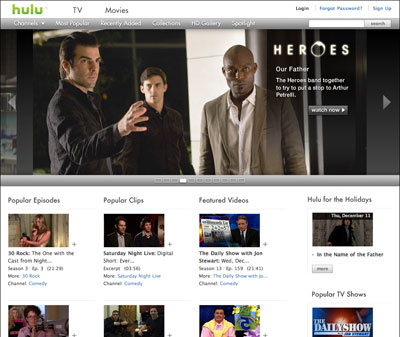
On both sides of the Atlantic an ‘anyone but Apple’ solution has become successful. In the US, NBC and News International launched Hulu:

cloudhulu

It is an advertising supported site for U.S.-based viewers to watch TV shows and films from Universal, Fox and NBC amongst others:
cloudhuluvt

In the UK, the BBC has had great success with its iPlayer service. It is a catch-up service structured around the schedules of their TV and radio stations:
cloudbbc

As the BBC is funded by the TV licence system in the UK, the service is free for British citizens.
cloudbbcvt

The problem with the BBC getting large numbers of people to watch TV on their catch-up service has made things difficult for advertising-supported networks to get the same kind of figures. ITV, Channel Four, Five and Sky TV have their own services, but far fewer people use them. They have much less money to spend on their services.

The UK commercial networks are facing the same problems that TV stations all over the world are facing: more entertainment options available to their audiences and a reduction in spending by major advertisers. Some of the networks have been calling for a share in the money the government raises for the BBC.

Instead of sharing any of that reliable stream of cash, the BBC would rather maintain the future of UK Public Service Broadcasting by creating partnerships with other organisations. In a document published today, they state:

The BBC is today launching a series of new partnerships that could deliver more than £120 million per annum by 2014 to PSB beyond the BBC, including sharing the iPlayer with other broadcasters and bringing it to the television set.

The wide-ranging proposals cover the production, distribution and exploitation of content. One partnership—to develop a common industry approach to delivering on-demand and internet services to the television—is already being progressed by a group including BBC, ITV and BT.

Other proposals announced include helping support regional news beyond the BBC; BBC Worldwide working with other broadcasters to develop new revenue streams; and the BBC sharing technology and R&D to create a common digital production standard.

(Emphasis mine)

They plan to bring a standard user interface for catch-up TV to UK TVs that will be able to play content from any channel. This might include content from the huge archives of the media owners.

My second highlight shows that they suggest that their technology could be used to create an open-source digital production system for programme-makers. The PDF specifically says:

The BBC is exploring how it can adapt its own significant digital production investment to help create a common digital production standard for the sector: bringing together the UK’s creative industry and technology vendors with ‘software as a service’ that adheres to agreed industry standards, including:
A digital archive tool: creating a shared repository for the industry allowing content to be more easily stored and accessed by producers and broadcasters in common
A digital production tool: enabling new material to be combined with archive material and moulded roughly before craft edit begins, and which allows content development to be shared more easily by producers, editors and others.

If you are worried about the power Apple, Adobe, Avid or Microsoft may want to wield over the future of post-production, this might be good news.

In order to keep the licence-fee money, the BBC may be forced to act as an honest broker in the UK to make sure all applications will be able to interoperate using open standards. This will take the risk out of post production technology investments, make collaborative production simpler and cheaper and will open up the market to small production companies:

These services would not be constrained by geographical boundaries: a small independent producer working on a commission in Scotland could save money by paying to re-use rushes recently shot by a different production team in London rather than reshoot that material. Craft edit and graphics could be delivered via service providers on the platform with multiple remote online review points. Finally, the finished product could be delivered digitally in file form to the commissioning broadcaster, conforming to agreed standards and ready for cross-platform publication.

(from the detailed BBC document on partnerships)

Another step towards the day when all footage will be stored in the internet ‘cloud’ and creative people will be able to collaborate to make films no matter their location or financial resources.

Here are some links to PDFs of relevant BBC R&D:

File-based Production: Making It Work In Practice

Business-to-business metadata interchange: Requirements for transport and packaging

Standardising media delivery in a file-based world

Open Technology Video Compression for Production and Post Production

PRISM (PeRvasive Infrastructure and Services for Media) is the BBC Research project for storing footage and programmes in the cloud.