To all those who are following a link to my redesigned tube map, please click one more time to see the original post and more on the London Tube Map. The comments below apply to the map shown on that page.
Apologies for the diversion!

To all those who are following a link to my redesigned tube map, please click one more time to see the original post and more on the London Tube Map. The comments below apply to the map shown on that page.
Apologies for the diversion!
On the subject of what multi-touch interfaces will be manipulating in the future…
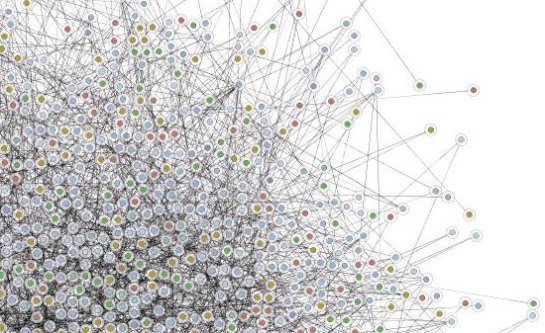
I have recently been working with a company that combines databases together to build ‘social networks’ – to model the way groups of people in society interact. This would be useful within organisations and projects too. If the connections within a project can be generated automatically, they’d be more useful…
I guess there’ll be some sort of three dimensional concept browser that will represent an individual’s model of their understanding and interaction with a project. Each member of the project would see a different view of the project. This is the sort of thing that will gain from direct (multi-touch-supported) manipulation.
…where is the user interface design for multi-touch systems?
My friend Jean sent me a link to a blog on the Microsoft Surface concept. Surface combines the power of multi-touch with table-based Space Invaders games of the early 80s. A couple of cameras monitor where the glass top is touched. That information is passed to a bit of software running on Windows.
Instead of talking about artists collaborating, how about thinking how the majority of people will benefit from multi-touch interaction. Most people read documents, write documents, calculate figures, look up information and make presentations. How will these activities be changed by multi-touch?
I don’t think this sketch abuses any organisation’s copyright:
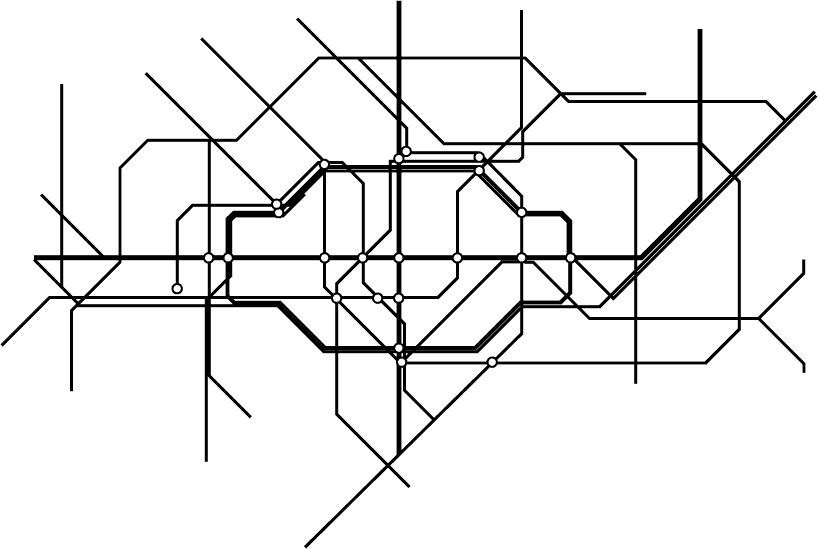
I suppose if I added specific colours to some of the lines, that might count as an infringement…
My friend Matt invited me to check out Kaltura, a communal video editing community (Their main site doesn’t support Safari so Safari users should take a look at their blog).
Their current plan is that you join up and initiate projects that can be shared with whoever you want. You come up with the kind of video you want to make, upload some clips, and invite people to add clips or make their own edits.
The concept is that this site gives access for ‘normal people’ to the tools for them to collaborate in editing films. More than one person can upload footage, more than one person can edit.

Each ‘Kaltura’ is ‘a community of clips and edits’. If you are a fan of a band, you could set up a site where you and others can upload clips and make fan videos. If you want to make a campaigning video, you can add clips of footage that might help get the message across.
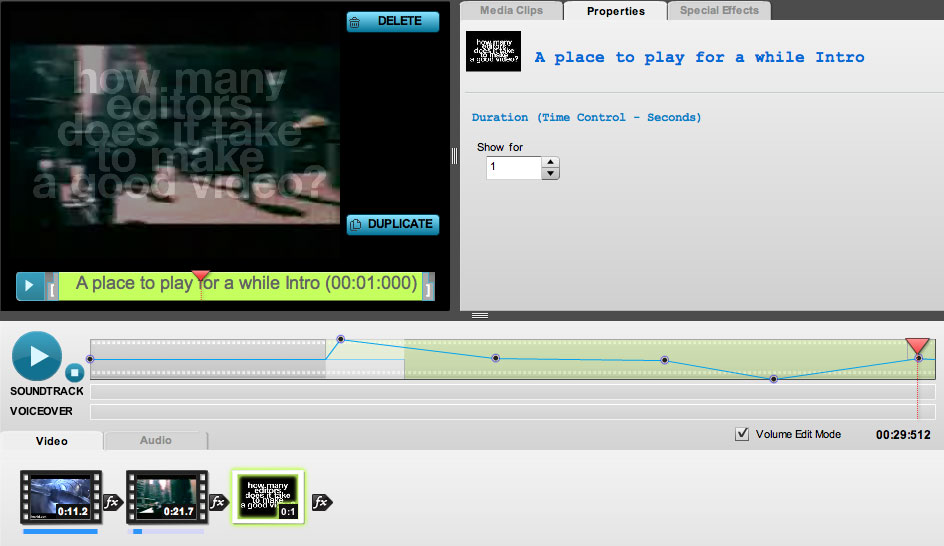
The video editor looks like an early version of iMovie. It’s flash based, so there don’t seem to be any keyboard shortcuts or mouse shortcuts.
Or an Undo feature.
All footage is assumed to be 4:3 ratio. There are a variety of transition types. You get one layer of video (with a text overlay channel) and three sound channels: from the clip on the timeline, a channel for music and effects (they need to be bounced down to a single file) and a channel for voiceover.
Do projects benfit from multiple editors? Could this be used for a team collaborating on edits? If this is offline resolution, how do I get the EDL so I can do the online?
…and when will they support Apple Safari?
There’s lots of room for buttons on the iPod Touch home screen. How about:
Final Cut Server client: Stream the current version of an FCP project. Make selects and simple edits (a la iMovie 08) on an FCP project on a server somewhere using a gestural interface
AppleHome: stream my 100GB+ collection back home to me whenever I have Wi-Fi access
Sling-Pod: stream my TV tuner signal to me
Robert X. Cringely thinks that the next technology killer app will telepresence. That’s this year’s name for video conferencing.
HP have a system that costs $300,000 to set up with fees of $18,000 to operate. You get a special room with HD displays and cameras, a fast internet connection and support. HP developed this with Dreamworks. It was designed to support the post-production process.
Mr. Cringely goes on to suggest that Apple might sell home-telepresence as their next consumer killer app. iMacs and portables have screens bulit in at the moment. Apple have the software and marketing expertise to sell the idea to the general public.
The thing I miss about full-time work is regularly spending my days with people I like. Chatting about random subjects. Giving them feedback about their work and lives. Telepresence will work for many more people when it gives us the social element of working with other people in person.
I think that the key to telepresence, making working from home much more like being in the office would be using a dedicated screen and the addition of a second camera. The first camera would be in a dedicated screen next to your main monitor. You could even use a autocue/prompting-type mirror to line up the person on the screen with the camera that’s watching you. This would be the normal personal interaction camera. I think having a seperate screen would help people talk to each other more comfortably. People don’t usually look directly and continuously into people’s eyes as they talk. They like to cutaway to other things in the room.
A second camera would emulate the non-verbal negotiation we do when we decide whether the person we’re looking at is in a state where they can be talked to. This camera would be positioned at 90 degrees to the conversation camera, behind the user. This would be framed as a mid-shot – showing the person from the waist up. This is the sort of view you get when walking past someone’s office, or looking over at their desk in an open plan office. The view that helps you see whether someone is free to talk. Also the view that can tell you if they have time for general chat, or are only free to talk business.
Once we have those extra channels of information, it’ll be a great deal easier to work from home because you won’t be missing your friends at work.
Earlier this month an Apple patented a multi-touch interface device for a portable computer. One illustration shows a camera above the screen that can detect people’s hands over a wide trackpad:
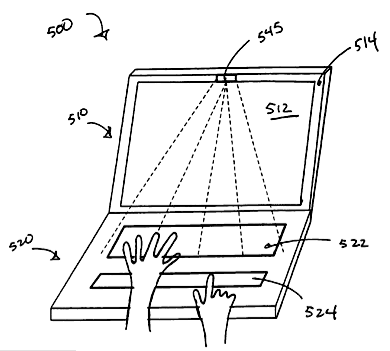
This means that until every screen that we have is touch sensitive, we’ll have touch devices that can recognise multiple fingers at the same time that will manipulate things on a seperate screen. They’ll have the same feature that the iPhone has – they’ll be able to detect fingers that haven’t quite touched yet. The advantage of that is we can choose where we touch before committing.
Following on from the previous post, fingers that hover could be shown as unfilled circles, while fingers that are touching would be filled transparent circles.

In this example, the editor has their left hand over the multi-touch device. The index finger is touching, so its red circle is filled. As we are in trim mode the current cursor for the index finger is the B-side roller because it is touching a roller. The other fingers are almost touching. They are shown with unfilled circles with faint cursors that are the correct based on where they are on the screen: the middle and ring fingers have the arrow cursor, if the little (pinky) finger touches, then it would be trimming the A-side roller.
Looks like it might be possible to come up with user interface extensions that let us use new interface devices with older software.
Here’s how a multi-touch interface might work when refining edits. In these screenshots, fingertips are shown as semi-transparent elipses. When a fingertip is detected above the surface but not touching, it is shown as a semi-transparent circle. I’m using FCP screenshots, but this could also work in this way in Avid.
Firstly, you could select edits by tapping them directly. If you want to select more than one edit, you could hold a finger on a selected edit and tap the other edits:

The edits selected:

With edits selected, you can then ripple and roll using two fingers. In the example below, the left finger stays still and the right finger (on ’14 and 13 skin’) moves left and right to ripple the right-hand side of the edits. The software could show which side of the edit is changing as you drag the clips to the right:

If you want to move the left-hand sides of the edits you’d move your left finger and hold the right finger still.
If you wanted roll the edit, you could use a single finger to move the edits left or right:
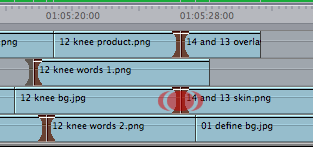
If you wanted slip a clip, you could select the edits on each end of the clip:

The way you use your two fingers defines whether you do a slip or a slide. Which ‘rollers’ get highlighted show which kind of edit you are performing. If you hold an adjacent clip with one finger and move the finger in the middle of the clip, you get a slip edit (the clips before and after would stay the same, the content within the clip will change):

If you only use one finger to move the middle of the clip, you get a slide (the content within the clip will stay the same, it will move backwards or forwards within the timeline, modifying the clips before and after):
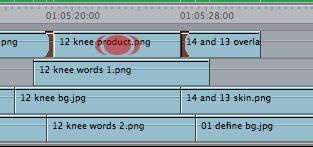
It doesn’t take too much to create gestures for other edits…
Multi-touch controls are the new ‘in thing.’ Soon we’ll be interacting with our tools by touching screens in multiple places at the same time using our fingers. This means that operating systems and applications will be able to respond to gestural interfaces. On the iPhone moving two fingers in a pinching together motion makes the picture or map smaller on the screen. The opposite movement makes the map larger. On some computer-based multi-touch systems, the position of your fingers at the start and finish allows you to rotate as you scale up.
Here’s a demo from January 2006 showing what a multitouch gestural interface looks like.
How does this impact on the next user interface for editing? If it’s going to related to multi-touch controls what will that be like? Will we suffer from new forms of RSI? Will we take our hands off the keyboard to directly manipulate our pictures and sound?
The advantage of mice and graphic pen tablets is that we don’t have to use palettes as large as our screens to manipulate pointers. With mice we can move the mice away from the desk and move the mouse in the opposite direction through the air before bringing it down on the desk to keep the pointer moving. However many large screens you have, you never run out of space with a mouse.
With pen tablets, we give up this advantage in return for having control of pen pressure. We need more precise hand control because the effective resolution that a small movement of a pen on a tablet is much smaller when and A5 tablet needs to represent 2 or 3 thousand horizontal positions across a pair of monitors. Wacom tablets can detect pen movements down to an accuracy of 2000 dpi, but how many people have that kind of muscle control?
Imgine having a pair of displays that add up to 3840 pixels wide by 1200 pixels high. A common editor’s setup. Imagine if these screens were touch screens that could detect every touch your fingers made. What would working with a system like that be like?
Unless we change the way we work with software, our arms are going to be very tired by the end of the day…
One of the good ways to innovate is to jump to the next stage in technology and come up with new ideas there. I would say that Avid, Apple and Adobe’s current interfaces may be tapped out.
I’ve coming up with some possible gestures and interface tools for editors. Is anyone interested? It’s worth thinking about. We might as well help out Avid or Apple or whoever’s going to come up with the interface that might beat both of them…
Keyboards 1880-1984 Mouse 1984-2009 Multitouch 2009-?
 alex4D old blog