Archive

final cut pro

In which I provide six Final Cut plugins that provide more controls for video transitions.

If you want more control over how transitions start and finish, try these six transitions. Depending on the nature of the effect, you might want transitions to ease in and ease out. In other cases, you might want the effect to start quickly and finish slowly.

Here’s what they look like:

Cross Dissolve + curve
curves_Cross_Dissolve
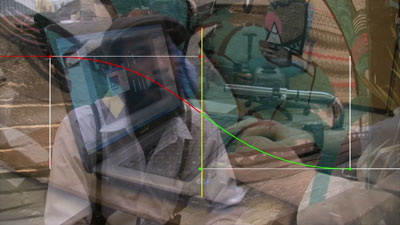
The graph shows the visibility of the outgoing clip. On the left, it starts at 100%, it initially reduces in visibility quite slowly. The curve is at its steepest halfway through the transition – the visibility is changing the most quickly at this point. The curve is shallower towards the right. That is when the visibility is changing more slowly as it approaches 0.

The curve controls look like this:
curves_controls_1

To display the graph, choose ‘Curve’ from the View pop-up. To change the shape of the curve, click the ‘+’ next to the point you want to change, then drag in the Canvas.

For example, these settings:
curves_controls_2
…produce this graph. The dissolve will happen quickly initially, then slow down:
curves_Cross_Dissolve_2

If the ‘Green’ point (the control for the angle at which the curve approaches the end of the transition) is changed, the transition will start quickly, continue slowly and finish quickly:
curves_Cross_Dissolve_3

Cross Zoom + curve
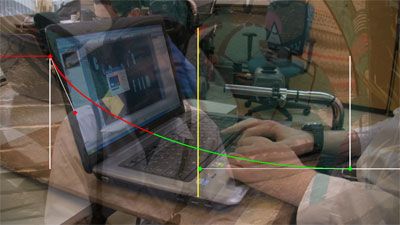
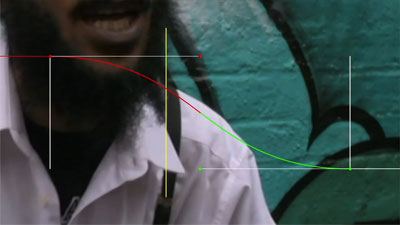
curves_cross_zoom

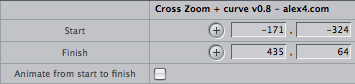
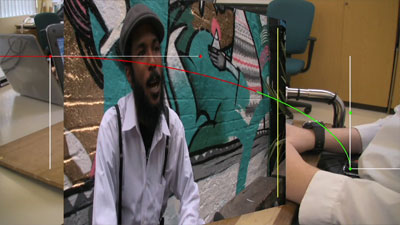
This version of the built-in transition ‘Cross Zoom’ adds controls so you can choose which parts of the incoming and outgoing clips are zoomed into and out of:

curves_Cross_Zoom_controls

Which produces results like this:

Spinback3D + curve
curves_spinback3D

There is also an extra control to choose a custom background colour for the background of the transition.

Spin3D + curve
curves_spin3D

Swing + curve
curves_Swing

Zoom + curve
curves_Zoom

Download Alex4D Transitions with curves
To use this plugin, download the ZIP document, copy the ‘Alex4D_transitions_+_curves’ folder to

Your Startup HD/Library/Application Support/Final Cut Pro System Support/Plugins

(Your Startup HD/Users/your name/Library/Application Support/Final Cut Express Support/Plugins for Final Cut Express users)

All the transitions except ‘Cross Dissolve + curve’ will appear in the ‘3D Simulation’ transition category. ‘Cross Dissolve + curve’ will appear in the ‘Dissolve’ transition category.

Visit my Final Cut home for more plugins and tips
finalcuthomethumbnail

In which I show evidence that Apple hasn’t given up on Pro Apps, and suggest why they aren’t in any hurry to update them.

Given recent upgrades for other editing software, Final Cut users have been increasingly frustrated with a lack of news of updates from Apple.

Today’s announcement of a very minor update for Final Cut Pro (to version 6.0.6) will be the main topic of conversation on the web and user group meetings in the weeks to come (such as the London SuperMeet on Thursday).

Some are saying that Apple have given up on editing software, and want to spend more time being a consumer products company.

I think that is unlikely. It is more likely that Apple isn’t releasing a new version until it is ready. As they don’t consider any other editing software as competition, they are letting technology trump marketing this time around.

In the 90s I used to beta test Director for Macromedia. It was long enough ago that we would get a care package every fortnight with 15-20 floppy discs. These would unstuff to be a new version of ‘Spike’ or whatever the codename was for the beta of Director 4, 5 or 6 we were testing. Every time we thought the programming team had only a couple of months left to squash the bugs we’d pointed out (as opposed to needing to sort so much that they’d never get it done), they’d send us a letter saying “Thanks for your help, we release in three weeks; please find a T-shirt enclosed.”

Macromedia needed to release at the next Macworld, or NAB or Comdex or whatever. The bugs were going to be fixed in version X.0.1 or 0.2.

But what is the evidence that Apple is still invested in Pro Apps such as Final Cut?

Apple is still looking for people to shape the future of Pro Apps

If you go to jobs.apple.com and search using ‘Pro Apps’ as the keyword, you get four listings:

Software Development Engineer Posted 9 Jun ’09
Sr Human Interface Designer, Pro Apps Posted 13 Jan ’09
Sr Visual Interface Designer, Pro Apps Posted 13 Jan ’09
Video Editor Product Designer, Pro Apps Posted 18 Nov ’08

These job descriptions tell a tale: The features and user interface of the next version of Final Cut were locked in November 2008. While the beta programme and bugfixing continue, it was time to hire an editor who knows about software development to join the team. He or she would be the person with real-world experience to communicate with the programmers the ways people in post production work up until now.

They didn’t find anyone who was quite right for that job, so they created two new job descriptions based on the previous one, but each looking for someone with more formal human interface design training [“Degree in interaction design, human factor and/or visual design (or equivalent).”]

Those jobs are still open, but on the 9th of this month, they posted the job description for someone to continue to develop the software behind the Pro Apps documentation system. A good time to hire someone new would be once a load of documentation for Final Cut Studio has changed.

Apple is working with external plugin makers on developer mailing lists

Although they can’t comment on unannounced products, if you follow the postings, they imply that version 6.0.6 will not be the last version of Final Cut.

For example, someone from the Apple team wrote this:

Sometime in the last year or two, I surveyed FxPlug developers and asked about which features they’d like to see, and one that came out near the top was “create windows in the UI.” If this was a feature you were looking for, can you remind me what it is that you need from it?

Although this might pique the interest of Final Cut users, I wouldn’t advise wading through the mailing list for nuggets for future features. You won’t find anything specific – certainly nothing committed to or worth basing your plans on.

Software development isn’t like pregnancy. It takes a different amount of people every time. This time it has taken a lot longer because Apple have had a ton of work to do. The current assumption is that Final Cut has had to be re-written from the ground up. Code written back in 97 and 98 has to be junked to get rid of the rats nest of additions and modifications over the years.

What about new features? I want them now!

I’ve already blogged about a great feature to add to Final Cut Studio which wouldn’t depend too much on existing or new code. You can bet that any feature that extends and re-enforces the Apple Pro hardware and software ecosystem will get priority.

The place to contribute to Final Cut Pro 7.5 and 8, therefore, is on user group sites with a lot of history. If you go the the LAFCPUG forum, they have a sticky topic that’s been around for years: ‘FCP Feature Requests’. If you think you have an original idea for a feature, read all the posts there first. If it hasn’t come up there, add a post on the end…

I don’t think Apple have given up on Pro Apps. The only problem they (and we) have is that they don’t consider Avid and Adobe proper competition any more. Premiere will forever be associated with enthusiastic amateurism, and Avid has only just passed Final Cut 6 feature-wise (in the eyes of FCP users) – which isn’t good enough for people to switch. If Apple felt more pressure from them, maybe we’d get new versions sooner. Competition is the only thing that will make Apple move more quickly.

Remember: Final Cut Studio is to high-end Macs what iTunes is to iPods/iPhones. Why would a few million dollars a year in software development not be worth all that hardware margin?

At least six free plugins coming in conjunction with the first Annual London SuperMeet for Final Cut Pro users.

They are mainly upgrades of existing transitions – featuring more control and extra features. I might produce a couple of useful generators too.

Come back soon!

In which I provide a free Final Cut plugin that provides more typeface, position and design options for adding text to productions.

This plugin gives you an extra style to use in lower thirds plus a few more extra features.

This how it looks with default settings:

lower-third

Here is what the controls look like. As you can see from the text entry boxes, you can have more than one line of text in each section. You can also add a graduated fill behind the text.

lower-third-ui-2

If you change some settings, the generator can look like this:

lower-third-options

Download Alex4D Lower Third
To use this plugin, download the ZIP document, copy the ‘Lower 3rd – Alex4D.fcfcc’ file to

Your Startup HD/Library/Application Support/Final Cut Pro System Support/Plugins

(Your Startup HD/Users/your name/Library/Application Support/Final Cut Express Support/Plugins for Final Cut Express users)

‘Lower 3rd – Alex4D’ will appear in the ‘Text’ generator category.

Visit my Final Cut home for more plugins and tips
finalcuthomethumbnail

In which I show how to use a combination of three of Final Cut’s filters to produce a green-tinged night-vision effect.

Neil writes in:

Do you know a quick and easy way to apply a night vision look to something shot during the day? I am trying to imitate some green night vision material that was shot with an infra red light off the camera.

Take your original clip:
quick-green-night-vision-1

Use the Channel Swap filter to make it display only the red channel:
quick-green-night-vision-2

Add the Bloom filter (from the Glow section):
quick-green-night-vision-3

And shift the colour to green and reduce the contrast using the Color Corrector 3-way filter:
quick-green-night-vision-4

The settings for the filters depends on your source footage. Spend most of your time changing the Brightness and Threshold of the Bloom filter. Then reduce the contrast using the Level control for Blacks, Midrange and Highlight.

Here are the settings I used for the example above:
green-night-vision-stack

Visit my Final Cut home for more plugins and tips
finalcuthomethumbnail

In which I suggest a feature for Apple’s Final Cut – a way to create and edit multiclips (clips that can be switched as live between different camera angles).

Here’s another idea for a future version of Final Cut. To make multiclips a lot more flexible, imagine being able to use any (single codec) sequence as the source of the multiclip in any other sequence.

Shooting productions in order to prepare for multiclip editing is a little unforgiving. If sequences can be switched like multiclips, shows with timecode problems could be set up in sequences like this:

Footage from four cameras in a sequence

You can see here that cameras 1, 2 and 3 were started and stopped during the performance. Camera 4 had a sync problem, which was fixed by delaying the audio 9 frames.

Imagine if you could view this sequence as a multiclip. Instead of video layers, you would have video angles. Audio channels would move to be associated with their specific video angle:

A sequence in multiclip mode

All the angles would remain editable as tracks – you could change filter settings, clip positions and keyframes. The extra rows at the top of the display would give you the option to blade to cut between angles, choose which angle to switch to, roll to reposition cuts, add transitions to video and audio edits (but probably not ripple, slip and slide. You could make those kind of changes in the rows in the lower part of the window). You could treat the area as a preview of how the multiclip will appear if it was added to a ‘parent sequence.’

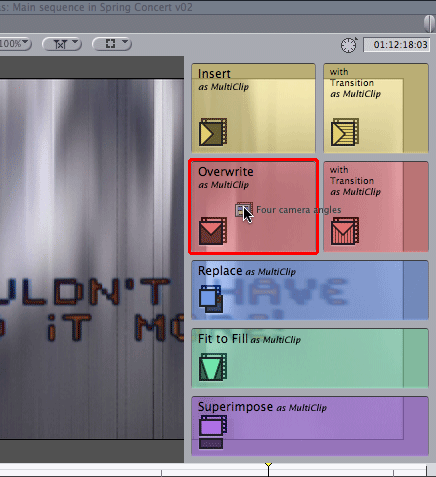
Once you are happy with the sequence, you could then add it as a multiclip to a parent sequence by holding down a modifier key as you drag to the canvas:

Dragging a sequence to the canvas as a multiclip

Once the multiclip is on the parent timeline, it would be editable in the same way as it is today.

In which I suggest that Apple could use their expertise in creating an App Store for the iPhone and iPod Touch to create a store for post-production professionals.

Now is the time to start guessing about the new features Apple might introduce in the ProApps that will make up Final Cut Studio 3. Most people are guessing that new versions of Final Cut Pro, Soundtrack Pro, Motion and DVD Studio Pro will be launched around the same time as the next version of Mac OS X. Snow Leopard is expected to be announced at Apple’s Worldwide Developer conference in May, with availability in June.

Some people say that Apple have had more and more problems dealing with Final Cut’s aging codebase. Fixing faults that have been around for years has proved too costly, however much they get in the way of long-time users. For example it is possible that Apple wanted to add draggable markers in the timeline, but implementing them caused too many bugs and unpredictable effects elsewhere in the application. It was probably easier to add features such as multicam.

This means that it might be that the best Apple could do with Final Cut would be to rewrite the whole application to fit better with the technology of 2009. It would probably take a few programmer-years to rewrite it all with no new big features. Experienced users would upgrade if all those little niggles were fixed, but Apple Marketing would have a problem with the ‘All new Final Cut Pro 7: Now works like it should have done for the last few years. Part of the new Final Cut Studio 3. Upgrade for only $499.’

Faithful Studio users are starting to request new features for their favourite apps, but it is likely that the feature list was frozen a little before Studio 2 was announced.

So, what would I add to Final Cut Studio 3? A built-in store for Final Cut Pro, LiveType, Motion, DVD Studio Pro, Compressor, Color, Soundtrack Pro, Aperture, Shake, Logic Pro, and MainStage.

Imagine having access to extra software and help from directly inside Apple ProApps. The Apple ProApps Store could also provide instant download access to plugins for Final Cut, Soundtrack, Motion, Compressor, Color, Aperture, Shake, Logic Pro and MainStage.

The economics of the App Store for the iPhone has changed the way people expect to be charged for their tools. Instead of buying large collections of royalty-free content, people could download just the parts they need. This would apply to clip video, livefonts, sound effects, music loops, and templates.

This would give people direct access to extra tools and help. This would also give tool makers access to a large community of users. As a Final Cut plugin creator, I would gladly give up 30% of my fees for Apple to handle distribution and billing for my software. They could even associate my plugins with specific serial numbers of Final Cut Pro and Motion. I could also provide free plugins, tutorials, footage and fonts to those who want them.

The Apple ProApps Store could also give access to freelancers who could provide personal tutorials, instant help and workflow consultancy. Sound designers, motion graphics professionals, typographers and programmers could make themselves available for commissioned work. Not many editors have created a professional environment for colour correction. Via the ProApps Store, freelance Apple Color graders could even colour correct a few representative frames from a series of shots in a difficult scene.

The Store could also provide a special search facilities that index external forums that might provide help when things go wrong or ideas when inspiration fails us.

Access to the store could be arranged through the Help system of each application. Version 1 could use a special version of the iTunes application. That would make the software engineering relatively simple given the huge effect this would have on the ProApps community.

If there was an Apple ProApps Store, what would you provide on it?

In which I suggest a very small user interface change to add a feature to Final Cut that editors have been requesting for many years.

I know… an idea that has been around for at least 10 years. However there are two parts to any feature request: the idea and how integrate it into the application. Many Apple and Avid competitors can add better features to their software. The trick is to come up with the user interface.

Final Cut has had markers on the timeline since the beginning (markers are the equivalent of Avid Locators). Clips can also have markers. I assume the request to make single and multiple markers movable using the mouse or keyboard has been around since before Final Cut Pro 1.0 came out.

The secret aspect of software development is that Apple and Avid know perfectly well the features than the majority of users would like. They need to weigh up which it is worth spending the money on implementing. We can only assume that when Final Cut was being designed in 1996 and 1997, a software implementation decision for the Timeline window was made that meant that it would be expensive to add a ‘move markers’ feature.

This means that adding an “option-click a marker and shift-clicking another marker before dragging” user interface is probably too hard to implement without causing too many other problems.

Most people guess that Final Cut 7 will probably be a completely re-written version (to get rid of all the bugfix and implementation workarounds of the last decade and for OS X Snow Leopard compatibility). However, how could you add moveable markers to Final Cut without having to change too much in the user interface?

If we go back to why we’d want to move markers, we usually need to move them to reflect edits. If a scene is shorter or longer, we want the markers further along the timeline to change too.

We can do this my having the option to make clip markers also act as sequence markers.

You do this by adding a check box in a dialog box…
clip-sequence-marker

and a different graphic to show in the ruler:
clip-sequence-marker-on-tim

The advantage of this method is that the sequence markers will then be updated to reflect any changes to the clips in the timeline.

After Larry Jordan’s London show a few punters stayed at the bar. We wondered whether some of the attendees there might want to stay in touch. We could support each other using similar Q&A sessions as we had today. Digitally, as well as meeting up in pubs and bars. If you’re interested follow me on Twitter and send a message using #ukeditors as the hashtag.

If you aren’t on Twitter and find all the noise about it a little irritating, read my posts on Twitter – ‘anti’, ‘check it out without signing up’ and ‘why Twitter’ for my take on it.

If you are new to Twitter and looking for editors and post people to follow, check out the people posting using the #editingandpost tag. If their posts interest you, follow them.

Following on from Larry Jordan‘s intense, cool and informative Final Cut PowerUp tutorial event in London, the question came up: which version of Final Cut works best with which versions of QuickTime and OS X?

Larry gave the most important advice: If your system is working fine do not upgrade until you need a specific new feature.

Here’s a link to a blog post with a table showing which version works best with which version… It might be a year old, but it should help the majority of people out there.

I’ve had no problems with FCP 6.0.4, QuickTime 7.5.5 on OS X 10.5.4

Comment with your combinations that work well!