Archive

final cut pro x

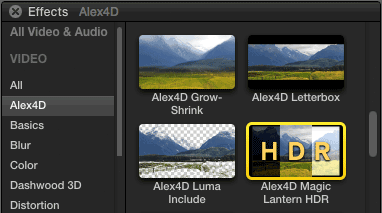
Magic Lantern is a system for adding features to Canon DSLRs, Unified is a recent ML package enables some cameras to shoot footage that can processed to produce content with a larger exposure range – i.e. High Dynamic Range.

The files produced are made up of alternate frames of under- and over-exposed footage. My new generators take these frames and give you the control to define how the overexposed frames are overlayed on top of the underexposed frames.

For more information on Unified and Magic Lantern and the software to for your Canon DSLR, visit the Wiki

December 2012:  I’ve replaced the generators that were here with a single effect.

in-titles-browser

Go to my newer blog post on the new version.


This transition first shows a few frames of the incoming clip, then some of the outgoing clip, then the incoming clip and continues in varying patterns.

It re-creates the ‘cuts only’ scene transitions used in the early 70s in films such as ‘Easy Rider.’ By showing a few frames of the next scene a little while before it starts, the clip acts as a ‘premonition’ of what will happen next. It was also used with a musical cue in ‘Captain Scarlet’ – a kids TV series.

As well as using the incoming clip, there is also the option to use a frame from elsewhere in your primary storyline instead. You choose it by dragging a ‘Timeline Pin’ which appears when you select the transition:

Here are the controls:

Read More

Final Cut Pro version 10.0.1 includes an updated version of the Ticker title effect. I’ve come up with some additional improvements. The most useful one is that I’ve linked the size of the background of the ticker to the font size of the text (note that the font size control in the Text tab of the inspector is disabled – use the text size control in the Title tab instead).

Read More

This is a quick post listing a few of the internal differences between version 10.0 and 10.0.1 of Final Cut Pro X.

Updates in Final Cut Pro / Contents /Resources / en.lproj / PELocalizable.strings

A few extra messages associated with importing XML.

There are also some messages supporting those attempting to run 10.0.1 on systems with unsupported graphics cards:

    To ensure optimal performance, use a graphics card that meets minimum system requirements. For more information on minimum system requirements, visit the Tech Specs page on the Final Cut Pro website.
    This system does not meet the minimum system requirements for graphics cards. For more information on minimum system requirements, visit the Tech Specs page on the Final Cut Pro website.
    This graphics configuration does not support hardware acceleration, which is required to run Final Cut Pro X.
    Safe mode does not support OpenGL hardware acceleration, which is required to run Final Cut Pro X. Please reboot normally and try again.

There is also support for running in trial mode.

New UI elements added to the Final Cut Pro/ Contents / Frameworks / Flexo.framework / Versions / A / Resources / en.lproj / directory:

    FFAXELExport.nib
    FFAXELImport.nib

    FFAudioMatchWindow.nib

    FFColorBoardContentView.nib
    FFColorMatchWindow.nib

    FFDataListClipsView.nib
    FFDataListRoleSetTile.nib
    FFDataListRolesView.nib
    FFDataListRoleTile.nib
    FFDataListTagsView.nib

    FFMatchAccessory.nib
    FFMatchFooter.nib

So there is more internal support for AXEL – ‘Apple eXchange Editing Language’ flavour of XML (which is distinct from Final Cut Pro XML v1.0). Here are two consecutive lines of Final Cut Pro / Contents / Frameworks / Flexo.framework / Versions / A / Resources / en.lproj / FFLocalizable.strings:

    “FFXMLFORMAT” = “Final Cut Pro X XML, %@”;
    “FFAXELFORMAT” = “Apple eXchange Editing Language (axel), %@”;

In the same file there is some additional text to support roles, including a concept I haven’t heard of yet:

    “FFSetRole” = “Set Role”;
    “FFFocusRole” = “Focus Role”;
    “FFUnfocusRole” = “Unfocus Role”;

I wonder what ‘focus’ing a role means…

Some editors who have animation experience miss the ability to smoothly control the position, scale and rotation of clips in Final Cut Pro X.

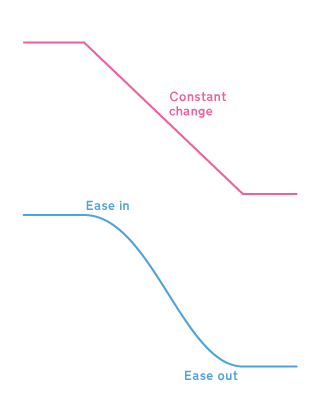
In the natural world objects don’t move at a constant speed, they slowly get moving, speed up and then slow down before stopping. That slow speed up and slow down is called ‘easing in’ to the animation and ‘easing out.’

My Smooth Move effect animates a clip between two states with the option to choose the shape of the curve that is used to animate the parameters.

Read More

Final Cut Pro X users can make their own PDF version of the online help, but the generated PDF doesn’t have any internal hyperlinks.

Here’s how to make your own copy of the help system that works when you don’t have an internet connection for your Mac, PC or phone.

The advantages of the html version over the PDF version are internal links between sections:

…pop-up boxes to explain terms:

and an operational search system:

Read More

To showcase the template features of Motion 5 and Final Cut Pro X, Apple shipped them with a range of fonts to suit every mood.

There are 28 font families, as some families have more than one variant there are 53 fonts in total. They are built into each app so that they’re are always available if projects include any Motion templates.

Read More