Archive

FCP X plugin

For the last 19 days I’ve been regularly tweeting using a new Twitter account: Plug4D.

Plug4D-icon-100-m

I’m using the account to post information on free Final Cut Pro X plugins: free effects, titles, transitions and generators. My 72nd tweet links to a 100th plugin.

I don’t know how many free plugins there are out there for Final Cut, but at this rate, I’ll be tweeting for at least another month before I need to repeat myself.

Thanks to http://fcp.co for providing a forum where many plugin makers post links to free software for Final Cut Pro.

My contribution to this week’s Free Effect Friday free Final Cut Pro X plugin is a graphic generator: Alex4D Shape Grid.

It draws a grid of shapes and animates the colours over time.

Here are the controls:

controls

Read More

My contribution to this week’s Free Effect Friday free Final Cut Pro X plugin is a lower third title: Alex4D Leaves.

It blows the letters onto the screen to form the title, and then blows them off.

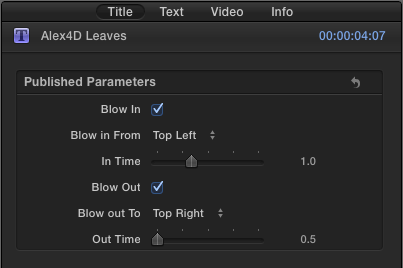
Here are the controls:

controls

Read More

My contribution to this week’s Free Effect Friday is a new kind of plugin – a transition that can be applied to more than two clips at once.

Alex4D Inset Transition is a special kind of title that has no text. Titles with no text are adjustment layers – when connected to a storyline, they effect all the layers below.

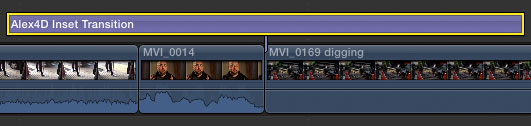
In this case the plugin animates a pair of shutters closing to hid the storyline below and then reopening. Here it is connected to the primary storyline so that it covers three clips:

on-timeline-close-open-1

timeline-1

When using the Close then Open option, you must make sure the Alex4D Inset Transition layer is centred over the edit between the two clips you want to transition between.

Here is a video showing most of its features:

As this plugin is implemented as a title effect, if you make changes to the clips it is applied to, you might have to adjust the duration and timing of the title to make the transition work. This extra work is the price for extra timing flexibility and flexibility in the number of clips the transition can be applied to.

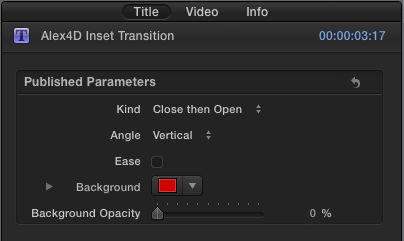
Here are the controls:

controls-2

Read More

Here’s another in my ‘a4d’ plugin series. This series is about making Apple Motion 5 features available in Final Cut Pro X.

The Light Rays a4d effect adds a smearing effect to video clips, stills and generators so they look as if a light is being shone from behind them.

Here is an example of what it can do

result-1

Here are the settings:

controls

Read More

It’s Friday, it’s time for another free Final Cut Pro X plugin. This one makes the ‘Random Tile’ Apple Motion 5 filter available to editors in Final Cut.

Use the Random Tile a4d effect to select a part of a clip using the on screen control. The plugin  replaces the source clip with many copies of that part of the clip and positioned randomly.

Using this source clip…

random-tile-source

…with the centre moved over Matt Davis’ face produces:

random-tile-default

Read More

Here’s another in my ‘a4d’ plugin series. This series is about making Apple Motion 5 features available in Final Cut Pro X.

The CMYK Halftone a4d effect makes video clips, stills and generators look like they were printed in a magazine or newspaper. In order to simulate a wide range of colours, printing usually uses a combination of four grids of colour – cyan, magenta, yellow and black. This is known as CMYK printing (K denotes black to avoid confusion with the blue of the red, green and blue combinations that are used in screen displays).

Here are four source clips:

source

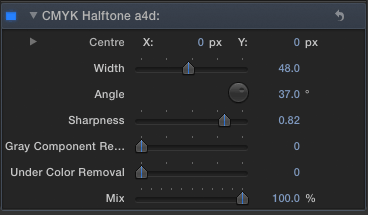
Using the following settings…

settings-1-controls

…you get this result:

settings-1

Here are some more results using different settings: Read More

Last year I made a set of generators that could be used on video clips to get more precise control over speed changes using an animation graph similar to that available in older versions of Final Cut Pro.

Since the 10.0.6 update to Final Cut Pro, the generators I uploaded in March 2012 no longer work. Here is an effect you can use instead.

Here’s a comparison between a time remap graph in older versions of Final Cut Pro and my effect:

Final Cut Pro Classic retiming vs Alex4D Time Remap

With these graphs, the steepness and direction of graph determine the speed and direction that the video clip frames play. The Y co-ordinate of the graph controls which source frame is displayed.

In this case the clip will play back in slow motion (because the angle of the graph line is shallow between the first and second keyframe – the Y co-ordinate is changing slowly), then in faster than normal motion. The video will then freeze between keyframes three and four (because the Y co-ordinate of the graph isn’t changing – the line is horizontal). Between keyframes four and five the video will go into reverse, as the Y co-ordinate is getting lower over time. Between the fifth and last keyframe the video will play back very quickly because the value of the graph’s Y co-ordinate is changing quickly.

Read More

When first trying out downloaded effects, transitions, titles and generators in Final Cut Pro X, sometimes the viewer turns blue.

If this happens to you, the most likely problem is that your version of Final Cut Pro X is too old. You need to use the Mac App Store to check for updates. You’ll see the update if you are signed into the App Store with the same Apple ID as you bought your copy of Final Cut Pro X.

In practice most people who provide transitions, effects, generators and titles update their versions of Motion 5 and Final Cut Pro X when they come out, so any tools they make available after that only work on the new version of Final Cut.

This means most effects and transitions made available after September 20th, 2011 won’t work in version 10.0.

Most effects and transitions made available after November 16th, 2011 won’t work in version 10.0.1 or earlier.

Most effects and transitions made available after January 31st, 2012 won’t work in version 10.0.2 or earlier.

Most effects and transitions made available after April 10th, 2012 won’t work in version 10.0.3 or earlier.

Most effects and transitions made available after June 11th, 2012 won’t work in version 10.0.4 or earlier.

Most effects and transitions made available after October 23rd, 2012 won’t work in version 10.0.5 or earlier.

Most effects and transitions made available after December 6th, 2012 won’t work in version 10.0.5 or earlier, but will work in the out of date version: 10.0.6.

Read More

In September 2011, I made an improved version of Final Cut Pro X’s Ticker title. I linked the size of the background of the ticker to the font size of the text and made the title work in different aspect ratios such as 4:3 and 2:1.

This new ‘Plus’ version adds some animation and layout options. Now you can have the ticker move from left to right or remain still. You can also choose where the ticker starts moving from, and if the ticker itself is cropped. The duration of tickers can be longer too.

The default text position is within the title safe area. You can control the vertical position of the ticker, the transparency, border and shadow of the text and the background.

(To get the dot “·” used in the sample text, press shift-option 9)

Here are the main controls:

Read More