Digging up an old CD, I found a copy I took of Apple.com as it was almost 12 years ago. None of the links work, but here it is:


Digging up an old CD, I found a copy I took of Apple.com as it was almost 12 years ago. None of the links work, but here it is:
A handy method for breaking down a long clip in Final Cut is to set markers to indicate the start of interesting shots, and make subclips based on these markers.
Once you have set the markers, you’ll see them listed below the clip in the browser. You can turn these into subclips by dragging them to a bin. In this example, a shot of bus journey through London (‘christmas lights full-1296p’) has five markers, each representing when the bus arrived at each landmark. To divide the clip into subclips that each only have the footage from the named landmark, I dragged the markers to a bin named ‘Christmas lights subclips’:
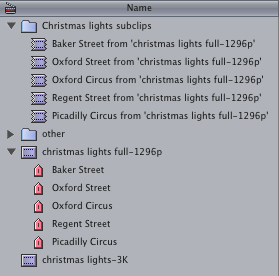
[Note that usually the subclips in the bin would be listed in alphabetical order, which wouldn’t be useful. To keep the subclips in chronological order, I sorted the Browser by clicking the ‘Media Start’ column]
This is convenient, but the fact that Final Cut adds from ‘christmas lights full-1296p’ to the name of each subclip is a little redundant. The following tip shows how you can edit the Final Cut Pro application itself so that it doesn’t add these suffixes to the names of the new subclips.
Before I explain this tip, I can only tell you that this method worked for me, I haven’t tested it on any combination of software and hardware but my own. This process might damage FCP on your system, so be careful. This operation is a little like the Mac users of 10 and 20 years ago using ResEdit to muck around inside their applications.

ResEdit was a tool for programmers, and it was easy to blunder around too much and create a fault in the application being modified. That is why the first stage is to make a backup copy of Final Cut, in case the copy you work on crashes or cannot open.
The backup copy is good to have around when the next software update appears. It is possible that changes inside Final Cut will make the upgrade process fail, and you’ll end up without a working copy of Final Cut. Before applying an update, delete your modified ‘Final Cut Pro’ and rename ‘Final Cut Pro copy’ back to ‘Final Cut Pro’
1. Duplicate ‘Final Cut Pro.app’ by selecting it and choosing Duplicate from the File menu or press Command-D (to make a safety copy in case this process goes wrong)
2. Select the original ‘Final Cut Pro.app’
3. Control-click it and choose ‘Show Package Contents’ from the pop-up menu
4. Go to the new folder that represents the contents of ‘Final Cut.app’
5. Open these series of folders within ‘Final Cut.app’: Contents > MacOS > Plugins
6. Select ‘Browser.bundle’
7. Control-click it and choose ‘Show Package Contents’

8. Open these series of folders within ‘Browser.bundle’: Contents > Resources > English.lproj

9. In the newly visible ‘English.lproj’ folder double-click ‘Localized.plist’ to open it in ‘TextEdit’
10. Search for string number 8045
11. Change the line below
from
%00s from ‘%01s’
to
%00s
i.e. from
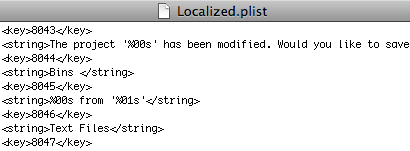
to
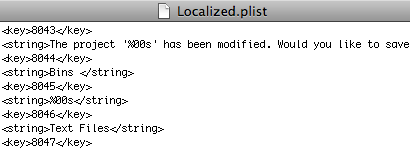
12. Save ‘Localized.plist’
13. Close the Browser.bundle window and the Final Cut Pro.app window.
When you next open Final Cut Pro (version 6.0.4), any new markers you drag from a clip will turn into subclips with no from ‘Clip’ suffix at the end of their names. Note that the string might not be number 8045 in other versions of Final Cut. If it is different in your version, try searching for %00s from ‘%01s’ in ‘Localised.plist’ and change that string.
If you are feeling brave, you could experiment and find the string that adds the word ‘Subclip’ to newly generated subclips based on In and Out points. Try searching for Subclip with a space in front.
Good luck!
To edit drama, we need to understand acting for film. Almost twenty years ago I saw a film acting masterclass presented by Michael Caine. One of the first things he said is:
[1:12] – “What we do, we actors in the movie, hang on to each other’s eyes. That’s the most important thing in film: eyes. If you are fair and have blond eyelashes like I have, you wear mascara, because if you have blond eyelashes, you might as well be in a radio play.”
[4:30] “If I look at you and I blink, it weakens me… If I don’t blink, it makes me strong”
[5:40] “Listening is what acting is all about in movies… ‘Think of extraordinary things to say, and decide not to say them’ – that’s the greatest piece of advice I could give to someone who wants to act in movies.”
If writers write to help actors act this way, and editors capture these aspects of actors’ performances, we’ll have great films.
While the BBC leaves this on the web, watch the rest of the show on YouTube. It is an hour long. Part 1:
Here are the links to the following parts: Part 2 · Part 3 · Part 4 · Part 5 · Part 6
Today is World AIDS day. You’ll see stuff all over the media for a day. The dilemma for those publicizing the spread of HIV is that encouraging sympathy for those infected in the third world will make life harder for the newly infected in the first world.
Earlier this year I made some films for a website to support British gay men who have recently been diagnosed as HIV positive. The concept is to them stories from all sorts of men who have different stories to tell about how they dealt and are dealing with HIV. After seeing that all sorts of reactions are ‘allowed’ on hearing the diagnosis, users should learn that being HIV positive in the UK is medically just like any other disease that requires you take a pill or two at the same time of the day for the rest of your life. It is other people’s reaction to your positive status becomes the hardest thing to deal with for most people. Sadly, awareness days like today might make other people’s reaction more difficult to manage.

To find out the practicality what it means to be HIV positive in the UK in 2008, visit What Next? Note that the site uses adult language to talk about all aspects of HIV.
Following on from my post on ancient Rome in 3D, the BBC have reported on more city modeling.
This evening the winners of the British Independent Film Awards were announced. Slumdog Millionaire and Hunger won three each.
For those in below the line positions, there was a catch-all award: that for Best Technical Achievement. The nominees were:
Wardrobe – Michael O’Connor – The Duchess
Cinematography – Sean Bobbitt – Hunger
Editing – Jon Gregory – In Bruges
Music – Harry Escott, Molly Nyman – Shifty
Cinematography – Anthony Dod Mantle – Slumdog Millionaire
The winner of Best Technical Achievement in British Independent Film is… Sean Bobbit, for Hunger.
Of course these people are just as artistic as actors, directors and writers. It is just that the film marketers haven’t come up with a way of describing what these contributors do in general that encompasses the thousands of creative decisions that go into each film. That is because it is convenient for the studios and media for the director of a film to represent all the non-writing and non-acting contributions to a film. It’s part of making it seem as if the director is the author of the film.
Editing is a special case when it comes to awards amongst all the ‘technical’ categories. How can anyone judge editing? Any ability more than competent is almost impossible to compare. As long as their editing isn’t obviously bad, how can you tell how good an editor is? Did they take perfect footage and make good scenes out of it, or did they rescue a film from disaster?
The only way to judge editing would for each film offering itself up for an award would make all the footage for a scene available to the judges. Then peers could judge which of the scenes was most effectively edited given all the footage at hand.
In practice the Oscar for Best Achievement in Editing is given to those editors hired to work on films that are in the running for Oscars, possibly not for the best editing of any film in a given year. But that Oscar is a good enough target for me!
After over a year of listening to Pilar Alessandra’s On The Page screenwriting blog (iTunes, FeedBurner), I was lucky enough to attend a London event meeting her alongside UK-based screenwriters. It was inspirational.
I’ve already written about some of her ten minute exercises, but this evening reminded me of something else: spending too long preparing can mean you never start.
The following tip deliberately uses terminology to put you off: Name your first draft your ‘Vomit Draft.’ If you have that sub-title at the top of every page, it’ll excuse you from spending too much time judging the first version of your script as you write. You can get all the ideas out in one go.
You know you’ll never show anyone else your Vomit Draft. That means you won’t risk anyone else judging your abilities (or you as person) based on that draft. If you don’t worry about making it perfect, you’ll have a terrible version of script done very quickly. This is good news because “writing is rewriting.”
Here’s where I digress: One of the problems with being a freelancer is the clients. It’s not just that they don’t know what they want, it’s that they only know what they don’t want when you show it to them. That problem is useful when it comes to editing your own script. Once you see a scene written down, once you read the way a character talks, you can see something is wrong, and you can come up with ways of improving what’s been written.
Another example of using rewriting as writing uses the example of having someone else asking you about your story. You might have a vague idea, but if another person asks you some specific questions, you might be able to firm up the idea.
You can practice doing this for someone else if they’ve just woken up and tell you about a dream they just had. Their dream will fade away very quickly as they become more awake and remember who they are and what the day might bring. To stop the fade, ask them specific questions about their dream: “Was it the house as it is now, or was as it was when you were growing up?” “Was the park full of people, or was it deserted?” “Did she whisper or did she shout?” The dreamer can then either remember dream more clearly or provide an answer that makes sense at that moment.
Your vomit draft is the dream. The re-write happens when you ask questions about the dream.
This tip shows you how you can make Final Cut Pro and Final Cut Express have more blurred edges to some of the transitions. Some video transitions have a blurred edge option. You get this by setting a border thickness and checking a box marked ‘Feather.’ The amount of blurriness is based on how thick you’ve set the border.
The problem is that the maximum border thickness for Final Cut is 100, which means that when the border is feathered, the blurred edge of the transition isn’t very wide. This screenshot shows how thick an unfeathered border is when it is set to 100:
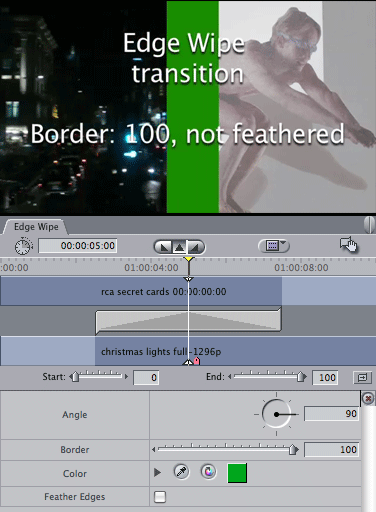
Transitions in Final Cut are implemented in a simple programming language called FxScript. In this tip, you’ll open the code for a transition, make four simple changes to produce a new transition that allows the border to be set to any value you want.
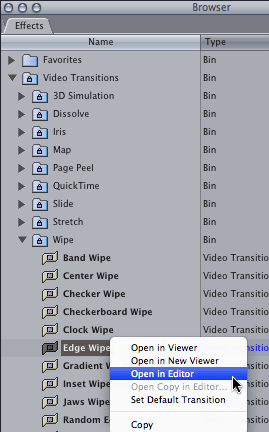
1. To edit the code for a transition, open the Video Transitions section of the Effects Tab and Control-Click the ‘Edge Wipe’ transition. Choose ‘Open in Editor’ from the pop-up menu:
2. Edit the text:
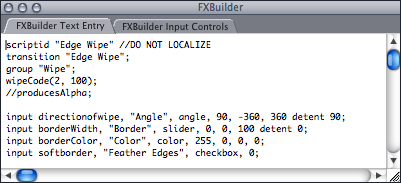
a. Change the first two lines so that ‘Edge Wipe‘ says ‘Edge Wipe – More feathered‘ – this ensures that the new plugin you’ll be creating will appear in Final Cut with a different name.
b. The next line you’ll change is the line of code that creates the Border slider.
Change
input borderWidth, "Border", slider, 0, 0, 100 detent 0;
to
input borderWidth, "Border", slider, 200, 0, 300 detent 0;
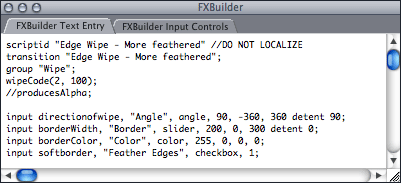
Instead of the slider defaulting to a border of 0, it defaults to a border of 200. The maximum value will now be 300 instead of 100. You can set these values to anything you want, but this is what worked well for me.
c. Change
input softborder, "Feather Edges", checkbox, 0;
to
input softborder, "Feather Edges", checkbox, 1;
This makes feathering the border the default. If you choose this transition instead of the normal one, it is likely that you will want the border to be feathered.
The script for your new transition should look like this:
3. Now you’ll make your new plugin. Choose ‘Create Plugin…’ from the ‘FXBuilder’ menu. Enter ‘Edge Wipe – More Feathered.txt’ as the file name. Save it in Your Startup HD/Library/Application Support/Final Cut Pro System Support/Plugins
4. Quit and restart Final Cut. You’ll then be able to use your new transition in the same way as any standard transition: from the the Effects tab of the Browser or from the Effects Menu:

Here are Edge Wipe and Edge Wipe – More feathered in action:
You may need to play this twice due to a playback bug on Vimeo that affects short videos.
Of course this works for any transition that has a feathered border option such as the Irises and most of the Wipes. If you’d like thicker borders on the 3D Simulation, Stretch and Slide transitions, you can change the maximum value of their input sliders.
As this year is 365 days long, your half-birthday comes 182 and half days after your normal birthday.
For example, if you were 29 on May 28th, your 29 and a halfth half-birthday is today from noon today until noon tomorrow. If you were 50 on June 22nd, you’ll be 50 and a half on 21st December.
My half birthday is from noon on November 1st to noon on November 2nd. I was born at 3:45pm BST, so was ‘half a year older’ at 2:45am on November 2nd this year.
Over the last twenty years I’ve designed many books on Systemic Thinking and Solution-Focused Brief Therapy. It has been my most consistent graphic design job over the years. I was around when desktop computers took over from traditional typesetting. It looks like the next book I design will be my first in a new generation of books: produced to be downloaded and printed on demand.
Recently my father pointed me in the direction of an article on a company called Blurb. Blurb offer anyone the chance to have the books they create available to the public using a print on demand model. This model is a very good idea if you want your publishing to be at all profitable.
Even with the help of Mac-based pay layout software and very fast digital printers, it still takes at least 6 months for traditional publishers to turn an author’s finished manuscript into a printed book. If a talented individual writes and designs their own book, it still takes weeks for traditional printers to produce a small number of copies and they charge a great deal for short runs. That means you need to sell more than half of a print run of a hundred books before you go into profit.
Once you submit your artwork, it takes two weeks for Blurb to produce copies. They are much more flexible when it comes to print runs. If you wanted to print 100 copies of your 400 page hardback novel with a four-colour dust jacket, Blurb would charge you £14.36 per copy. If you wanted just 5 copies, the price goes up to £15.95.
Of course it is tempting to order 200 copies so that the price goes down to £13.56 per copy. If you were selling it for £18.95 that would mean a larger profit. However the whole point of print on demand is that you don’t need to keep stock. You don’t need to worry about getting the money together to pay for the initial order. You take no risk by making the book available online. You take the order, Blurb fulfill the printing, and you are immediately in profit.
This is just one part of how print on demand will change the publishing industry. Eventually it might save the high-street bookshop. Currently these shops are being squeezed by online alternatives. Why go to your neighbourhood bookshop when they probably won’t have the book you want. If they do it’ll cost more that it is on Amazon. If they don’t have it in stock you’ll have to wait a week or more to get it if they order it.
Contrast this with the problems that local photo developing shops have. Their specialised services are now available to anyone with a photo print at home. Who shoots pictures onto 35mm negatives any more?
If you combine these two models, you get the One-hour bookstore. Imagine a device the same size as an old-style photo developing machine that can print, cut and bind a book within an hour. It won’t be very long until such a device is available. When it is, readers will have the option of getting the book they want within hours instead of waiting for Amazon to deliver within days.
One day the public will see books in the same way as they understand pictures and music: as abstract ideas. There is no such thing as a music recording or a photograph any more. Pictures and music are stored and transferred as files that can be printed onto photo paper or transferred to a portable player.
When books are seen the same way copyright-holders may have the opportunity to get paid for their work without having to risk so much money in holding stock and distributing content to places near the buying public. That will lower the entry costs of publishing for everyone.

 alex4D old blog