
Final Cut: My improved Crop plugin
This is an alternative to Final Cut’s crop section of the Motion tab.
This blog post used to host version 1 of my Crop plugin. I’ve updated it, so now you can download version 1.1.
When you blur the crop using the Edge Feather control, it only adds the feathering to the edges you crop. The built-in crop feathers all edges.

Here are the controls:

You can also invert the crop, so that the area removed is inside the area defined by the slider values. You can also choose the have different feather values for each edge:
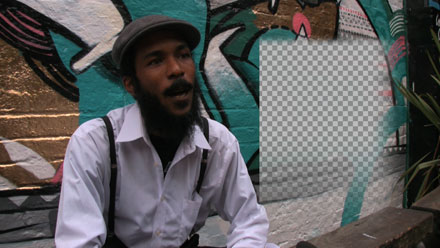
…the result of these settings:


To use this plugin, download the ZIP document, copy the ‘Alex4D Crop.fcfcc’ file to
Your Startup HD/Library/Application Support/Final Cut Pro System Support/Plugins
(Your Startup HD/Users/your name/Library/Application Support/Final Cut Express Support/Plugins for Final Cut Express users)
‘Alex4D Crop’ will appear in the ‘Matte’ filter category.

 alex4D old blog
Good job dude! Now you can make a split screen with a soft edge without resorting to a travel matte effect.
Alex – my thanks for yet another great creative tool!
amazing.
Stu Aull
Alaska
Thanks for all your great tools.
Hey thanks Alex, appreciated. Just terrific!
My favorite use will be quick and dirty masks behind text. Soft on right and bottom.
Very nice. THANKS
The number of times I’ve needed this! Mostly to paint out objects (mics etc) protruding into the frame. Will save me having to use multiple layers to get a soft edge in the frame and a clean outside edge of frame. Simple, brilliant. The way it should always have been.
Pingback: Improved crop plugin | Soñar Despierto
Outstanding! This addresses a real need.
Thank you, Alex!
This is an awesome tip, very useful!
Pingback: The Editblog » Linkage: September 09
Amazing plugins, I use this all the time, thanks a bunch!
Pingback: FCP Free: Alex 4D’s Feathering Mattes « Free « FCPDaily :: Final Cut Pro Tips, Tricks and Reviews :: Updated Each Weekday
Is there a version of this that is not a matte? I’m trying to dissolve between shots with matte/masks and the mattes combine during the dissolve and expose parts of the image that I have masked. I’m trying to avoid this. Any ideas?
Saved my bacon! Thank you for your generosity!
Jim Long
Pegasus Productions
Hmmm, when I apply this to a paragraph of typeset .psd text so I can ‘reveal on’ the ttext with the right-most edge feathered, my transparent areas are filled with white. Am I missing something?
Thank you so much! You just saved this Final Cut beginner (2nd day – woo hoo) a ton of headache and frustration!
Thank you muchly!
Thanks so much – this was really helpful!
I feel like I have been sleeping under a rock for not having discovered this plugin before. This is what I always needed! Thanks!
Have really been needing a plug in like this. However it would be nice if feather went much higher. Like 500