
Final Cut: My free ‘Pond Ripple’ transition plugin
I recently noticed that the ‘Ripple Dissolve’ transition works best on quick transitions. If you set the duration to much more than a minute, you can see that the incoming clip fades in – it isn’t distorted by the pond ripples.
My new plugin ripples the outgoing clip as well:

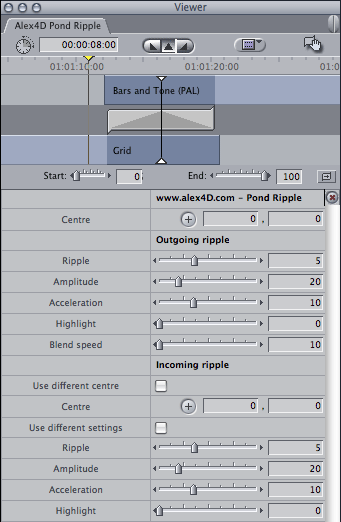
I’ve also added some extra controls so that the position, speed and intensity of the incoming ripple can be different from that of the outgoing clip:
Here is a clip showing how the transition works and comparing it with ‘Ripple Dissolve’:

To use this plugin, download the ZIP document, copy the ‘Alex4D Pond Ripple v1.fcfcc’ file to
Your Startup HD/Library/Application Support/Final Cut Pro System Support/Plugins
(Your Startup HD/Users/your name/Library/Application Support/Final Cut Express Support/Plugins for Final Cut Express users)
‘Alex4D Pond Ripple’ will appear in the ‘Dissolve’ video transition category.

 alex4D old blog
Pease change the Video from Private to public.
Would really like to see that Effect before installing 🙂
Foiled again! I hoped to get all those gullible editors out there to install my new ‘wipe all hard drives’ plugin.
I would have got away with it if it hadn’t been for that pesky kid.
Was a pleasure 😉
But it’s a really bad Idea to cluster your effects with Stuff you wouldn’t need. But this one looks worth a download and install. As your Closing Credits and move were.
George
Hi, Alex,
Just read about the plugin in the Lafcpug newsletter.
AT LAST!
hard to believe it was never fixed by Apple,
thanks for this,
nick